


Smoothing VE tables - Interpolation Spreadsheet


Junior Member
Joined: Sep 2010
Posts: 88
Total Cats: 3
Reply
 0
0

0


Thread Starter
Junior Member
Joined: Sep 2011
Posts: 252
Total Cats: 2
From: Chesterfield, VA

Quick copy/paste - click anywhere in the VE table in TS. Press CTRL+A to select all. Then CTRL+C to copy the table. Go to the spreadsheet and click the top-left cell in the origial values section. Press CTRL+V to paste the values.
The new values are now generated. Select the new values. CTRL+C to copy. Go back to TS and click the top-left cell. Press CTRL+V to paste the new values.
Once you get used to this method it should take less than 5 seconds to get your new values.
The new values are now generated. Select the new values. CTRL+C to copy. Go back to TS and click the top-left cell. Press CTRL+V to paste the new values.
Once you get used to this method it should take less than 5 seconds to get your new values.
Last edited by travisb; Jun 22, 2012 at 07:11 AM.
Reply
0
0
Thread Starter
Junior Member
Joined: Sep 2011
Posts: 252
Total Cats: 2
From: Chesterfield, VA
Can anyone confirm that smoothing the table is making a difference to drive quality / AFR stability?. i know that when VEAL was new people were saying " my maps now smooth but its driving better and more stable AFR". I know it makes sence that it would, perhaps it was only people with really ---- VE tables that said it made there tables better.
Thanks
Scott
Thanks
Scott
Reply
0
0
Quick copy/paste - click anywhere in the VE table in TS. Press CTRL+A to select all. Then CTRL+C to copy the table. Go to the spreadsheet and click the top-left cell in the origial values section. Press CTRL+V to paste the values.
The new values are now generated. Select the new values. CTRL+C to copy. Go back to TS and click the top-left cell. Press CTRL+V to paste the new values.
Once you get used to this method it should take less than 5 seconds to get your new values.
The new values are now generated. Select the new values. CTRL+C to copy. Go back to TS and click the top-left cell. Press CTRL+V to paste the new values.
Once you get used to this method it should take less than 5 seconds to get your new values.

Reply
0
0

Could you add in a strength factor to the interpolation? Being perfectly smooth isnt everything, sometimes the car wants what it wants and its not a pretty table. I still get better driving tunes smoothing by hand than any interpolation algorithm I've run into yet. But they're helpful as ---- when you jump into a car with the tune way the hell off.
Reply
0
0


Joined: Jun 2005
Posts: 19,338
Total Cats: 574
From: Fake Virginia
Could you add in a strength factor to the interpolation? Being perfectly smooth isnt everything, sometimes the car wants what it wants and its not a pretty table. I still get better driving tunes smoothing by hand than any interpolation algorithm I've run into yet. But they're helpful as ---- when you jump into a car with the tune way the hell off.
Reply
0
0

I'm going to use my new smoothed table as a starting point fore VEAlive. It will be interesting to see if I end up wit a fairly smooth table. i thought VEAlive gave me a pretty smooth table to begin with.
Reply
0
0
Thread Starter
Junior Member
Joined: Sep 2011
Posts: 252
Total Cats: 2
From: Chesterfield, VA
There are two tabs in the spreadsheet, one for 16x16 and one for 12x12.
Paste your VE values as before into the Original Values section. To the right is the Smoothed Values section.
Below the Original Values are the Factored Values. To the right of the Factored Values is a section where you can enter your Factors using the same 12x12 or 16x16 size table.
For the factors, enter a number between 0 and 100. With higher factors, less smoothing will be applied and the values will be closer to your original ones. With lower factors, more smoothing will be applied.
Because of the Factors table you can choose how much or little smoothing to apply. You might want less smoothing in the idle regions and high map/high rpm area if those are already well tuned.
===============
Here is an example.
Take a table that looks like this:
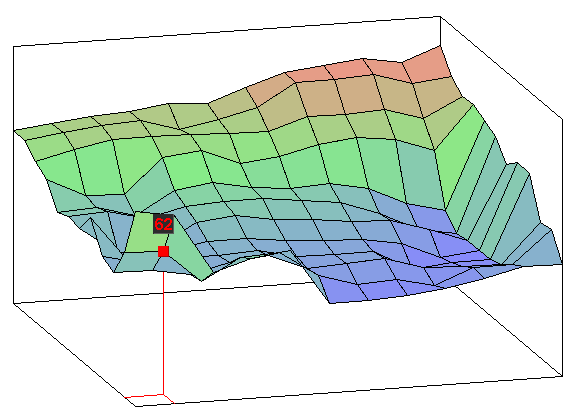
It smooths like this:
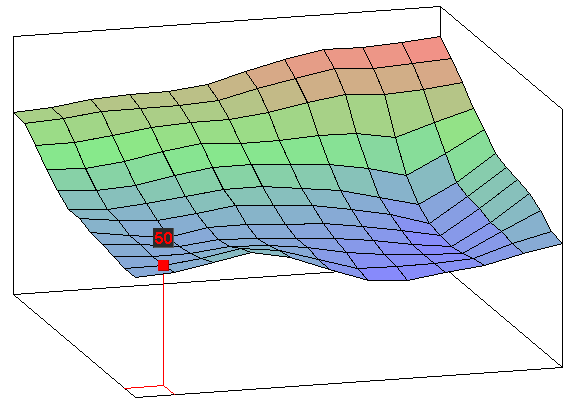
With a factor of 50 across the entire table it looks like this:
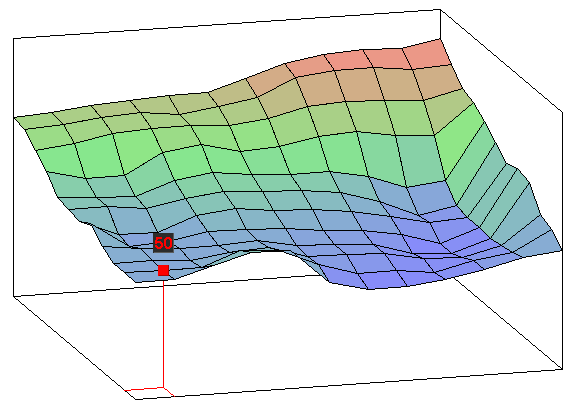
Please test and let me know how it works for you.
New version with light blue-green-red coloring and black text in post 32. https://www.miataturbo.net/showpost....7&postcount=32
Last edited by travisb; Jun 22, 2012 at 12:20 PM.
Reply
0
0
Thread Starter
Junior Member
Joined: Sep 2011
Posts: 252
Total Cats: 2
From: Chesterfield, VA
Reply
0
0

I'm now am a smooth table believer. My VE table was pretty smooth from a lot of tuning in a very narrow MAT window, and having a nicely dialed in MAT correction table. I drove iwth my new smoothed tables (fuel, spark, afr) The difference was subtle, but i felt the transitions while shifting were more smooth.
I'm going to test the smoothing with autotune. i.e. tune a session, then smooth and see if beginning with a smooth table will result in a smoother VEAlive table. I really think this should bt incorporated into tunerstudio. after a VEAlive session it prompts you to smooth the table.
EDIT: I'm not sure if I could have used the word "smooth" any more in that post. lol
I'm going to test the smoothing with autotune. i.e. tune a session, then smooth and see if beginning with a smooth table will result in a smoother VEAlive table. I really think this should bt incorporated into tunerstudio. after a VEAlive session it prompts you to smooth the table.
EDIT: I'm not sure if I could have used the word "smooth" any more in that post. lol
Reply
0
0

This is very cool. I am an interpolation freak, and I do exactly what this spreadsheet does. Manually. Interpolating 3 cells at a time across a 32x32 grid in hydra is not super fun.
Matt, in my experience, smooth fuel/VE will net better driveability. AFR may not be deadnuts perfect, but what is the point of having perfect AFR if car drives cruddy?
Matt, in my experience, smooth fuel/VE will net better driveability. AFR may not be deadnuts perfect, but what is the point of having perfect AFR if car drives cruddy?
Reply
0
0


Junior Member
Joined: Dec 2008
Posts: 315
Total Cats: 9
From: Ft. Lauderdale, FL
I have not plugged any values into the spreadsheets, but I looked at your formulas and they look good. I would add $ to lock the areas where your formulas are looking. For example:
=IF(OR(C2<>"",C3<>"",D2<>"",D3<>""),AVERAGE(C2,C3, D2,D3),"")
Would look like:
=IF(OR($C$2<>"",$C$3<>"",$D$2<>"",$D$3<>""),AVERAG E($C$2,$C$3,$D$2,$D$3),"")
This way no matter where you paste in your formula (This case W2), it will always look at C2, C3, D2 & D3 even if you pasted this formula into Z26 for example.
=IF(OR(C2<>"",C3<>"",D2<>"",D3<>""),AVERAGE(C2,C3, D2,D3),"")
Would look like:
=IF(OR($C$2<>"",$C$3<>"",$D$2<>"",$D$3<>""),AVERAG E($C$2,$C$3,$D$2,$D$3),"")
This way no matter where you paste in your formula (This case W2), it will always look at C2, C3, D2 & D3 even if you pasted this formula into Z26 for example.
Reply
0
0

Senior Member

Joined: Aug 2010
Posts: 613
Total Cats: 3
From: Maumelle, AR
Thats pretty slick, I went through the factors table and upped the percentage on the cells that I know ve analyze live has done a pretty good job with.... Very interested to see how it drives, and how ve al does now.
Reply
0
0
Joined: Jun 2005
Posts: 19,338
Total Cats: 574
From: Fake Virginia
I have not plugged any values into the spreadsheets, but I looked at your formulas and they look good. I would add $ to lock the areas where your formulas are looking. For example:
=IF(OR(C2<>"",C3<>"",D2<>"",D3<>""),AVERAGE(C2,C3, D2,D3),"")
Would look like:
=IF(OR($C$2<>"",$C$3<>"",$D$2<>"",$D$3<>""),AVERAG E($C$2,$C$3,$D$2,$D$3),"")
This way no matter where you paste in your formula (This case W2), it will always look at C2, C3, D2 & D3 even if you pasted this formula into Z26 for example.
=IF(OR(C2<>"",C3<>"",D2<>"",D3<>""),AVERAGE(C2,C3, D2,D3),"")
Would look like:
=IF(OR($C$2<>"",$C$3<>"",$D$2<>"",$D$3<>""),AVERAG E($C$2,$C$3,$D$2,$D$3),"")
This way no matter where you paste in your formula (This case W2), it will always look at C2, C3, D2 & D3 even if you pasted this formula into Z26 for example.
Reply
0
0

Senior Member
Joined: Apr 2016
Posts: 790
Total Cats: 188
From: Atlanta
I'll probably get slagged for necro-posting this thread, but-
I found this thread in a search, and this Excel tool is flat out awesome for smoothing VE tables. I figured I would give other MS newbs who are new to the game a chance to check it out. Major props to the author.
I found this thread in a search, and this Excel tool is flat out awesome for smoothing VE tables. I figured I would give other MS newbs who are new to the game a chance to check it out. Major props to the author.
Reply
1
1


