


Smoothing VE tables - Interpolation Spreadsheet


Thread Starter
Junior Member
Joined: Sep 2011
Posts: 252
Total Cats: 2
From: Chesterfield, VA
 Smoothing VE tables - Interpolation Spreadsheet
I created a spreadsheet to help smooth VE table values. See attached file. The values shown below are just for example purposes.
Simply copy the values from your tune and paste them into the spreadsheet in the "ORIGINAL VALUES" section.
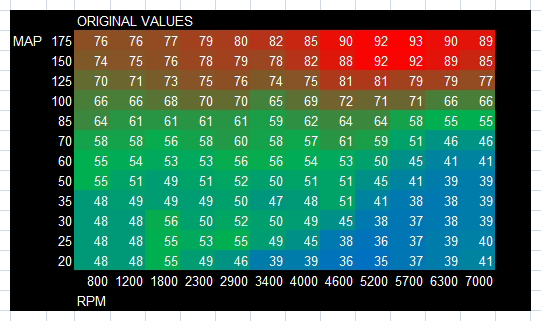
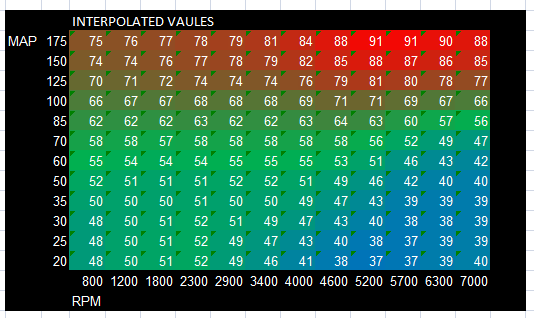
The new values are calculated in the "INTERPOLATED VALUES" section. Copy these new values back to your tune. Make adjustments were necessary. Like in your idle region, for example, if you want to keep that area using the same value in each cell.
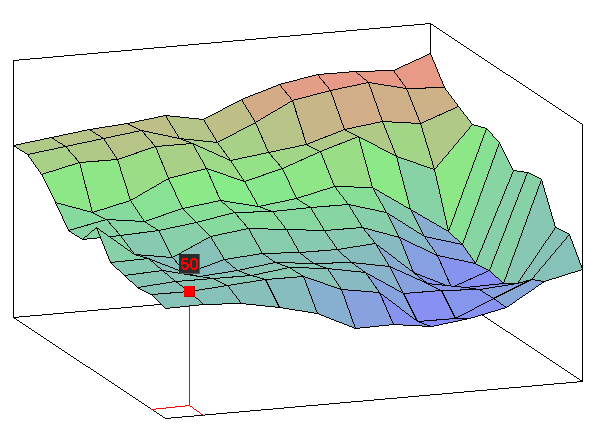
This takes a table that looks like this
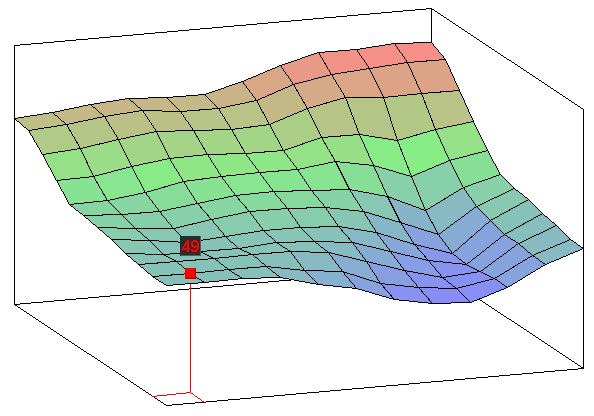
And gives you this
You can edit the spreadsheet to change MAP and RPM values. They are not used in calculations and are just for your information.
You can add additional rows or columns if needed but you will need to adjust the formulas.
Let me know if there are any suggestions updating this.
Edit - 16x16 and 12x12 version with factoring in post #31. https://www.miataturbo.net/showpost....5&postcount=31
Simply copy the values from your tune and paste them into the spreadsheet in the "ORIGINAL VALUES" section.
The new values are calculated in the "INTERPOLATED VALUES" section. Copy these new values back to your tune. Make adjustments were necessary. Like in your idle region, for example, if you want to keep that area using the same value in each cell.
This takes a table that looks like this
And gives you this
You can edit the spreadsheet to change MAP and RPM values. They are not used in calculations and are just for your information.
You can add additional rows or columns if needed but you will need to adjust the formulas.
Let me know if there are any suggestions updating this.
Edit - 16x16 and 12x12 version with factoring in post #31. https://www.miataturbo.net/showpost....5&postcount=31
Last edited by travisb; Jun 22, 2012 at 12:05 PM.
Reply
 3
3

3



you know tuner studio does it too right?
I just did mine --
here's how my current fuel map looks:
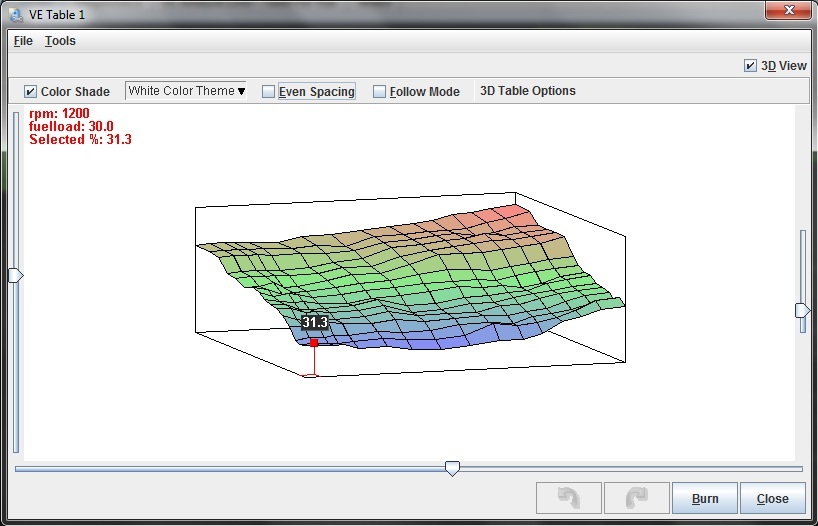
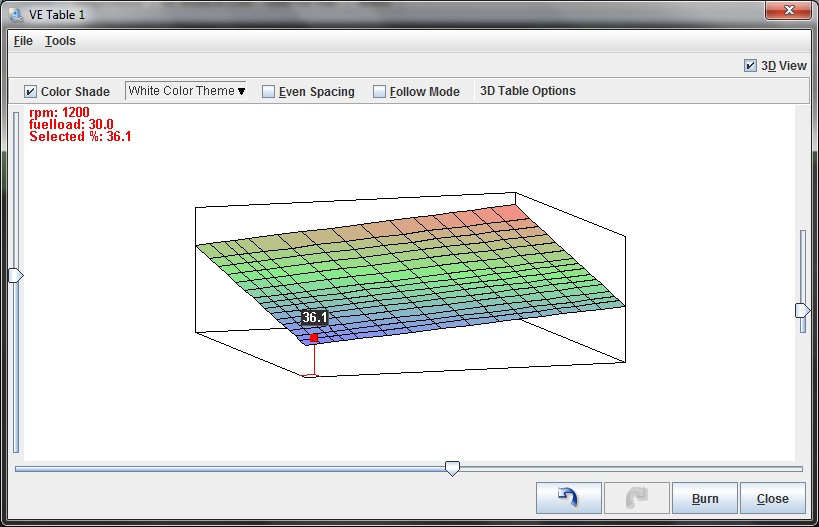
selecting all and interpolating:
spending about 2 minutes and selectively interpolating the peaks/valleys:

but your spreadsheet seems a bit easier. make a 16x16 one and ill try it.
I just did mine --
here's how my current fuel map looks:
selecting all and interpolating:
spending about 2 minutes and selectively interpolating the peaks/valleys:
but your spreadsheet seems a bit easier. make a 16x16 one and ill try it.
Reply
0
0


Thread Starter
Junior Member
Joined: Sep 2011
Posts: 252
Total Cats: 2
From: Chesterfield, VA
Here is my 16x16 version. Try it out and let me know what you think.
PLEASE VERIFY THE DATA BEFORE YOU BURN TO THE ECU. I MAKE NO CLAIMS TO THE ACCURACY OF THIS SPREADSHEET OR TAKE ANY LIABILITY SHOULD YOU DESTROY YOUR CAR.
Edit - 16x16 and 12x12 version with factoring in post #31. https://www.miataturbo.net/showpost....5&postcount=31
PLEASE VERIFY THE DATA BEFORE YOU BURN TO THE ECU. I MAKE NO CLAIMS TO THE ACCURACY OF THIS SPREADSHEET OR TAKE ANY LIABILITY SHOULD YOU DESTROY YOUR CAR.
Edit - 16x16 and 12x12 version with factoring in post #31. https://www.miataturbo.net/showpost....5&postcount=31
Last edited by travisb; Jun 22, 2012 at 12:05 PM. Reason: Disclaimer.
Reply
1
1
Thread Starter
Junior Member
Joined: Sep 2011
Posts: 252
Total Cats: 2
From: Chesterfield, VA
I also used this for my ignition table. All it does is take the average of all the neighboring cells. If the numbers you already have are somewhat accurate, then it just smooths everything out. I'm guessing it is ok to do this.
Last edited by travisb; Jun 21, 2012 at 08:57 PM.
Reply
0
0
Thread Starter
Junior Member
Joined: Sep 2011
Posts: 252
Total Cats: 2
From: Chesterfield, VA
Reply
0
0

Joined: Jun 2005
Posts: 19,338
Total Cats: 574
From: Fake Virginia
that's what I was telling brain. it's not a smoothing algorithm, it's an averaging algorithm.
select a line or a rectangle and it'll connect the points with a linear (or planar) set of values.
your smoothing one is pretty baller.
select a line or a rectangle and it'll connect the points with a linear (or planar) set of values.
your smoothing one is pretty baller.
Reply
0
0
So here's like 2-3 mins of using tuner studio quickly:
and here's 3 seconds in excel:
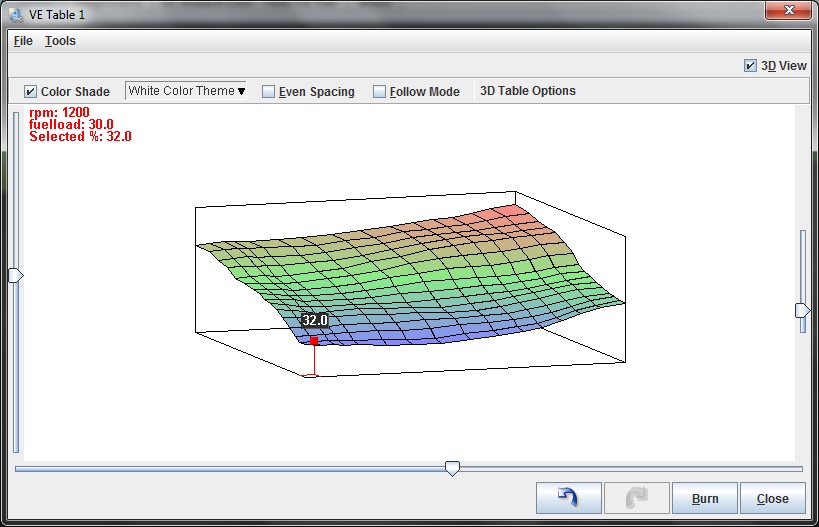
it's pretty cool
Reply
0
0


My only concern is that some of my high noost cells smoothed by 2%. Hopefully this doesnt cause an afr issue. Is a smooth ve table really necessary with the correct interpolation values?
Reply
0
0

Elite Member
Joined: Mar 2006
Posts: 1,574
Total Cats: 106
From: Schwarzenberg, Germany
I am totally impressed!
I tried it with my VEtable - so nice and smooth now. This thing should be included in the VEanalyze function - analyze AND smooth. Because the smooth function takes no actual AFR target into account... (But it's very nice anyway...)
I just thought about giving a call out to Phil Tobin if there would be a way to make an "Extrapolate"-function. We will never know, what the real values in the upper left and lower right edges will be. So I thought there should be an excel spreadsheet or something like this to put in the actual "VEanalyzed"-Values and extrapolate to the untouched edges - and get smooth transitions at the edges of the really used values...
I tried it with my VEtable - so nice and smooth now. This thing should be included in the VEanalyze function - analyze AND smooth. Because the smooth function takes no actual AFR target into account... (But it's very nice anyway...)
I just thought about giving a call out to Phil Tobin if there would be a way to make an "Extrapolate"-function. We will never know, what the real values in the upper left and lower right edges will be. So I thought there should be an excel spreadsheet or something like this to put in the actual "VEanalyzed"-Values and extrapolate to the untouched edges - and get smooth transitions at the edges of the really used values...
Reply
0
0

Can anyone confirm that smoothing the table is making a difference to drive quality / AFR stability?. i know that when VEAL was new people were saying " my maps now smooth but its driving better and more stable AFR". I know it makes sence that it would, perhaps it was only people with really ---- VE tables that said it made there tables better.
Thanks
Scott
Thanks
Scott
Reply
0
0


