


Inline Image Scaling Mod?


Thread Starter


Joined: Jun 2005
Posts: 19,338
Total Cats: 574
From: Fake Virginia
 Inline Image Scaling Mod?
Is there a way to autoscale images on posts that are wider than your browser? I dig all the pics an dont care about bandwidth but my home laptop is only a 13" monitor at 1024x768. I hate scrolling sideways!
Thanks!
Matt
Thanks!
Matt
Reply
 0
0

0


Thanks for bringing this up, it's a real annoyance having to scroll horizontally.
We use Ncode image resizer at sr20forum.com and it works like a charm.
http://www.ncode.nl/vbulletinplugins/
We use Ncode image resizer at sr20forum.com and it works like a charm.
http://www.ncode.nl/vbulletinplugins/
Reply
0
0

https://www.miataturbo.net/forum/showthread.php?t=17400
C
Reply
0
0

Joined: Sep 2005
Posts: 34,382
Total Cats: 7,504
From: Chicago. (The less-murder part.)
Pretty much all modern web browsers (even IE) have an option to auto-resize images larger than the screen. Under IE6, it was under Tools -> Internet Options, Advanced tab, Multimedia section, "Enable Automatic Image Resizing". I'd imagine the newer build is similar.
Firefox, Opera, Safari, all these have the same capability.
Please, for the love of God, do not rescale images at the server. If folks want them rescaled they can do it in their browser. The rest of us can choose to scroll.
Firefox, Opera, Safari, all these have the same capability.
Please, for the love of God, do not rescale images at the server. If folks want them rescaled they can do it in their browser. The rest of us can choose to scroll.
Reply
0
0


yeah but automatic image rescaling doesn't work on vbulletin when the img tag is used...i hate scrolling too so i make all my pics 800x600 for online use. I also hate forced scaling on forums, but a max of 1240x1024 wouldn't be horrible, most fall under it.
Reply
0
0
Joined: Sep 2005
Posts: 34,382
Total Cats: 7,504
From: Chicago. (The less-murder part.)
Because then those of us who wish to see the images in their full native resolution cannot.
Well, poo. Never noticed that, but you're right.
True... Though what if we forgo the resizing and simply put to death anyone who posts images wider than 1024?
edit: Ok, I see what started this. J_man shall be the first against the wall.
Originally Posted by Braineack
yeah but automatic image rescaling doesn't work on vbulletin when the img tag is used...
I also hate forced scaling on forums, but a max of 1240x1024 wouldn't be horrible, most fall under it.
edit: Ok, I see what started this. J_man shall be the first against the wall.
Reply
0
0
Thread Starter
Joined: Jun 2005
Posts: 19,338
Total Cats: 574
From: Fake Virginia
Ah well the plug-ins I've seen on other forums will show the inline image scaled down with a link to view it full size. This makes me and all the purist joe perezes happy.
Reply
0
0
Take a look at the developer's page for the plugin I mentioned. It is very flexible and allows tuning on a per user basis. Don't want the image scaling? No problem, just set the option in your user control panel. Browsing on a laptop? Set the scaling to 800x600, etc etc.
Once the plugin is installed on the server, users will have these additional options in their control panel.
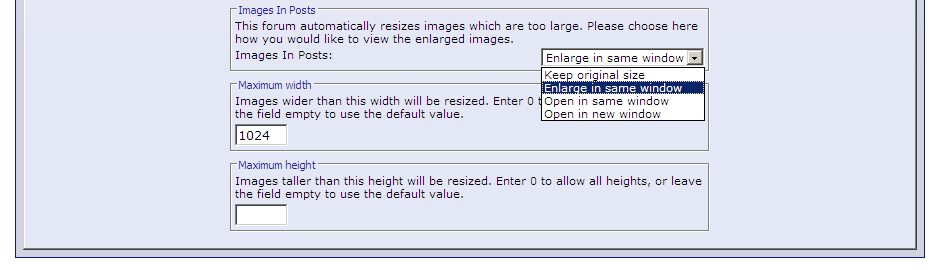
I believe the plugin does the rescaling on the client side, which is a bonus, as it imparts no additional load on the server.
And by the way, even 1024x768 images posted to this forum require a bit of scrolling when viewed on a 1280x1024 screen.
C
Once the plugin is installed on the server, users will have these additional options in their control panel.
I believe the plugin does the rescaling on the client side, which is a bonus, as it imparts no additional load on the server.
And by the way, even 1024x768 images posted to this forum require a bit of scrolling when viewed on a 1280x1024 screen.
C
Reply
0
0


Thread
Thread Starter
Forum
Replies
Last Post
russian
Miata parts for sale/trade
6
Oct 8, 2015 03:01 PM


