Notices
MEGAsquirt A place to collectively sort out this megasquirt gizmo

Wideband CAN module settings

Thread Tools
 
Search this Thread
 
Old Jun 14, 2017 | 03:39 PM
  #1  
curly's Avatar
Thread Starter
Cpt. Slow
iTrader: (25)
 
Joined: Oct 2005
Posts: 15,196
Total Cats: 1,398
From: Oregon City, OR
Default Wideband CAN module settings

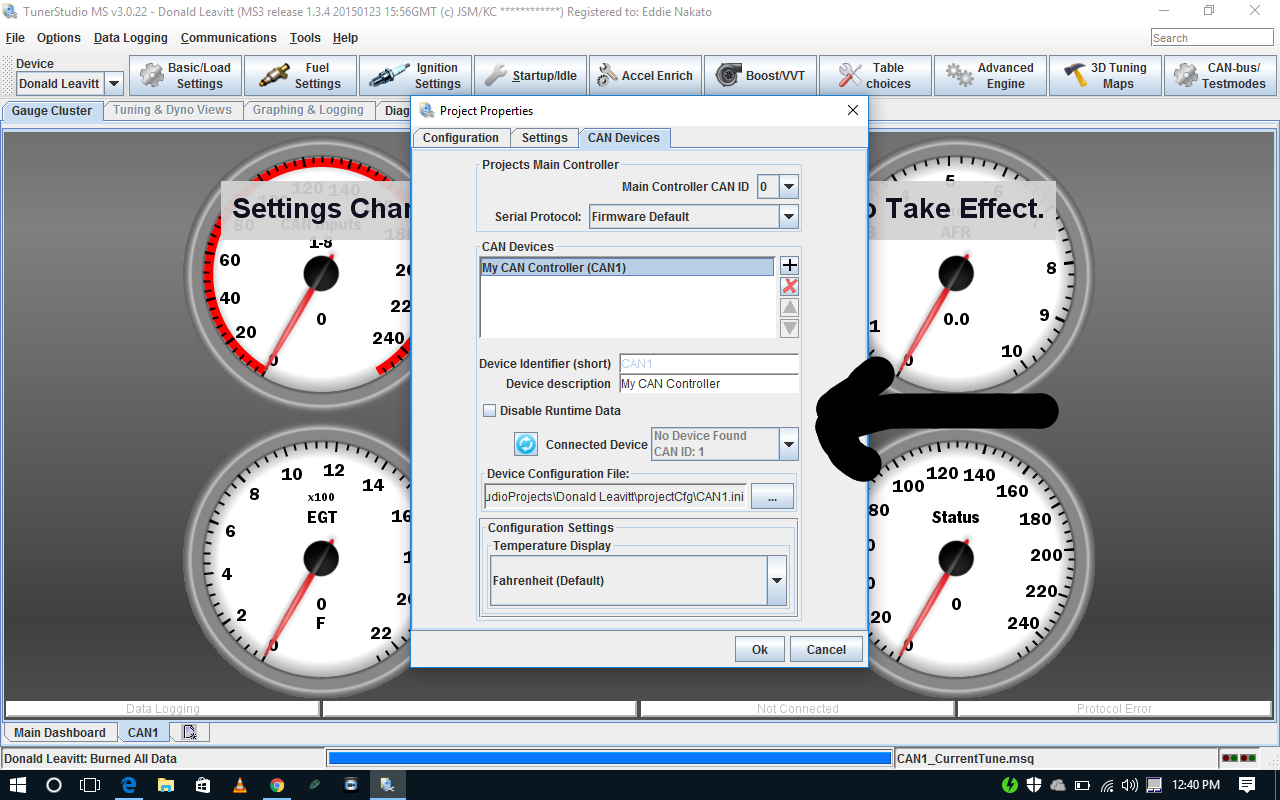
I'm trying to setup one of Rev's wideband modules with his MS3 basic, can someone spoon feed me the settings? I've followed the instructions including wiring and setup, but can't get it to communicate with the laptop.
Old Jun 14, 2017 | 03:41 PM
  #2  
curly's Avatar
Thread Starter
Cpt. Slow
iTrader: (25)
 
Joined: Oct 2005
Posts: 15,196
Total Cats: 1,398
From: Oregon City, OR
Default

Aidan says the project properties are important too...
Old Jun 14, 2017 | 03:43 PM
  #3  
aidandj's Avatar
SADFab Destructive Testing Engineer
iTrader: (5)
 
Joined: Apr 2014
Posts: 18,643
Total Cats: 1,870
From: Beaverton, USA
Default

If you are able to change settings on the wideband module then you are getting a connection. What is the AFR reporting?

You also need to change Fuel Settings->AFR/EGO Control-> EGO ports to CAN EGO.
Old Jun 14, 2017 | 03:44 PM
  #4  
aidandj's Avatar
SADFab Destructive Testing Engineer
iTrader: (5)
 
Joined: Apr 2014
Posts: 18,643
Total Cats: 1,870
From: Beaverton, USA
Default

Set the Device ID in the project properties to 9.

Name:  Jt59V8R.png
Views: 108
Size:  235.1 KB

Also. post tune.
Old Jun 14, 2017 | 03:45 PM
  #5  
curly's Avatar
Thread Starter
Cpt. Slow
iTrader: (25)
 
Joined: Oct 2005
Posts: 15,196
Total Cats: 1,398
From: Oregon City, OR
Default

AEM is reading full lean, TS gauge reads 7.4
Old Jun 14, 2017 | 03:46 PM
  #6  
dleavitt's Avatar
Senior Member
iTrader: (1)
 
Joined: May 2015
Posts: 757
Total Cats: 223
From: Salem, OR
Default

I had a little trouble when setting it up the first time too. I don't know what exactly I did different, but after going through the steps a few times it ended up working.
Old Jun 14, 2017 | 03:46 PM
  #7  
dleavitt's Avatar
Senior Member
iTrader: (1)
 
Joined: May 2015
Posts: 757
Total Cats: 223
From: Salem, OR
Default

Originally Posted by aidandj
Set the Device ID in the project properties to 9.
This, I had trouble getting that to stick for some reason.
Old Jun 14, 2017 | 03:47 PM
  #8  
curly's Avatar
Thread Starter
Cpt. Slow
iTrader: (25)
 
Joined: Oct 2005
Posts: 15,196
Total Cats: 1,398
From: Oregon City, OR
Default

This is what I get when I do that.

Old Jun 14, 2017 | 03:49 PM
  #9  
aidandj's Avatar
SADFab Destructive Testing Engineer
iTrader: (5)
 
Joined: Apr 2014
Posts: 18,643
Total Cats: 1,870
From: Beaverton, USA
Default

Ok. Then the instructions need to be updated if its shipping as CAN device 1.

@Reverant
Old Jun 14, 2017 | 03:49 PM
  #10  
aidandj's Avatar
SADFab Destructive Testing Engineer
iTrader: (5)
 
Joined: Apr 2014
Posts: 18,643
Total Cats: 1,870
From: Beaverton, USA
Default

Originally Posted by curly
AEM is reading full lean, TS gauge reads 7.4
You also need to change Fuel Settings->AFR/EGO Control-> EGO ports to CAN EGO.

This might fix that.
Old Jun 14, 2017 | 03:50 PM
  #11  
dleavitt's Avatar
Senior Member
iTrader: (1)
 
Joined: May 2015
Posts: 757
Total Cats: 223
From: Salem, OR
Default

Originally Posted by aidandj
Ok. Then the instructions need to be updated if its shipping as CAN device 1.
I am 99% sure it was 9 when I installed it originally (This is my car he's working on). Unfortunately my laptop is at home so I can't confirm on my copy of the old tune.
Old Jun 14, 2017 | 03:52 PM
  #12  
curly's Avatar
Thread Starter
Cpt. Slow
iTrader: (25)
 
Joined: Oct 2005
Posts: 15,196
Total Cats: 1,398
From: Oregon City, OR
Default

EGO 1 Port is already set to CAN EGO, lambda averaging lag is set to 100, and Innovate EGO data is set to 9,0,0 as per the instructions.
Old Jun 14, 2017 | 03:53 PM
  #13  
aidandj's Avatar
SADFab Destructive Testing Engineer
iTrader: (5)
 
Joined: Apr 2014
Posts: 18,643
Total Cats: 1,870
From: Beaverton, USA
Default

Originally Posted by curly
EGO 1 Port is already set to CAN EGO, lambda averaging lag is set to 100, and Innovate EGO data is set to 9,0,0 as per the instructions.
Ah. If the device ID isn't 9 anymore then this needs to be 1.
Old Jun 14, 2017 | 04:00 PM
  #14  
curly's Avatar
Thread Starter
Cpt. Slow
iTrader: (25)
 
Joined: Oct 2005
Posts: 15,196
Total Cats: 1,398
From: Oregon City, OR
Default

Still gives me the same error if I set everything to 1 instead of 9.
Old Jun 14, 2017 | 04:01 PM
  #15  
aidandj's Avatar
SADFab Destructive Testing Engineer
iTrader: (5)
 
Joined: Apr 2014
Posts: 18,643
Total Cats: 1,870
From: Beaverton, USA
Default

The protocol error?
Old Jun 14, 2017 | 04:02 PM
  #16  
curly's Avatar
Thread Starter
Cpt. Slow
iTrader: (25)
 
Joined: Oct 2005
Posts: 15,196
Total Cats: 1,398
From: Oregon City, OR
Default

Yes, that it's communicatiing with my device but not at the assigned CAN id
Old Jun 14, 2017 | 04:05 PM
  #17  
aidandj's Avatar
SADFab Destructive Testing Engineer
iTrader: (5)
 
Joined: Apr 2014
Posts: 18,643
Total Cats: 1,870
From: Beaverton, USA
Default

This sounds like the same error @vteckiller2000 was having.

But he never fixed it.

You can use a utility called port scanner to test devices, and see what each CAN id is.

Megasquirt Support Forum (MSEXTRA) ? Port scanner (View topic)
Old Jun 14, 2017 | 04:12 PM
  #18  
curly's Avatar
Thread Starter
Cpt. Slow
iTrader: (25)
 
Joined: Oct 2005
Posts: 15,196
Total Cats: 1,398
From: Oregon City, OR
Default

Port scanner is coming up with "unknown device" for CAN ID 0-14.
Old Jun 14, 2017 | 04:13 PM
  #19  
aidandj's Avatar
SADFab Destructive Testing Engineer
iTrader: (5)
 
Joined: Apr 2014
Posts: 18,643
Total Cats: 1,870
From: Beaverton, USA
Default

Thats not right. CAN ID 0 should at least be showing up as the MS3.

Can you post the tune?
Old Jun 14, 2017 | 04:14 PM
  #20  
dleavitt's Avatar
Senior Member
iTrader: (1)
 
Joined: May 2015
Posts: 757
Total Cats: 223
From: Salem, OR
Default

Hopefully Rev can chime in. CAN module was working back in January, so it shouldn't be a hardware problem.


All times are GMT -4. The time now is 10:59 AM.