


MSI Afterburner!!!!


Thread Starter
Elite Member
iTrader: (7)
Joined: May 2007
Posts: 3,006
Total Cats: 103
From: Dallas, Tx
 MSI Afterburner!!!!
I will never buy a non MSI video card again.
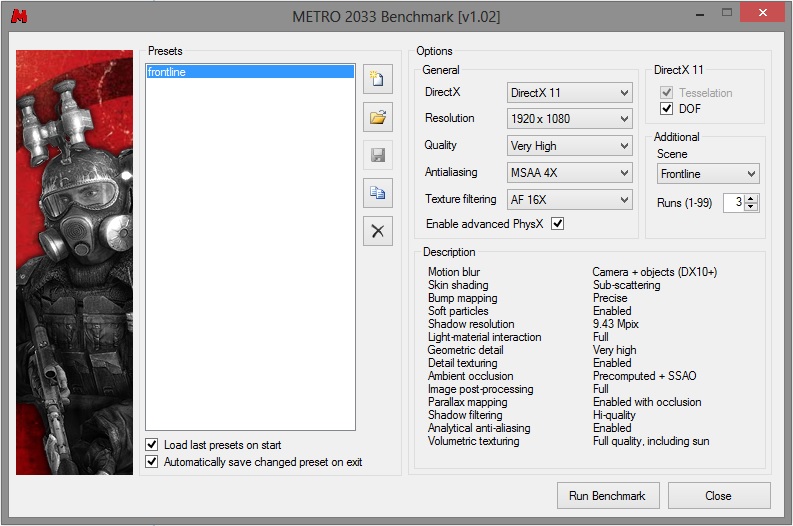
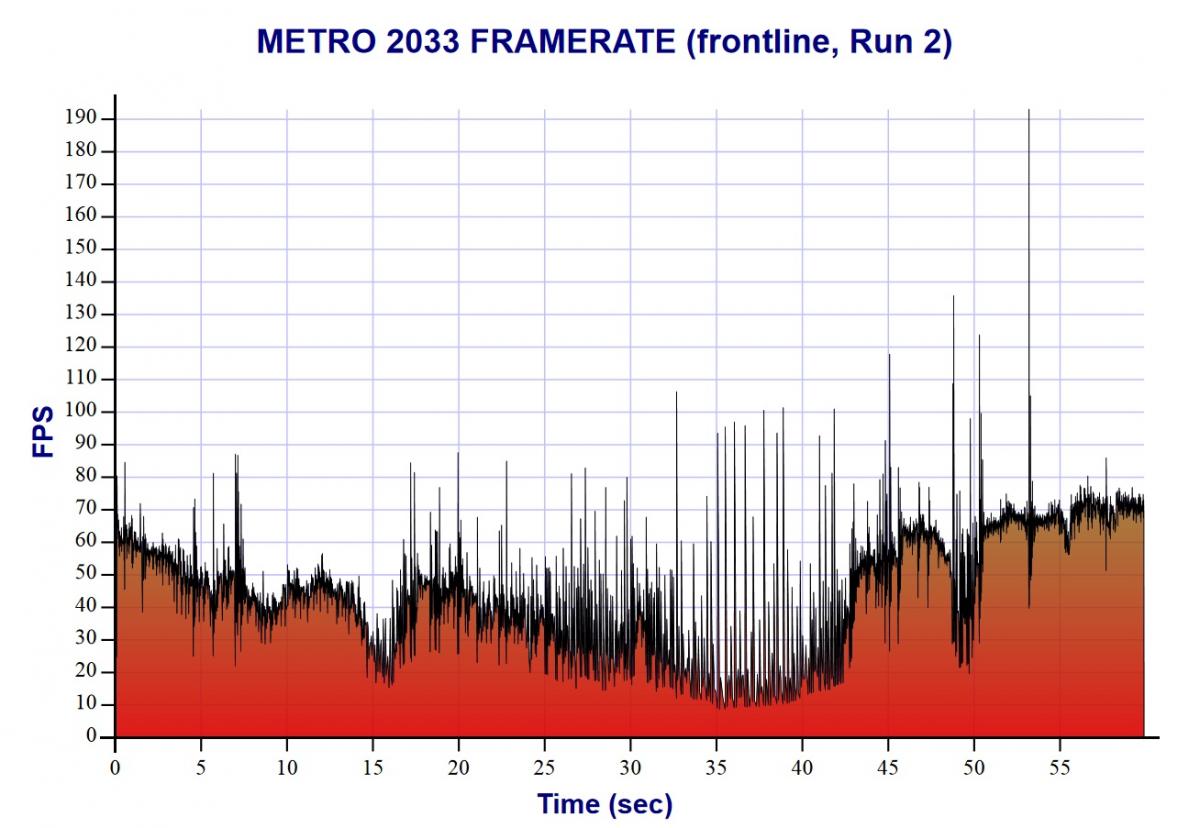
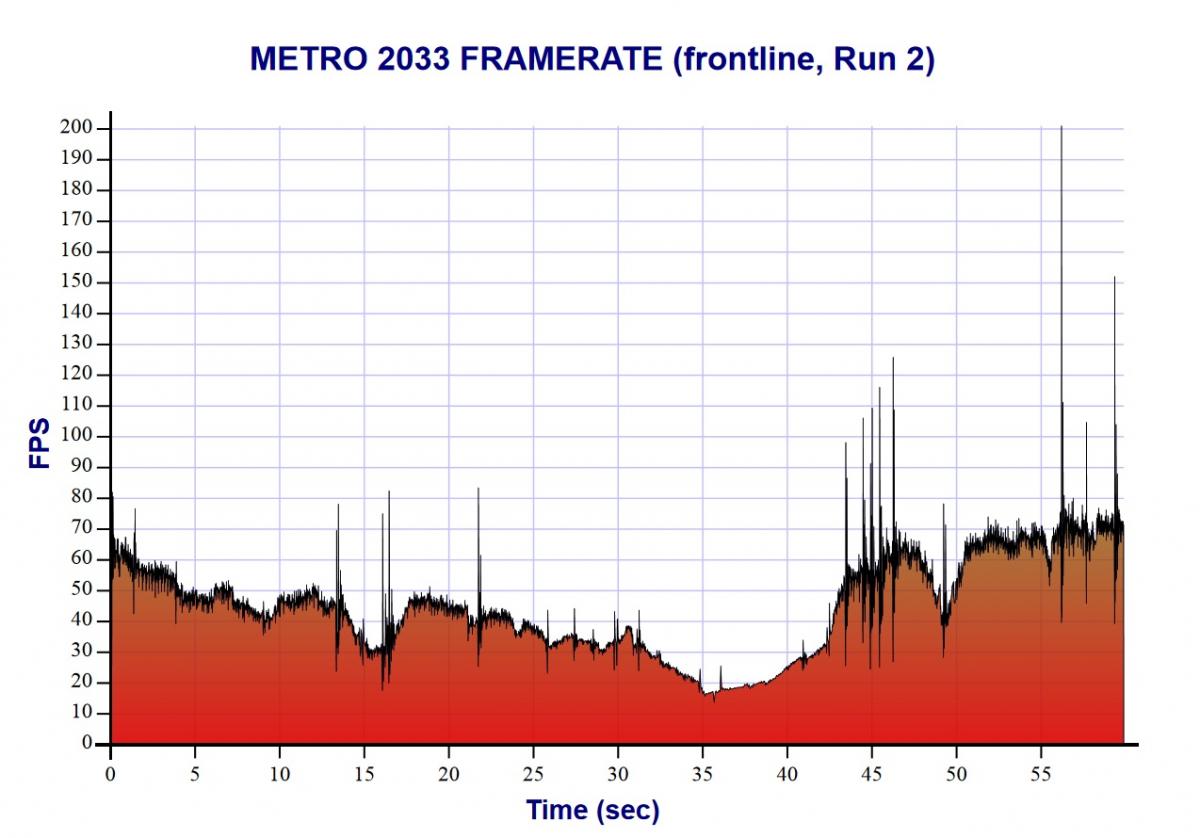
In the benchmark run you could see that video jerking.
Posting run 2 because 1 and 3 had 250 fps spikes making it look like a fox news graph.
Without
With
In the benchmark run you could see that video jerking.
Posting run 2 because 1 and 3 had 250 fps spikes making it look like a fox news graph.
Without
With
Reply
 0
0

0



That... is.... Awesome!
Seriously, the number one thing that bothers me with games is when the video isn't smooth, I'm not talking dropping below 60 fps, but ^That kind of choppiness.
Seriously, the number one thing that bothers me with games is when the video isn't smooth, I'm not talking dropping below 60 fps, but ^That kind of choppiness.
Reply
0
0
Thread Starter
Elite Member
iTrader: (7)
Joined: May 2007
Posts: 3,006
Total Cats: 103
From: Dallas, Tx
I have used it on a HIS card before and it didn't do any thing other then let me unlock voltage and adjust up to 10% over normal clocks. Auto OC it does on msi cards works well enough that i haven't had to do any manual tuning yet.
Reply
0
0


Joined: Sep 2005
Posts: 34,428
Total Cats: 7,548
From: Chicago. (The less-murder part.)
I guess I don't understand what the charts are attempting to convey. In both of them, FPS is highly variable and is almost always lower than the refresh rate.
Reply
0
0
Joined: Sep 2005
Posts: 34,428
Total Cats: 7,548
From: Chicago. (The less-murder part.)
Huh.
Wouldn't it be better to reduce the quality* settings in order to achieve a consistently high** framerate, rather then to optimize the settings for a universally low framerate?
* = anti-aliasing, texture filtering, resolution, etc.
** = a framerate which is at least equal to the refresh rate.
Wouldn't it be better to reduce the quality* settings in order to achieve a consistently high** framerate, rather then to optimize the settings for a universally low framerate?
* = anti-aliasing, texture filtering, resolution, etc.
** = a framerate which is at least equal to the refresh rate.
Reply
0
0
Huh.
Wouldn't it be better to reduce the quality* settings in order to achieve a consistently high** framerate, rather then to optimize the settings for a universally low framerate?
* = anti-aliasing, texture filtering, resolution, etc.
** = a framerate which is at least equal to the refresh rate.
Wouldn't it be better to reduce the quality* settings in order to achieve a consistently high** framerate, rather then to optimize the settings for a universally low framerate?
* = anti-aliasing, texture filtering, resolution, etc.
** = a framerate which is at least equal to the refresh rate.
Reply
0
0
It'd definitely be faster to have less load on the system, but there are some that can't bear to play games with less than maximum settings...
...says the person with a New 670 4gb on the way.
...says the person with a New 670 4gb on the way.
Reply
0
0
Thread Starter
Elite Member
iTrader: (7)
Joined: May 2007
Posts: 3,006
Total Cats: 103
From: Dallas, Tx
Huh.
Wouldn't it be better to reduce the quality* settings in order to achieve a consistently high** framerate, rather then to optimize the settings for a universally low framerate?
* = anti-aliasing, texture filtering, resolution, etc.
** = a framerate which is at least equal to the refresh rate.
Wouldn't it be better to reduce the quality* settings in order to achieve a consistently high** framerate, rather then to optimize the settings for a universally low framerate?
* = anti-aliasing, texture filtering, resolution, etc.
** = a framerate which is at least equal to the refresh rate.

Ya if I was getting less then 45fps I would change settings but I'm running a bench tool that is trying to going for max stress and see how well the system runs.
Reply
0
0
Reply
0
0

Reply
0
0
Just bump one down to Physix. Made a huge difference to have a card in Borderlands 2 and Batman. Every 2-3 generation upgrade leaves you with a usable card in physix. Pretty clever of them.
Reply
0
0
Joined: Sep 2005
Posts: 34,428
Total Cats: 7,548
From: Chicago. (The less-murder part.)
I'd have thought that the goal was to achieve a framerate which was no lower than the refresh rate (60 FPS), such that you get one complete frame for each "scan" of the display. This avoids both tearing and studdering.
But what do I know? I've only been playing first-person shooters on the internet since 1996.
Reply
0
0

I don't think he was trying to play, joe, he was trying to benchmark. Obviously 60fps is best, but he just wants to see what he can squeeze out of that card.
Jeff you should jump into one of the massive Planetside2 battles and see how it does.
Jeff you should jump into one of the massive Planetside2 battles and see how it does.
Reply
0
0
Thread Starter
Elite Member
iTrader: (7)
Joined: May 2007
Posts: 3,006
Total Cats: 103
From: Dallas, Tx
Huh.
I'd have thought that the goal was to achieve a framerate which was no lower than the refresh rate (60 FPS), such that you get one complete frame for each "scan" of the display. This avoids both tearing and studdering.
But what do I know? I've only been playing first-person shooters on the internet since 1996.
I'd have thought that the goal was to achieve a framerate which was no lower than the refresh rate (60 FPS), such that you get one complete frame for each "scan" of the display. This avoids both tearing and studdering.
But what do I know? I've only been playing first-person shooters on the internet since 1996.
There is the 30 vs 60 fps debate that will go on for ever but I find that anything over 45 is smooth. Most newer (maybe last 5 years) game engines have adopted a top tear design where you don't get that middle screen tearing. It happens above the eye line in the top 10% of the screen so it's significantly less visible and even with v-sync on some still tear that top edge to keep from having frame drop do to v-sync. That's how rage runs 60fps on x360 with out dumbing down graphics as much. So new high graphic games you run max settings, get 45-60 fps and don't notice screen tearing like you us to.
Reply
0
0

Thread
Thread Starter
Forum
Replies
Last Post


