


Controller code version problem


Thread Starter
Junior Member
iTrader: (1)
Joined: Oct 2005
Posts: 466
Total Cats: 0
From: Charlotte, NC
 Controller code version problem
Trying to set up the software for megasquirt and I run into the "controller code version does not match signature in MSns-extra.ini"
Attempt 1:
-You said you flashed my tune on the MS already so I put that and those 3 files you sent in the email aside.
- MegaTune: http://www.megamanual.com/files/software/
-I downloaded/installed/unzipped all 11 files in that directory
-I downloaded these too:
MSII Downloader: http://www.megamanual.com/ms2/downl2.htm
MSnSE: http://megasquirt.sourceforge.net/ex...alpha/029v.zip
Logging (MegaLogViewer): http://www.ideasandsolutions.biz/Meg...ewer/download/
-Ran the copy-ini
-Open megatune, then that warning comes up
-set configurator, lambda sensor, kpa, and Celsius
-save, run megatune, that warning comes up
Attempt 2:
Scott then tells me to uninstall megatune, and redownload/reinstall it.
run the copy-ini.bat file, then go here: http://www.texasneons.org/viewcvs/msns-e_hr/
download the edit-settings.bat file.
download it into your 029v folder. Run at and then change the line "#unset MSNS_EXTRA" to # set MSNS_EXTRA" by highlighting the "un" and changing it to a double space. Change the default "# set MSI" to "#unset MSI"
then try running Megatune.
Tried this procedure twice, and I am still getting the same problem.
Any input would be great and thank you Scott for putting up with me.
Attempt 1:
-You said you flashed my tune on the MS already so I put that and those 3 files you sent in the email aside.
- MegaTune: http://www.megamanual.com/files/software/
-I downloaded/installed/unzipped all 11 files in that directory
-I downloaded these too:
MSII Downloader: http://www.megamanual.com/ms2/downl2.htm
MSnSE: http://megasquirt.sourceforge.net/ex...alpha/029v.zip
Logging (MegaLogViewer): http://www.ideasandsolutions.biz/Meg...ewer/download/
-Ran the copy-ini
-Open megatune, then that warning comes up
-set configurator, lambda sensor, kpa, and Celsius
-save, run megatune, that warning comes up
Attempt 2:
Scott then tells me to uninstall megatune, and redownload/reinstall it.
run the copy-ini.bat file, then go here: http://www.texasneons.org/viewcvs/msns-e_hr/
download the edit-settings.bat file.
download it into your 029v folder. Run at and then change the line "#unset MSNS_EXTRA" to # set MSNS_EXTRA" by highlighting the "un" and changing it to a double space. Change the default "# set MSI" to "#unset MSI"
then try running Megatune.
Tried this procedure twice, and I am still getting the same problem.
Any input would be great and thank you Scott for putting up with me.
Reply
 0
0

0





I don't think you can even get a controller error unless the MS is connected??
If i was you I would delete everything you have again. Then go to:
http://diyautotune.com/downloads/tun...win_101007.exe
That will automatically start the download. It contains known working firmware and includes a good .bat file.
Delete the other crap you have now though and start fresh. This package folder they have works great. At least that's been my experience.
If i was you I would delete everything you have again. Then go to:
http://diyautotune.com/downloads/tun...win_101007.exe
That will automatically start the download. It contains known working firmware and includes a good .bat file.
Delete the other crap you have now though and start fresh. This package folder they have works great. At least that's been my experience.
Reply
0
0
Thread Starter
Junior Member
iTrader: (1)
Joined: Oct 2005
Posts: 466
Total Cats: 0
From: Charlotte, NC
I'll probably get burned for this one but I just downloaded and installed cjernigan's diyautotune link. Do I follow the same steps Scott provided up top in my original posts? ::flame suit on:: diyauto's program is bit different that what i've been learning.
-open megasquirt folder
-ms1 extra 029v
-open copy.ini program
-run edit-settings application
-change settings
-Open megatune
-set configurator, lambda sensor, kpa, and Celsius
-save
-configure maps
and then...?
-open megasquirt folder
-ms1 extra 029v
-open copy.ini program
-run edit-settings application
-change settings
-Open megatune
-set configurator, lambda sensor, kpa, and Celsius
-save
-configure maps
and then...?
Reply
0
0
You need to burn the firmware using the .bat in the 029v folder to make sure you have the right firmware. Or you need you go into easytherm and calibrate the firmware for your Miata sensors or w/e you are using. When using easytherm, select custom, then make sure you browse to the msns_extra.s19 file in the 029v folder. It will then create a mod file for you to use when burning with the MSII downloader.
Reply
0
0

Supporting Vendor

Joined: Sep 2006
Posts: 2,332
Total Cats: 67
Could you post a screen shot of the whole error message?
Reply
0
0

I wouldnt use MSII downloader, I know everyone is recommending it, but it has been nothing but problems for me. using the firmware bat file and using the firmwares compiler is just so much simpler.
Reply
0
0
I've already flashed his MS. I flashed it at the same time as 6 other MSs without any issues. this is why it's confusing me. I even loaded a base map on it, and had no errors with my laptop and MT.
Reply
0
0
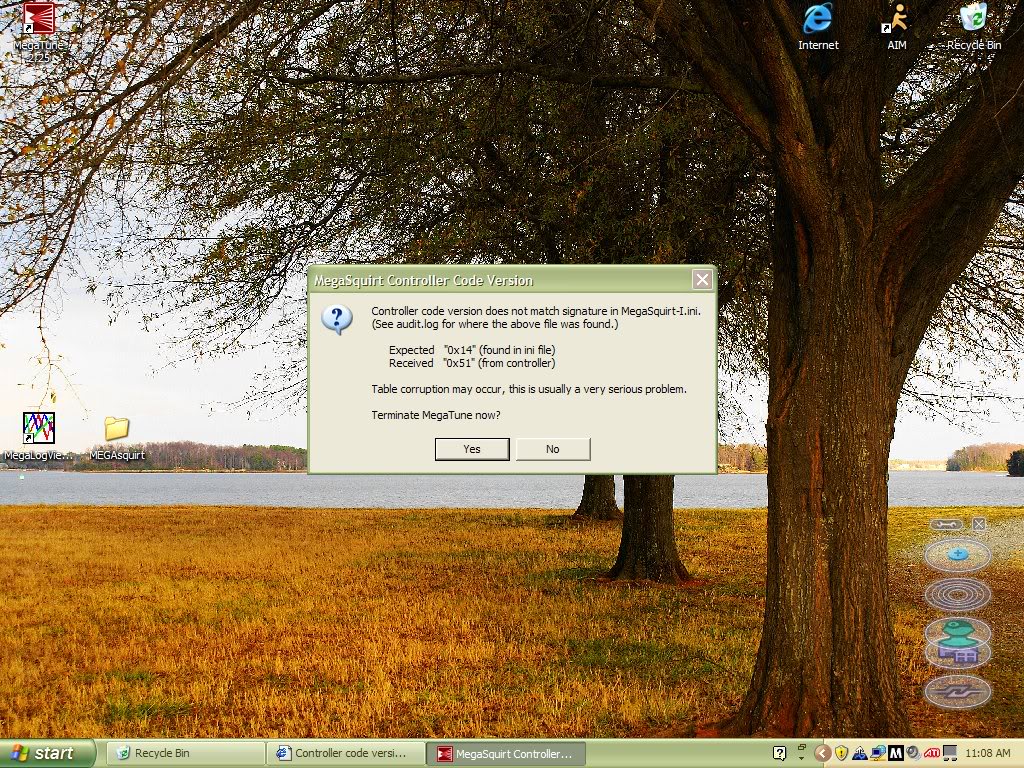
This is why I dislike using the DIYautotune installer. Its so confusing. Easier to just drop the msnse ini file into the main folder of megatune, setup the proper extension under Car1 and you are done. never have to touch it again and you never get that box at startup asking you to select what code you plan to run.
Reply
0
0
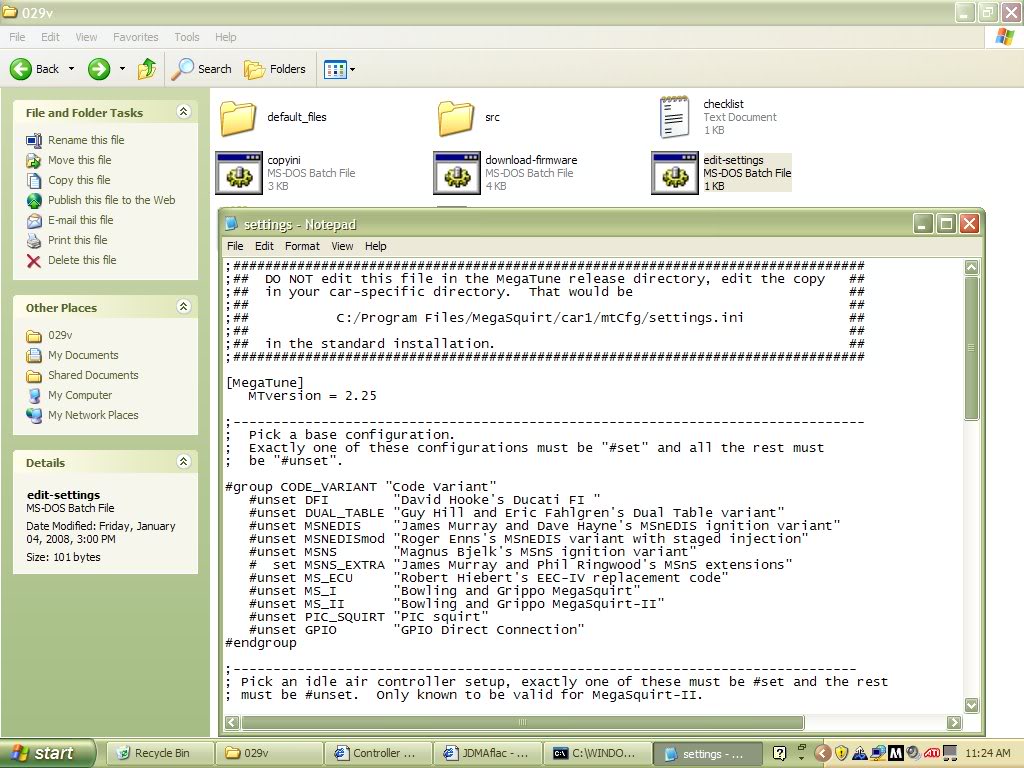
JDMFlac, are you positive you copied the msnse ini file into the megatune directory? I dont remember which one you have to put it in but its the one with all the ini's.
Also your error message shows it as still trying to load the MS1 ini.
Also your error message shows it as still trying to load the MS1 ini.
Reply
0
0
running edit-settings performs the same thing. it's telling megatune to open a different ini file.
when you run copyini, it puts the 029v ini file into the correct directory. so when MT opens it read the MSNS_extra.ini.
when you run megatune, it looks like it's still trying to open regular megatune.
try this. copy and paste msns-extra.ini from 029v folder to: C:\Program Files\MegaSquirt\MegaTune2.25\mtCfg
when you run copyini, it puts the 029v ini file into the correct directory. so when MT opens it read the MSNS_extra.ini.
when you run megatune, it looks like it's still trying to open regular megatune.
try this. copy and paste msns-extra.ini from 029v folder to: C:\Program Files\MegaSquirt\MegaTune2.25\mtCfg
Reply
0
0


