


No comunication out of serial cable from ms2



 No comunication out of serial cable from ms2
Hey guys i bought labrats ms2 to put in my buddy daniels car alil while ago, and we have everything hooked up and ready to go but, the MS does not want to comunicate with the laptop. The outside 2 led's are lit when i power the system on and from what i could tell nothing was fubar on the baord etc. (I am far from an expert in ms mods though), so does anyone have any insight? This kinda sucks to get everything done and then have to wait on a damn com issue or whatever this turns out to be.
https://www.miataturbo.net/miata-parts-sale-trade-5/braineack-wired-ms2-v3-plus-boomslang-parallel-harness-53105/ is the forsale thread where he says scot did his ignition mods and it talked to the stim.
https://www.miataturbo.net/miata-parts-sale-trade-5/braineack-wired-ms2-v3-plus-boomslang-parallel-harness-53105/ is the forsale thread where he says scot did his ignition mods and it talked to the stim.
Reply
 0
0

0

Senior Member
Joined: Aug 2010
Posts: 498
Total Cats: 0
From: San Luis Obispo, CA

Are you positive that the serial port on the faptop works?
If you go into windows device mangler, does it say you have something hooked up to the port? Did windows try and install a device when you plugged it in?
Reply
0
0
no the device manager registered com1 as open but nothing ever connected with MS, braineack suggested that maybe i should try to install and use tuner studio to communicate instead of megatune im gonna give that a try and report back. windows did not try to install a device when i pluged everything in. And yes i have tryed cycleing the power on both devices in varius itterations.
Reply
0
0

yeah the buffer settings seem fine on tuner studio when i do the autodetect for software it comes up with a non matching profile of. MS2Extra 2.1.1a the laptop that i am using doesnt even have an ethernet port so i gues i am stuck troubleshooting this on my rig and transfering the solution to the old one via usb jump drive.
Reply
0
0


Sounds like you neglected to do your 1st time project set up:
http://www.diyautotune.com/tech_arti...dio_how_to.htm
http://www.diyautotune.com/tech_arti...dio_how_to.htm

Reply
0
0
no joy it keeps on fighting me when i try to uplaod another ini file, it asks me for a connect anyway override and then it goes away for a sec only to return the same as before.
Reply
0
0

well i have downlaoded the new service pack from diy autotune in the hopes that maybe i had a corrupted file or 2 lets hope this works.
And no joy these ini mismatch errors are realy pissing me off.
And no joy these ini mismatch errors are realy pissing me off.
Last edited by magnamx-5; Jan 4, 2011 at 12:27 AM.
Reply
0
0


Reply
0
0
you shouldn't need to reflash. and if you did, you shouldn't need a jumper.
MS2 flashing is much different from MS-I. It's done from an executable file based around that firmware version.
Let me clear this up. You are saying that when you hit "detect" it finds the unit and says you have 2.1.1a loaded, Correct?
But then it says you do not have the firmware locally and you need to find it?
It seems you just need to d/l the firmware file it's looking for and then point TunerStudio into the right direction.
So try downloading this: http://msextra.com/doc/ms2extra/file...ha20090912.zip
and extract it to a folder somewhere. Then when TunserStudio asks to find the local firmware file, put it to that directory and pick the file it shows. Then you should be good to go.
If it says the firmware doesnt match after that, we might need to just try to find the correct file to download, they aren't labeled very well and I dunno what revision is loaded. Or you could reflash it so you know exactly what is loaded from the start.
MS2 flashing is much different from MS-I. It's done from an executable file based around that firmware version.
Let me clear this up. You are saying that when you hit "detect" it finds the unit and says you have 2.1.1a loaded, Correct?
But then it says you do not have the firmware locally and you need to find it?
It seems you just need to d/l the firmware file it's looking for and then point TunerStudio into the right direction.
So try downloading this: http://msextra.com/doc/ms2extra/file...ha20090912.zip
and extract it to a folder somewhere. Then when TunserStudio asks to find the local firmware file, put it to that directory and pick the file it shows. Then you should be good to go.
If it says the firmware doesnt match after that, we might need to just try to find the correct file to download, they aren't labeled very well and I dunno what revision is loaded. Or you could reflash it so you know exactly what is loaded from the start.
Reply
0
0
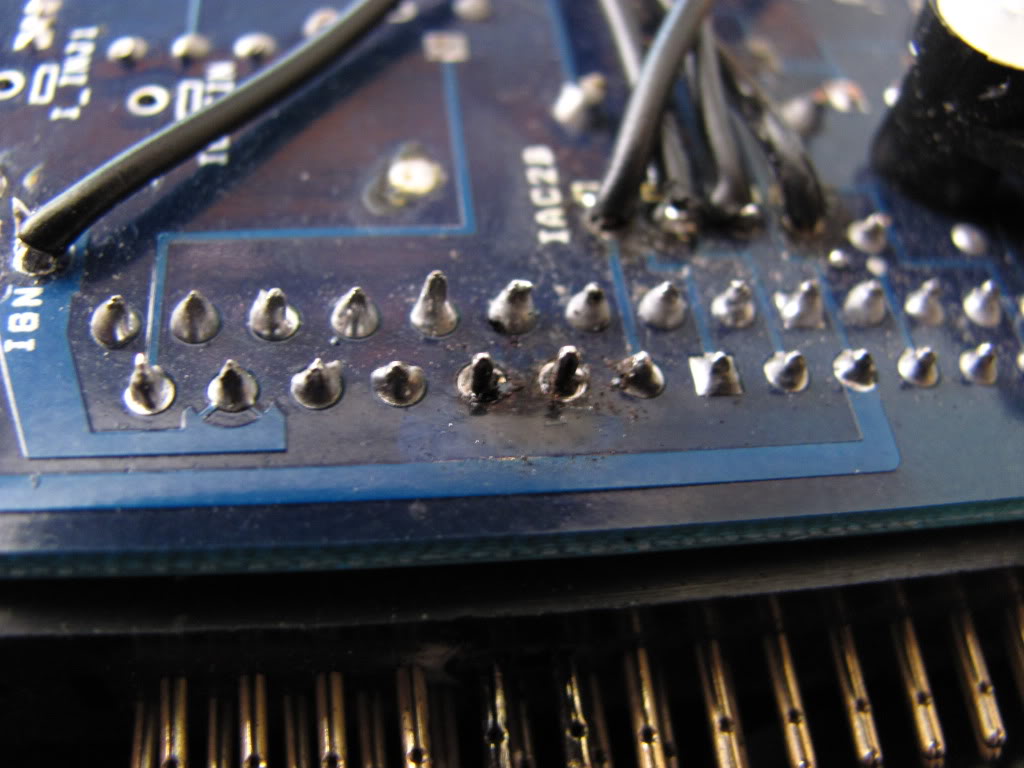
Ok so i jumpered the boot and tried to reflash the firmware to something that would play nice with MT and i was rewarded with this. Why the hell the injector output would go meltdown on me is a mystery. Overall nothing on this MS is adding up at all. And i am seriusly considering eating the cost of a new unit, or resoldering those 2 pins and seeing what i have. But the main issue i have is even if i solder the 2 pins and they work. There is no garruntee that the tunerstudio will play nice with the unit.
Reply
0
0
the dinosaur of a laptop that i got in the original deal i tried to flash the regular ms2 firmwre like what you linked and i followed the video on DIY explicetly
http://www.diyautotune.com/videos/te...irst-start.htm
http://www.diyautotune.com/videos/te...irst-start.htm
Reply
0
0


