


90-93 MSPNP not working


Thread Starter
Junior Member
Joined: Jan 2011
Posts: 81
Total Cats: 0
 90-93 MSPNP not working
Hi all, please help I'm going nuts.
Background: 93, 1.6 had a bipes installed with timing advanced to 18.
Installed a MTX-L BW 02 grounded to ECU ground with narrowband output wired to stock ECU wire. Gauge reads expected figures. Diconnected Bipes timing still at 18
Installed MSPNP, found MSPNP on com port 9, connected, installed map with AFM. Started car, ran but cut out below 1300rpm. Could not set timing as it would not idle.
Decided to reinstall stock ECU to set timing at 10. After timing set at 10, installed MSPNP, engine would not start. Put back in stock ECU, engine didn't start for ages, smell of fuel, eventually spluttered to start with blue smoke out exhaust. Engine runs between 10 and 13 AFR on idle.
Now the problems. Cannot connect MSPNP to laptop. tested com port in communications - setting in Megatune. No response.
Questions. Could I have damaged the MS doing above? I removed the St Sig 10A fuse every time I installed the MS. How can I test the MSPNP. I tested the serial to USB on the MTX-L and it works fine. Where can I get the MSPNP tested/repaired (I'm in Ireland)
Thanks in advance
Background: 93, 1.6 had a bipes installed with timing advanced to 18.
Installed a MTX-L BW 02 grounded to ECU ground with narrowband output wired to stock ECU wire. Gauge reads expected figures. Diconnected Bipes timing still at 18
Installed MSPNP, found MSPNP on com port 9, connected, installed map with AFM. Started car, ran but cut out below 1300rpm. Could not set timing as it would not idle.
Decided to reinstall stock ECU to set timing at 10. After timing set at 10, installed MSPNP, engine would not start. Put back in stock ECU, engine didn't start for ages, smell of fuel, eventually spluttered to start with blue smoke out exhaust. Engine runs between 10 and 13 AFR on idle.
Now the problems. Cannot connect MSPNP to laptop. tested com port in communications - setting in Megatune. No response.
Questions. Could I have damaged the MS doing above? I removed the St Sig 10A fuse every time I installed the MS. How can I test the MSPNP. I tested the serial to USB on the MTX-L and it works fine. Where can I get the MSPNP tested/repaired (I'm in Ireland)
Thanks in advance
Reply
 0
0

0


Thread Starter
Junior Member
Joined: Jan 2011
Posts: 81
Total Cats: 0
Reply
0
0
OK. Sorry. Didn't see that you had flooded but eventually coughed back to life on the stocker.
Anyway, the first thing I would sort out here is COMs. Those have to be reliable or you're dead in the water.
After that, I'd revert to step 1. You were actually doing fine. 1300 is plenty good enough for the first step of synchronizing the timing in the MS. When you select a fixed spark advance angle through the software, it no longer changes with RPM.
Once that is done, your idle settings will need a lot of work. They always do. It's also a great intro to the MS. Here's a thread that might help: https://www.miataturbo.net/megasquirt-18/timing-idle-requesting-some-help-57133/
Anyway, the first thing I would sort out here is COMs. Those have to be reliable or you're dead in the water.
After that, I'd revert to step 1. You were actually doing fine. 1300 is plenty good enough for the first step of synchronizing the timing in the MS. When you select a fixed spark advance angle through the software, it no longer changes with RPM.
Once that is done, your idle settings will need a lot of work. They always do. It's also a great intro to the MS. Here's a thread that might help: https://www.miataturbo.net/megasquirt-18/timing-idle-requesting-some-help-57133/
Reply
0
0

Supporting Vendor

Joined: Sep 2006
Posts: 2,332
Total Cats: 67
You can use TunerStudio if you want; you just have to copy the INC files so it will display the right temperature.
I would first see if it responds to Port Check.
I would first see if it responds to Port Check.
Reply
0
0
Thread Starter
Junior Member
Joined: Jan 2011
Posts: 81
Total Cats: 0
thanks, its not responding to port check. When I plug in and power it from the ignition i get the following error message.
the selected comm port (Com11 or Com9) could not be opened.
To fix this click communications - settings and change the port.
then click file - offline to connect to ECU
So I do above and when I click to test the selected port i get 'no response'
I have checked device manager and the USB/serial driver is in Com11 and is working correctly.
Whats my next step - send it to DIYAuto for repair from Ireland?
thanks
the selected comm port (Com11 or Com9) could not be opened.
To fix this click communications - settings and change the port.
then click file - offline to connect to ECU
So I do above and when I click to test the selected port i get 'no response'
I have checked device manager and the USB/serial driver is in Com11 and is working correctly.
Whats my next step - send it to DIYAuto for repair from Ireland?
thanks
Reply
0
0
Supporting Vendor
Joined: Sep 2006
Posts: 2,332
Total Cats: 67
Can you set the USB port to something lower, 10 or less?
Reply
0
0
Thread Starter
Junior Member
Joined: Jan 2011
Posts: 81
Total Cats: 0
I did the port check
COM9 Opened
9600 baud
No connection made.
115200 baud
No connection made.
1 valid port found.
Hit return when done...
Is there any way I could have blown the MS during install, e.g. plugging in, powering up and trying to load the initial map 90-93 with AFM?
Help, I'm going nuts. If I can't get the simple bits what hope have I of tuning this. Really thinking of skipping the whole plan.
COM9 Opened
9600 baud
No connection made.
115200 baud
No connection made.
1 valid port found.
Hit return when done...
Is there any way I could have blown the MS during install, e.g. plugging in, powering up and trying to load the initial map 90-93 with AFM?
Help, I'm going nuts. If I can't get the simple bits what hope have I of tuning this. Really thinking of skipping the whole plan.
Reply
0
0
Supporting Vendor
Joined: Sep 2006
Posts: 2,332
Total Cats: 67
Those should not damage it. I would try reloading the firmware next. If you get an error message, please post a screen shot.
Reply
0
0
Thread Starter
Junior Member
Joined: Jan 2011
Posts: 81
Total Cats: 0
hi Matt,
this is what I got, thanks for your help,
Downloading new Firmware to your MegasquirtPNP
WARNING:
PAY ATTENTION OR YOU WILL BURN UP YOUR IGNITOR and/or COIL PACK.
You must unplug your ignitor before continuing. Failure to do
so will destroy your ignitor. This can be very expensive to
replace!
After reflashing the firmware, reload the base map for your MSPNP
which will reconfigure your MSPNP with settings compatible with
with your ignition system. Then you can plug the ignitor back
in, start your car, and check your base timing.
If you understand this
Press any key to continue . . .
Did you really read that? Because if not, you're probably about
to break your car. If you did read it
Press any key to continue . . .
You did save your current map right? If you've spent any time
tuning, you probably should. This will overwrite it if you continue.
Press any key to continue . . .
Communication ports:
1 - COM1
2 - COM2
3 - COM3
4 - COM4
5 - COM5
6 - COM6
7 - COM7
8 - COM8
9 - COM9
Q - Quit
This version of C:\Program Files (x86)\MegaSquirt\MSPNP MM9093 with AFM\src\CHOI
CE.COM is not compatible with the version of Windows you're running. Check your
computer's system information to see whether you need a x86 (32-bit) or x64 (64-
bit) version of the program, and then contact the software publisher.
Press any key to continue . . .
this is what I got, thanks for your help,
Downloading new Firmware to your MegasquirtPNP
WARNING:
PAY ATTENTION OR YOU WILL BURN UP YOUR IGNITOR and/or COIL PACK.
You must unplug your ignitor before continuing. Failure to do
so will destroy your ignitor. This can be very expensive to
replace!
After reflashing the firmware, reload the base map for your MSPNP
which will reconfigure your MSPNP with settings compatible with
with your ignition system. Then you can plug the ignitor back
in, start your car, and check your base timing.
If you understand this
Press any key to continue . . .
Did you really read that? Because if not, you're probably about
to break your car. If you did read it
Press any key to continue . . .
You did save your current map right? If you've spent any time
tuning, you probably should. This will overwrite it if you continue.
Press any key to continue . . .
Communication ports:
1 - COM1
2 - COM2
3 - COM3
4 - COM4
5 - COM5
6 - COM6
7 - COM7
8 - COM8
9 - COM9
Q - Quit
This version of C:\Program Files (x86)\MegaSquirt\MSPNP MM9093 with AFM\src\CHOI
CE.COM is not compatible with the version of Windows you're running. Check your
computer's system information to see whether you need a x86 (32-bit) or x64 (64-
bit) version of the program, and then contact the software publisher.
Press any key to continue . . .
Reply
0
0
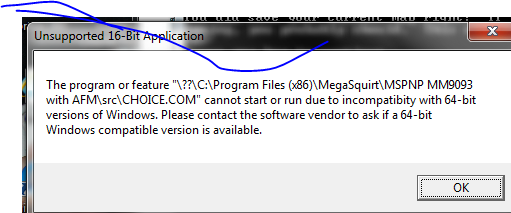

Try changing it to COM2. A lot of times COM1 is used. I had to get a new serial to USB adapter, MS seems to be very particular. I would use the one from diy. There is a certain chipset in the adapter that seems to be required.
Reply
0
0
Thread Starter
Junior Member
Joined: Jan 2011
Posts: 81
Total Cats: 0
thanks, i will try another usb adaptor.
when you had problems with yours, did your pc indicate it was not working. My pc says the drivers are installed and working. Also it did work 1st time I plugged it in after telling megatune which com port (9) to look for in 'communications'
thanks
when you had problems with yours, did your pc indicate it was not working. My pc says the drivers are installed and working. Also it did work 1st time I plugged it in after telling megatune which com port (9) to look for in 'communications'
thanks
Reply
0
0
Thread Starter
Junior Member
Joined: Jan 2011
Posts: 81
Total Cats: 0
1. Turn off Megasquirt
.
.
Press any key to continue . . .
2. Install Boot jumper (or short out boot resistor)
.
tried using another pc with serial port to upgrade firmware.
this is what i got, any suggestions
Press any key to continue . . .
3. Turn on Megasquirt
.
.
Press any key to continue . . .
.
This should count up to 1700+ lines
.
src\download.exe -c1 msns-extra.s19
MS Download 1.10
Download failed:
Expected response "
Boot>",
but received this "".
Press any key to continue . . .
.
.
Press any key to continue . . .
2. Install Boot jumper (or short out boot resistor)
.
tried using another pc with serial port to upgrade firmware.
this is what i got, any suggestions
Press any key to continue . . .
3. Turn on Megasquirt
.
.
Press any key to continue . . .
.
This should count up to 1700+ lines
.
src\download.exe -c1 msns-extra.s19
MS Download 1.10
Download failed:
Expected response "
Boot>",
but received this "".
Press any key to continue . . .
Reply
0
0
Thread Starter
Junior Member
Joined: Jan 2011
Posts: 81
Total Cats: 0
i then tried loading the 64 bit firmware and got this
The zipfile has not been extracted correctly - please ensure you
'use folder names' or create sub directories when extracting.
This batch file cannot run without:
CHOICE.COM
ms2dl.exe
.
.
Aborting
Press any key to continue . . .
I unzipped it on 2 different laptops and got same result.
when it says paste it in your project folder i presume this is '90-93 with afm' not the full 'megasquirt' folder with other subfolders?
thanks in advance
The zipfile has not been extracted correctly - please ensure you
'use folder names' or create sub directories when extracting.
This batch file cannot run without:
CHOICE.COM
ms2dl.exe
.
.
Aborting
Press any key to continue . . .
I unzipped it on 2 different laptops and got same result.
when it says paste it in your project folder i presume this is '90-93 with afm' not the full 'megasquirt' folder with other subfolders?
thanks in advance
Reply
0
0

Thread
Thread Starter
Forum
Replies
Last Post
Frank_and_Beans
Supercharger Discussion
13
Sep 12, 2016 08:17 PM


