


Computer Advice Needed




[Phoronix] NVIDIA Confirms Linux Driver Problems
One example of which bit a co-worker.
Note that I'm not saying ATI is some god-king card, but to try to argue that ATI is always inferior to nVidia with the current state of the drivers is not entirely true. See: My recommendation for people to research for themselves if an ATI card may be superior for their purposes.
One example of which bit a co-worker.
Note that I'm not saying ATI is some god-king card, but to try to argue that ATI is always inferior to nVidia with the current state of the drivers is not entirely true. See: My recommendation for people to research for themselves if an ATI card may be superior for their purposes.
Reply
 0
0

0

Junior Member
Joined: May 2011
Posts: 141
Total Cats: 0
From: Victoria, BC
I don't like to argue with people on the forums i like, it always ends bad.
I just think for what you're going to be doing people are suggesting things that WAYYYY exceed anything you'll need. Then, on the other end, people are overlooking some of the more important aspects of a computer.
This thread has gone on long enough, and i do not feel any of my input would be helpful at this point.
I just think for what you're going to be doing people are suggesting things that WAYYYY exceed anything you'll need. Then, on the other end, people are overlooking some of the more important aspects of a computer.
This thread has gone on long enough, and i do not feel any of my input would be helpful at this point.
Not trying to rant, but if you want a cheap computer, there is no better time to learn to build your computer than right now. I have always ordered my parts from NCIX.com and have gotten away with very cheap machines that fully cover my needs.
Personally, for your needs, I would just do something like this (yes, I wasted part of my work day to build this just to show you):
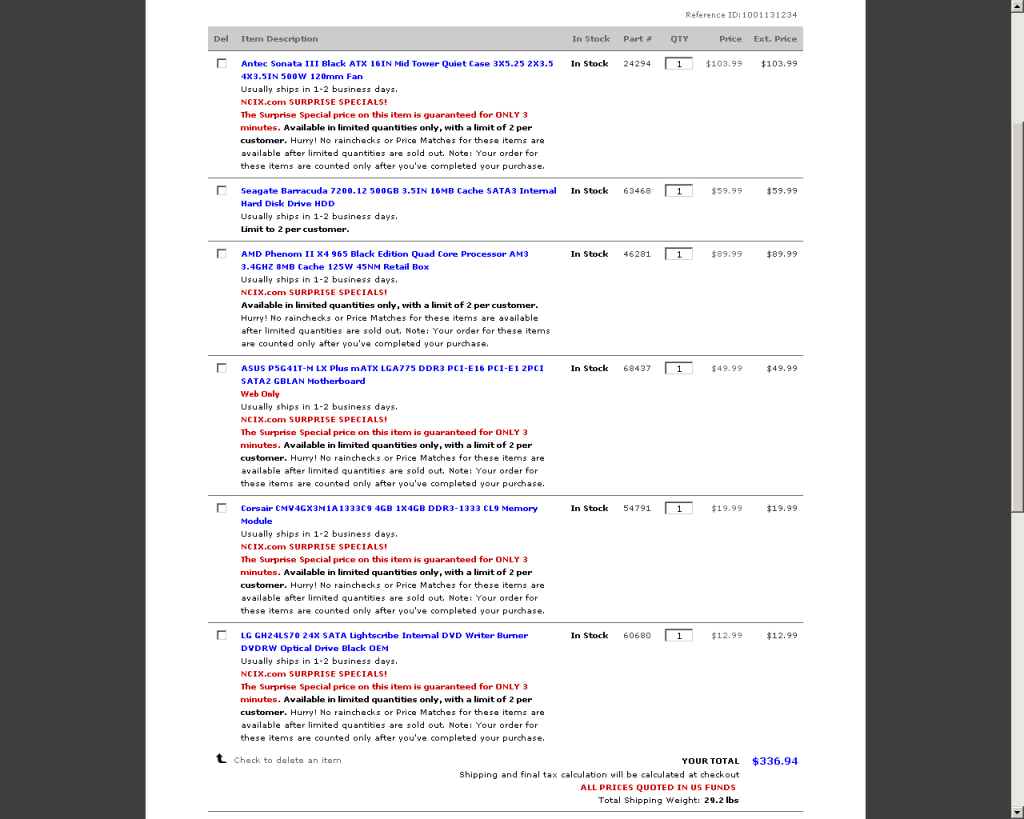
Total is: $336.94
That leaves you with 4GB RAM which can be EASILY upgraded to 8GB, a 500GB hard drive, a decent motherboard, an amazing case that comes with an ANTEC power supply, good RAM, and more than enough processing power. If you want to dual-boot Linux, there is plenty of space for that. If you want to upgrade to a better sound card, no problem. After building the computer, you will be able to upgrade it later since you know it from the inside out

Mind you, that doesn't include the OS. Nor does it include all that bloatware that comes with pre-made computers...
Anyway, just my
 and my workday rant.
Reply
0
0

Thread Starter
Joined: Aug 2008
Posts: 6,110
Total Cats: 283
From: Key West
You guys keep forgetting that I have no idea what any of this is. Saying that "x" won't work or is overkill because "y" better means absolutely nothing to me.
Gotta break this down Barney style for me. "x" is better than "y" because....
Troy, thanks for the suggestions. I will look into that today as I am currently on vacation from work and have an open schedule until October 1st. So I'd like to get this thing ordered (or built) before then. Also, Troy, I would need a case right? Any suggestions for those?
Couple of quick things to add:
-Anything over 500GB hard-drive will be wasted space. I have two 1TB externals and a handful of 32GB flash drives. I like to keep multiple copies of certain items and anything important is immediately stored away.
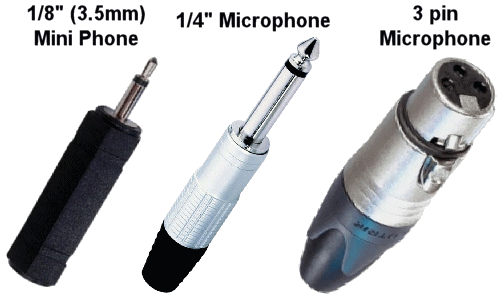
-I do not edit photos or HD movies. I do however have a USB->1/4" audio converter and software for recording bass guitar lines. My old laptop ran that fine, so I have no fear that any new computer will do it just fine. Beyond that program and some simple videos, I do nothing special besides watch movies, music and play emulators.
-NO SERIOUS GAMING. I'm a console gamer. I get limp dick over new PC games (and most new console games, too).
Gotta break this down Barney style for me. "x" is better than "y" because....
Troy, thanks for the suggestions. I will look into that today as I am currently on vacation from work and have an open schedule until October 1st. So I'd like to get this thing ordered (or built) before then. Also, Troy, I would need a case right? Any suggestions for those?
Couple of quick things to add:
-Anything over 500GB hard-drive will be wasted space. I have two 1TB externals and a handful of 32GB flash drives. I like to keep multiple copies of certain items and anything important is immediately stored away.
-I do not edit photos or HD movies. I do however have a USB->1/4" audio converter and software for recording bass guitar lines. My old laptop ran that fine, so I have no fear that any new computer will do it just fine. Beyond that program and some simple videos, I do nothing special besides watch movies, music and play emulators.
-NO SERIOUS GAMING. I'm a console gamer. I get limp dick over new PC games (and most new console games, too).
Reply
0
0
Junior Member
Joined: May 2011
Posts: 141
Total Cats: 0
From: Victoria, BC
Troy, thanks for the suggestions. I will look into that today as I am currently on vacation from work and have an open schedule until October 1st. So I'd like to get this thing ordered (or built) before then. Also, Troy, I would need a case right? Any suggestions for those?
Yes, you are going to need a case. The build I posted above includs a very good, basic case made by Antec (a reputable and good company in my books). The case is the Antec Sonata III which comes with a (500 watt) power supply which is MORE than enough to suit your needs. The case is also very easy to work with, has lots of room for expansion (mine has 4 HDD, 1 DVD drive, 1 Sound Blaster Audigy - you'd love this thing, has 2 x 1/4" jacks on the front, RCA L/R jacks, SPDIF in/out, built-in mic amp, mini MIDI... but I digress). Anyway, the case is great for the price and includes a decent PSU.
Reply
0
0


Erat and UnknownPerson are correct, you could easily get away with a $300 bargain basement number.
I usually try to go 1 level up from that, just as futureproofing. It is less important in this case, as NOBODY will voluntarily pay to upgrade to Windows 8, so I wouldn't be worried about that.
But the silicone in the chips does start to degrade from the voltage which is run through them, and therefore have a limited life by design (nothing we can do about it, we are talking about transistors that measure 22 nanometers). Because of this, I usually opt for something that is not the bottom bargain.
Video card is another good future-proof addition, though you definitely don't need it.
Again, you don't really need 6 gigs of ram. I pointed out that machine because it is a great value, you get 6 gigs for the price of a machine I would expect to have only 4 gigs.
Don't buy the first thing you see. If you have 3 weeks, wait another week or 2 (however long you feel you can) and see what else is out there.
I usually try to go 1 level up from that, just as futureproofing. It is less important in this case, as NOBODY will voluntarily pay to upgrade to Windows 8, so I wouldn't be worried about that.
But the silicone in the chips does start to degrade from the voltage which is run through them, and therefore have a limited life by design (nothing we can do about it, we are talking about transistors that measure 22 nanometers). Because of this, I usually opt for something that is not the bottom bargain.
Video card is another good future-proof addition, though you definitely don't need it.
Again, you don't really need 6 gigs of ram. I pointed out that machine because it is a great value, you get 6 gigs for the price of a machine I would expect to have only 4 gigs.
Don't buy the first thing you see. If you have 3 weeks, wait another week or 2 (however long you feel you can) and see what else is out there.
Reply
0
0
Reply
0
0
Junior Member
Joined: May 2011
Posts: 141
Total Cats: 0
From: Victoria, BC
Couple of quick things to add:
-Anything over 500GB hard-drive will be wasted space. I have two 1TB externals and a handful of 32GB flash drives. I like to keep multiple copies of certain items and anything important is immediately stored away.
-I do not edit photos or HD movies. I do however have a USB->1/4" audio converter and software for recording bass guitar lines. My old laptop ran that fine, so I have no fear that any new computer will do it just fine. Beyond that program and some simple videos, I do nothing special besides watch movies, music and play emulators.
-NO SERIOUS GAMING. I'm a console gamer. I get limp dick over new PC games (and most new console games, too).
-Anything over 500GB hard-drive will be wasted space. I have two 1TB externals and a handful of 32GB flash drives. I like to keep multiple copies of certain items and anything important is immediately stored away.
-I do not edit photos or HD movies. I do however have a USB->1/4" audio converter and software for recording bass guitar lines. My old laptop ran that fine, so I have no fear that any new computer will do it just fine. Beyond that program and some simple videos, I do nothing special besides watch movies, music and play emulators.
-NO SERIOUS GAMING. I'm a console gamer. I get limp dick over new PC games (and most new console games, too).
Buying a pre-made computer is good for the reason (and only really this reason) that you get a computer ready to go in most people's books. For me, an out-of-box computer is not ready to go and requires a bunch of purging of bloatware and messing around to get things the way I like it - usually I just end up installing a fresh copy of Windows with OEM DVDs. Good. Pre-made computers can be good, but my experience has almost always been less than satisfactory.
You do not need 30 million GB of RAM, nor do you really need 6GB of RAM. Why? Unless you multitask like a madman or run memory hogging applications (VMs, Photoshop, Premiere, Google Chrome x 100 tabs, etc etc) often and with other applications in the background (aka, multitasking), 4GB of RAM should suffice. For example, on the average day, on my desktop, I have Photoshop, Chrome x ~20 tabs, iTunes, YouTube, Sublime Text and several background processes (antivirus, Dokan SSHFS, uTorrent) and sometimes my XP VM running at the same time. My computer has 4GB of RAM and works just fine.
Same thing with the multitasking goes for processors. Think of it this way: Quad-core = 4 CPU cores = "4 processors" = 4 foreground applications handled with full power simultaneously. Simultaneously. A single-core CPU handles multiple processes by switching back and forth rapidly, so its not really simultaneous, but it can appear to be so. To be honest, the only reason I included a Quad-core processor is because of the cheap price and because more and more applications are able to spread across multiple cores that it would be silly to not future-proof yourself at least a bit. My wife got by just fine for a really long time with her dual-core Celeron processor (yes, they make a dual-core processor, look it up) which cost us ~$30. It wasn't until I introduced her to Chrome and tabs that we needed to upgrade her to 6GB or RAM and a Hexcore processor (she LITERALLY has ~80 Chrome tabs open at ALL times, uses Photoshop now, watches Netflix, and does accounting across her 3 monitors) - and her computer has still never even almost hit its maximum potential.
Why name brand motherboards and components? Okay okay, the motherboard I posted was cheap (~$50) but not nearly as cheap as the motherboards thrown into most Acers, HP, etc computers. Cheaper motherboards blow capacitors (ask me how I know) and usually have other major limitations. Other name brand components usually follow suit. If you want to be part of the cool crowd, buy WD hard drives, Corsair or G.skill RAM, Corsair or Antec PSU, ASUS or Gigabyte motherboards and profit. Personally, though, I buy whatever is considered some kind of "same brand" at the cheapest price - such as Hitachi HDD, Mushkin RAM, Intel mobo, etc... and still profit over dem cheap *** Acer, HP, etc.
/rant
Reply
0
0
Junior Member
Joined: May 2011
Posts: 141
Total Cats: 0
From: Victoria, BC

Reply
0
0


Joined: Sep 2005
Posts: 34,381
Total Cats: 7,504
From: Chicago. (The less-murder part.)
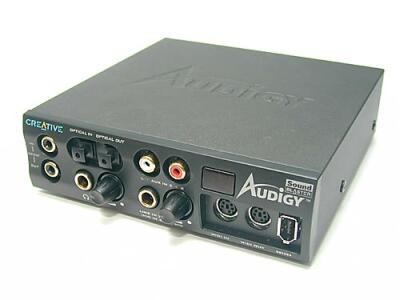
This is also commonly seen on cards targeted at the home-studio folks, such as from M-Audio and the like.
Reply
0
0
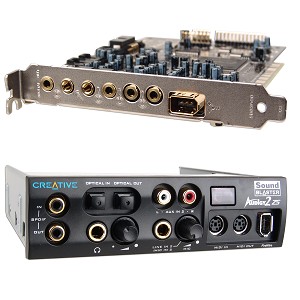

Lol, my bad. I misread your OP, and thought you were saying that the CASE included 2 1/4" jacks. Since I have never seen a case with 1 1/4" jack, I was a little skeptical. Of course it makes sense that the SB card has 1/4" jacks on it.
Reply
0
0

nVidia has not been perfect by any means, nor has ATI - although ATI's driver support for Linux has came a LONG way in the past couple years, I have to give them that.
If you asked me which card to go with for 2d work, I seriously doubt either would matter. In fact, if someone could tell the difference in day to day use, I'd be shocked.
3d stuff and/or gaming? nVidia. (In fact, I have a 470GTX and a 440GT in my two desktop PCs that run Linux!)
HTPC? ATI, and I picked a machine built around ATI specifically for HTPC use.
I could go on with a much longer list, but to try to categorically state "Well, nVidia is best for all purposes!" is awfully silly, Reverant.
Reply
0
0
Thread Starter
Joined: Aug 2008
Posts: 6,110
Total Cats: 283
From: Key West
Okay, I decided to go ahead and use what you posted as my blue print. I'm going to build a computer, just gotta make sure I have Fae on speed dial 
I'm gonna start price hunting tonight and I will post things in here so you guys can give the thumbs up or down.
I'm gonna start price hunting tonight and I will post things in here so you guys can give the thumbs up or down.
Reply
0
0

Joined: Oct 2011
Posts: 5,717
Total Cats: 830
From: Detroit (the part with no rules or laws)
I used tin snips, and a dremmel to get the backing for my liquid cooler to fit around my motherboard tray. In retrospect i believe a would have been more efficient.
would have been more efficient.
Reply
0
0
Thread Starter
Joined: Aug 2008
Posts: 6,110
Total Cats: 283
From: Key West
Reply
0
0


Changed my mind, I want to build this.
Shazim's PC Desk/Case Mod - Imgur
Shazim's PC Desk/Case Mod - Imgur
As for the rest of the setup it looks just like a large case with some sort of water cooling setup. While it looks nice and cool, water cooling is definitely something that is overkill for you.
Reply
0
0


