


Megasquirt 64 bit error message


Thread Starter
Elite Member
iTrader: (11)
Joined: Apr 2008
Posts: 2,498
Total Cats: 1
From: Texas, 'Murica
 Megasquirt 64 bit error message
Hi everyone, i am trying to install a pnp on my 95 with out mass air flow. Anyways, when i go to load up the firmware, it says that it isnt operational with my version of windows. (i am running Vista). Do you have any ideas, do i have to download any more software? Are there different versions im not aware of, i checked the site, the Faqs on here, and did a search on m.net and here. Also, of course i consulted the manual. Any ideas?
Reply
 0
0

0



How about grabbing a screen shot of the error message?

Reply
0
0



Junior Member
Joined: Aug 2006
Posts: 239
Total Cats: 5
From: Cedar City, UT
try right clicking the program, going into propertys and setting compatibilty to make it run in windows XP mode maybe?
it did not install the program in your "program files" folder did it? all my 32 bit apps i have go into the "program files x86" folder for me
it did not install the program in your "program files" folder did it? all my 32 bit apps i have go into the "program files x86" folder for me
Reply
0
0

Reply
0
0

Junior Member
Joined: Sep 2009
Posts: 68
Total Cats: 0
From: Kennewick, WA
Reply
0
0
Reply
0
0
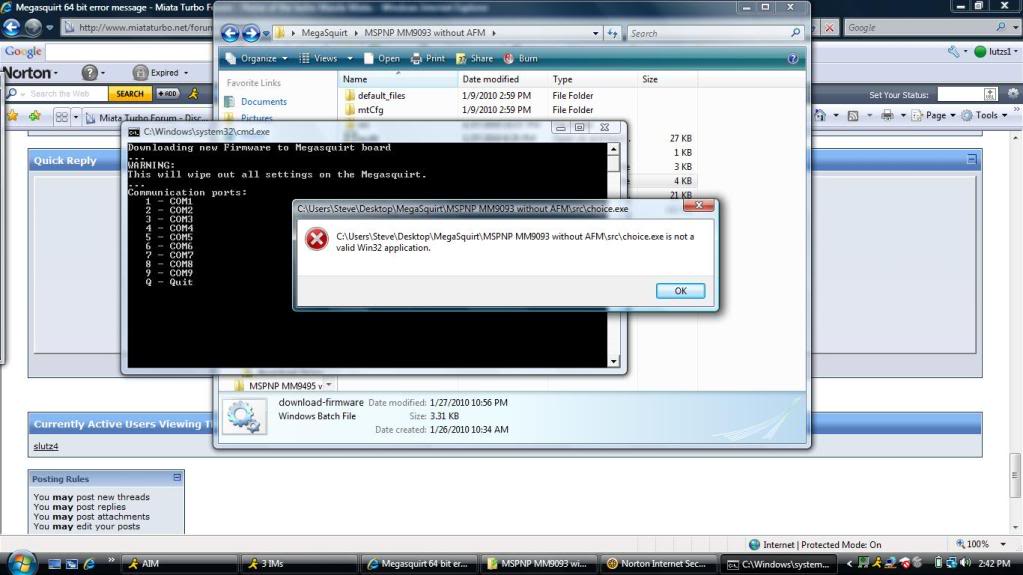

this problem is caused by the choose command the flashing script uses. if someone were to remove, or bypass, the comm port selection and just hard code a specific port in it should work.
Ill take a swing at it. What comm port are you using?
_____________________
OK the aabove would work, the fix is to replace CHOICE.COM(16bit) in \src with a 32/64-bit version. Preferably choice.exe
Attached is a copy of the newer version of choice.exe(one named "choice.exe" and the other "choice.com", both are the same file). Drop them into the src folder(C:\Program Files\MegaSquirt\[version]\src) and see how it runs. Only other problem I see is download.exe not being compatible with 32-bit, but we will see.
EDIT AGAIN:
Or you could just listen to the people at M.net, they seem to have ti fixed.
Ill take a swing at it. What comm port are you using?
_____________________
OK the aabove would work, the fix is to replace CHOICE.COM(16bit) in \src with a 32/64-bit version. Preferably choice.exe
Attached is a copy of the newer version of choice.exe(one named "choice.exe" and the other "choice.com", both are the same file). Drop them into the src folder(C:\Program Files\MegaSquirt\[version]\src) and see how it runs. Only other problem I see is download.exe not being compatible with 32-bit, but we will see.
EDIT AGAIN:
Or you could just listen to the people at M.net, they seem to have ti fixed.
Last edited by DXO; Feb 1, 2010 at 03:32 AM.
Reply
0
0
Thread Starter
Elite Member
iTrader: (11)
Joined: Apr 2008
Posts: 2,498
Total Cats: 1
From: Texas, 'Murica
this problem is caused by the choose command the flashing script uses. if someone were to remove, or bypass, the comm port selection and just hard code a specific port in it should work.
Ill take a swing at it. What comm port are you using?
_____________________
OK the aabove would work, the fix is to replace CHOICE.COM(16bit) in \src with a 32/64-bit version. Preferably choice.exe
Attached is a copy of the newer version of choice.exe(one named "choice.exe" and the other "choice.com", both are the same file). Drop them into the src folder(C:\Program Files\MegaSquirt\[version]\src) and see how it runs. Only other problem I see is download.exe not being compatible with 32-bit, but we will see.
EDIT AGAIN:
Or you could just listen to the people at M.net, they seem to have ti fixed.
Ill take a swing at it. What comm port are you using?
_____________________
OK the aabove would work, the fix is to replace CHOICE.COM(16bit) in \src with a 32/64-bit version. Preferably choice.exe
Attached is a copy of the newer version of choice.exe(one named "choice.exe" and the other "choice.com", both are the same file). Drop them into the src folder(C:\Program Files\MegaSquirt\[version]\src) and see how it runs. Only other problem I see is download.exe not being compatible with 32-bit, but we will see.
EDIT AGAIN:
Or you could just listen to the people at M.net, they seem to have ti fixed.
Reply
0
0
I have been playing around with it on my desktop (64bit) and just as stated before it does not work. After replacing the CHOICE.COM file it proceeds to work correctly. With no cable hooked up, when choosing a com port it will still continue to the next screen for you to choose if you are upgrading from the standard code or not. So it should work with just replacing the CHOICE.COM file. In my opinion this should have been included before.
Side note... What USB>Serial cable are you using that has 64bit drivers?
Side note... What USB>Serial cable are you using that has 64bit drivers?
Reply
0
0
Thread Starter
Elite Member
iTrader: (11)
Joined: Apr 2008
Posts: 2,498
Total Cats: 1
From: Texas, 'Murica
USB 2.0 TO SERIAL RS232 DB9 9 PIN ADAPTER CABLE PDA GPS - eBay (item 230389570256 end time Dec-16-09 07:33:10 PST)
It is that cable with prolific driver software 3.2.0.0
It is that cable with prolific driver software 3.2.0.0
Reply
0
0

Thread
Thread Starter
Forum
Replies
Last Post
Zaphod
MEGAsquirt
47
Oct 26, 2018 11:00 PM


