


Megasquirt won't connect


Thread Starter
Elite Member
iTrader: (17)
Joined: Aug 2007
Posts: 2,954
Total Cats: 184
From: Knoxville, TN
 Megasquirt won't connect
I originally thought this was a MSDroid problem, posted here: https://www.miataturbo.net/megasquir...gnature-83401/
Then I realized my computer won't connect either. I've now tried MSDroid on 2 phones and Tunerstudio on 2 computers. This is after it worked flawlessly for the last year or so. I bought all new cables; new serial cable, new serial to usb for the computer, and new usb to mini-usb for the phone. None of which would work.
I opened the megasquirt up but nothing looked obviously wrong so I put it back together. Is there anything I can try or should I start begging one of our MS gurus to save me? Anyone had this problem before?
*Edit - FWIW, the ECU still works, the car drives fine, just had a few issues in the tune I wanted to work on.
Then I realized my computer won't connect either. I've now tried MSDroid on 2 phones and Tunerstudio on 2 computers. This is after it worked flawlessly for the last year or so. I bought all new cables; new serial cable, new serial to usb for the computer, and new usb to mini-usb for the phone. None of which would work.
I opened the megasquirt up but nothing looked obviously wrong so I put it back together. Is there anything I can try or should I start begging one of our MS gurus to save me? Anyone had this problem before?
*Edit - FWIW, the ECU still works, the car drives fine, just had a few issues in the tune I wanted to work on.
Reply
 0
0

0

Supporting Vendor

Joined: Sep 2006
Posts: 2,332
Total Cats: 67
Are you using a direct serial connection, or a USB cable? If it's a USB adapter, what kind?
Reply
1
1
Thread Starter
Elite Member
iTrader: (17)
Joined: Aug 2007
Posts: 2,954
Total Cats: 184
From: Knoxville, TN
I'm using a serial to USB adapter. The one I normally use was from you guys (DIYAutotune). I tried another one that I'd used in the past, not sure where it came from but neither would work so I assumed that wasn't the issue.
Reply
0
0
Supporting Vendor
Joined: Sep 2006
Posts: 2,332
Total Cats: 67
Try running the Port Check program and post a screen shot of the results.
Reply
1
1
Thread Starter
Elite Member
iTrader: (17)
Joined: Aug 2007
Posts: 2,954
Total Cats: 184
From: Knoxville, TN
I assume this is what you're talking about, if not let me know.
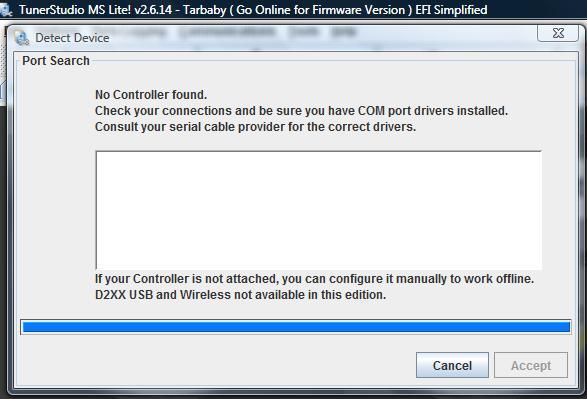
I uninstalled/reinstalled the usb adapter and checked the settings to make sure they were at 115200.
Thanks so much for the help. I really appreciate it.
I uninstalled/reinstalled the usb adapter and checked the settings to make sure they were at 115200.
Thanks so much for the help. I really appreciate it.
Reply
0
0
Supporting Vendor
Joined: Sep 2006
Posts: 2,332
Total Cats: 67
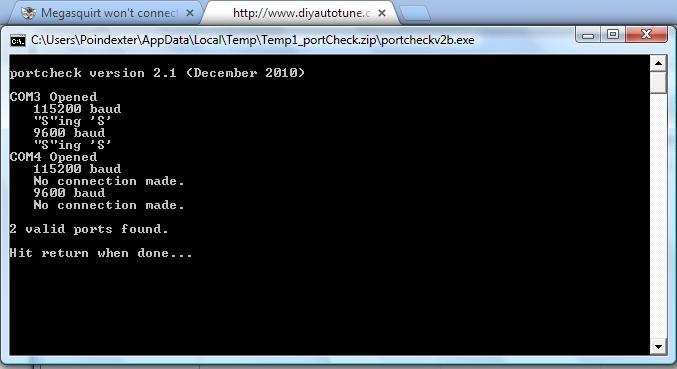
Sorry, I need you to use a different program - it's here: http://www.diyautotune.com/downloads.../portCheck.zip
Reply
1
1
Supporting Vendor
Joined: Sep 2006
Posts: 2,332
Total Cats: 67
No signal at all. Exactly what MS variant is this?
Reply
1
1
Supporting Vendor
Joined: Sep 2006
Posts: 2,332
Total Cats: 67
What firmware did you load to it?
(If the answer is, "I don't know", please reload the firmware.)
(If the answer is, "I don't know", please reload the firmware.)
Reply
0
0
Thread Starter
Elite Member
iTrader: (17)
Joined: Aug 2007
Posts: 2,954
Total Cats: 184
From: Knoxville, TN
Braineack built the megasquirt for me and loaded the firmware so the answer is "I don't know." I'll give it a try and report back. I assume the newest available is what I want? Thanks.
Reply
0
0

Thread Starter
Elite Member
iTrader: (17)
Joined: Aug 2007
Posts: 2,954
Total Cats: 184
From: Knoxville, TN
I finally got a chance to mess with the car, so I'm back here begging for help again.
I downloaded firmware, installed the boot jumper, and tried to reload the firmware. The great news is that I'm getting a connection, the bad news is I'm too dumb to figure out how to load the new firmware.
When I run the loader I'm getting these prompts and I'm unsure how to go further:
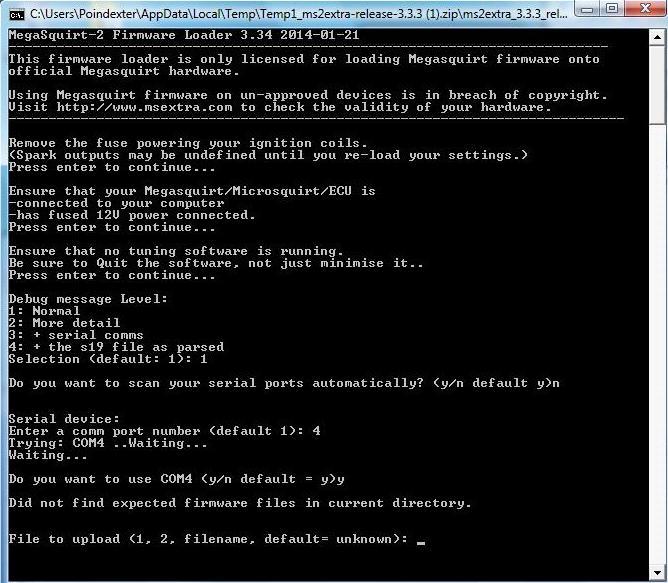
The readme file says to open Tunerstudio and it should detect and automatically install the correct file, but it does not (or I'm doing something wrong). I was unable to manually install the firmware through Tunerstudio as well. When I try to "Detect Device" under project properties I am getting a message that no Firmware is installed.
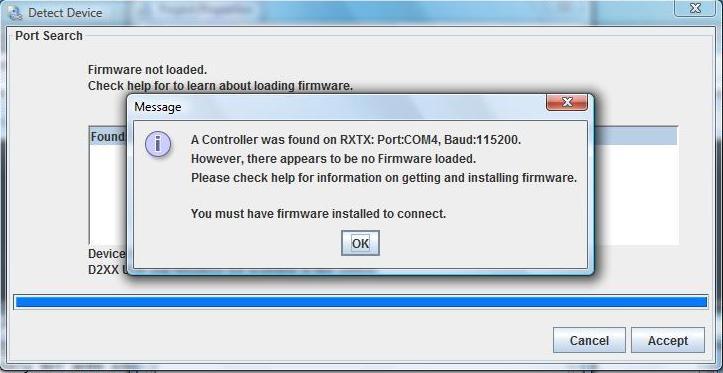
Again any advise is greatly appreciated and I offer infinite apologize for my ignorance.
I downloaded firmware, installed the boot jumper, and tried to reload the firmware. The great news is that I'm getting a connection, the bad news is I'm too dumb to figure out how to load the new firmware.
When I run the loader I'm getting these prompts and I'm unsure how to go further:

The readme file says to open Tunerstudio and it should detect and automatically install the correct file, but it does not (or I'm doing something wrong). I was unable to manually install the firmware through Tunerstudio as well. When I try to "Detect Device" under project properties I am getting a message that no Firmware is installed.

Again any advise is greatly appreciated and I offer infinite apologize for my ignorance.
Reply
0
0
Supporting Vendor
Joined: Sep 2006
Posts: 2,332
Total Cats: 67
Please make sure you've unzipped the firmware download. That error message is very common when running it inside a ZIP file.
Reply
1
1
Thread Starter
Elite Member
iTrader: (17)
Joined: Aug 2007
Posts: 2,954
Total Cats: 184
From: Knoxville, TN
Matt, thank you so much for the help. I got the new firmware loaded and tunerstudio connected right up with no other issues. This is actually the 3rd megasquirt I've bought from you guys. Hopefully I won't need another one anytime soon, but if I do DIY will definitely be my first stop.
Reply
0
0

Newb
Joined: May 2021
Posts: 1
Total Cats: -1
From: Boone
Matt, thank you so much for the help. I got the new firmware loaded and tunerstudio connected right up with no other issues. This is actually the 3rd megasquirt I've bought from you guys. Hopefully I won't need another one anytime soon, but if I do DIY will definitely be my first stop.
Reply
-1
-1

Thread
Thread Starter
Forum
Replies
Last Post
Zaphod
MEGAsquirt
47
Oct 26, 2018 11:00 PM
stoves
Suspension, Brakes, Drivetrain
5
Apr 21, 2016 03:00 PM


