


Ubuntu: install tunerstudio & megalog viewer noob guide



 Ubuntu: install tunerstudio & megalog viewer noob guide
This is a complete noob guide for those who are unfamiliar with ubuntu. Those who are will prob not need this guide. Fortunately I had a friend who was familiar with ubuntu to show me a few things.
For those of you who are unaware Ubuntu is a form of linux. It is a highly stable and highly secure operating system. It is completely free and open source (you are allowed to backwards engineer and modify it).
Fortunately both tunerstudio and megalog viewer both have ubuntu versions available so there is no need to run wine (a program that allows you to run widnows applications on linux).
Here are links for both of them
http://www.ideasandsolutions.biz/Meg...ewer/download/
https://www.efianalytics.com/TunerStudio/download/
On both of them be sure to choose the Non-Windows download.
Now with these there is no install wizard as there is on windows. In fact there really isnt even an install process. You simply unpack and run the proper .sh file and you are going.
For tunerstudio you run the TunerStudio.sh file and NOT the TunerStudio32.sh file
In megalog viewer you run the MegaLogViewer.sh file.
When you open these files you will have four different options. Click on run.
For megalog viewer you will need to have java runtime. Directions on that are here.
https://help.ubuntu.com/community/Java
If you are anything like me you are not going to want to navigate through your folders everytime you want to open up these programs.
You will probably want a desktop shortcut or like me an application menu selection.
Now the FIRST thing you will need to do before making a shortcut is to display (not run) the .sh file and make sure the file directory path is correct. I believe that if you have left tunerstudio exactly where you unpacked it then it should be correct. Or if you moved it like me then you will need to edit it. Eithor way you should check to be sure.
After you click display on the .sh file you should get a window something like this
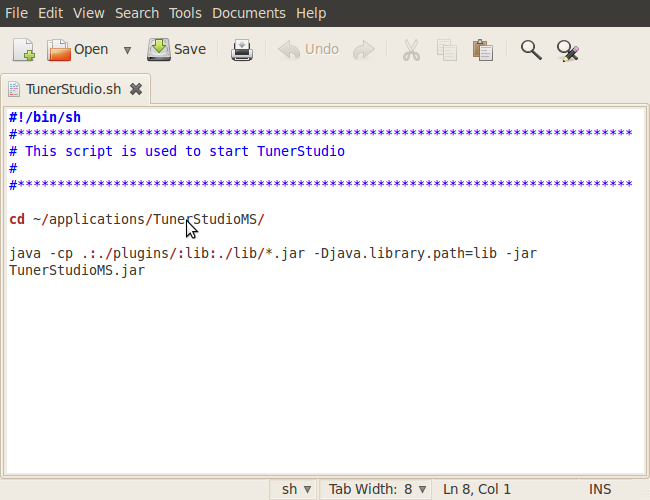
Now that applications folder isnt default on ubuntu. I added that folder in the home folder.
I recomend doing something similar so that as you install these type of programs on your ubuntu laptop that there is some sort of organization going on.
Then you will need to do the same with the MegaLogViewer.sh file. Except when I unpacked that it didnt even have that directory my pointer is pointing at in the pic. So I copied and pasted the one from the tunerstudio.sh file and edited it accordingly.
Now that you have the programs operational it is time to make your shortcuts. And you MUST correct the directories before you make the shortcuts other wise you will need to go into the shortcuts and edit their directories to match. Even if you run directly off the .sh file and you relocate the folder you will have to correct the directory before even that will work.
The desktop shortcut is the easiest one to do. Simply right click on the proper .sh file and then click 'make link'. Then a link (shortcut) will appear in that same folder. Just click and drag that to your desktop and you are done.
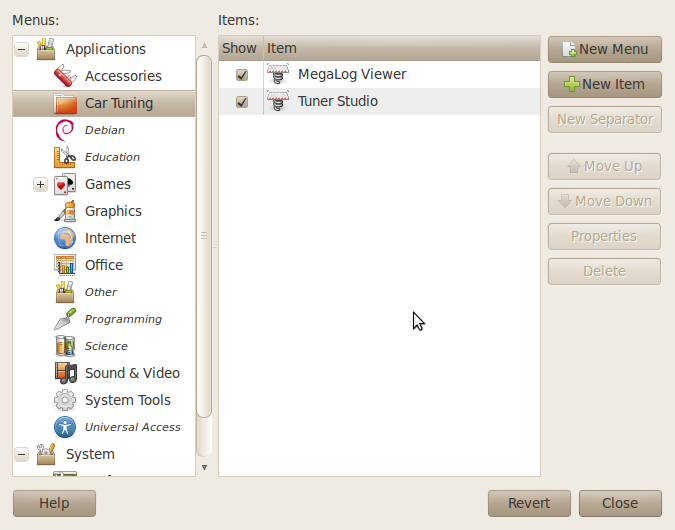
If you are like me you are going to want an applications menu selection instead. Just right click on the applications menu and click edit menus. On the left hand side you can select what category you want it in or you can just click new item on the right hand side and have it directly on the applications menu. I chose to make a new category titled "car tuning" and put them both in there. To make a new category click on applications in the upper left and click new menu on the right hand side.
Once you have decided how you want the menu to be organized then you click on "new item" on the right hand side (be sure to have the proper category selected). Then title what you want it to be called and for the command click browse and locate the proper .sh file. Once you have got that click on ok and you are done. When you are done your menu editor should look something like this.
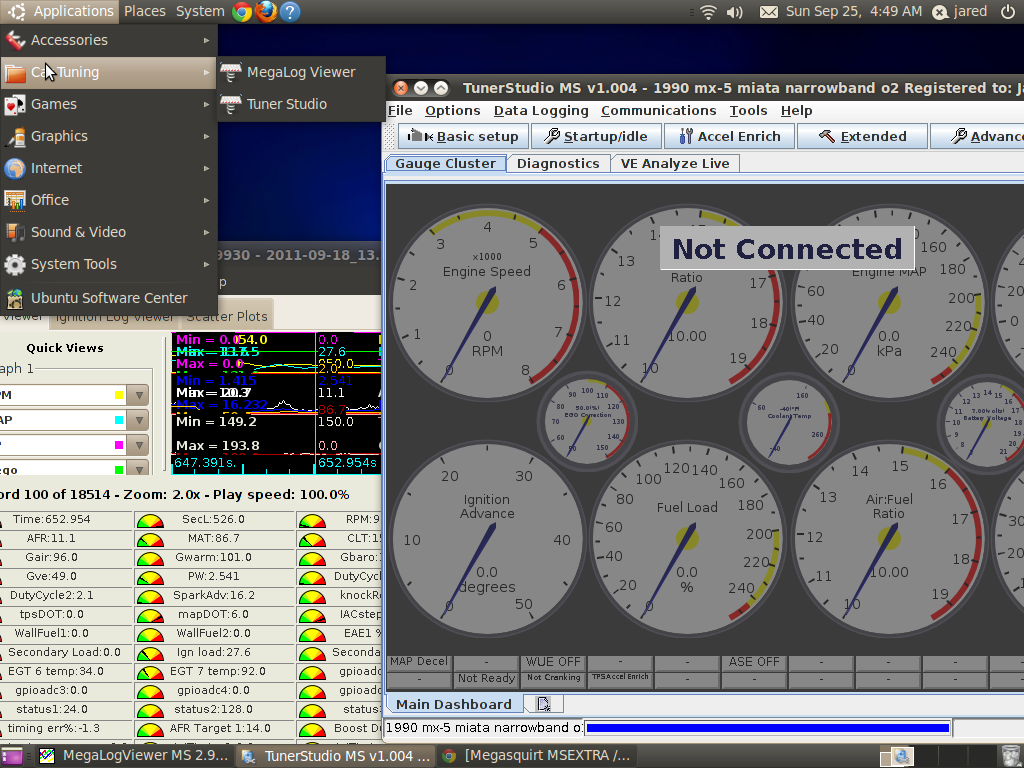
Here is one last screenshot showing both the programs running.
I am running Ubuntu 10.04 LTS Lucid Lynx
I had no problems with the db9 port and tunerstudio recognizing my diypnp.
I dont know anything about using the usb adapter with ubuntu. I would check the ubuntu forums for that or just do a google search.
Happy Tuning!
For those of you who are unaware Ubuntu is a form of linux. It is a highly stable and highly secure operating system. It is completely free and open source (you are allowed to backwards engineer and modify it).
Fortunately both tunerstudio and megalog viewer both have ubuntu versions available so there is no need to run wine (a program that allows you to run widnows applications on linux).
Here are links for both of them
http://www.ideasandsolutions.biz/Meg...ewer/download/
https://www.efianalytics.com/TunerStudio/download/
On both of them be sure to choose the Non-Windows download.
Now with these there is no install wizard as there is on windows. In fact there really isnt even an install process. You simply unpack and run the proper .sh file and you are going.
For tunerstudio you run the TunerStudio.sh file and NOT the TunerStudio32.sh file
In megalog viewer you run the MegaLogViewer.sh file.
When you open these files you will have four different options. Click on run.
For megalog viewer you will need to have java runtime. Directions on that are here.
https://help.ubuntu.com/community/Java
If you are anything like me you are not going to want to navigate through your folders everytime you want to open up these programs.
You will probably want a desktop shortcut or like me an application menu selection.
Now the FIRST thing you will need to do before making a shortcut is to display (not run) the .sh file and make sure the file directory path is correct. I believe that if you have left tunerstudio exactly where you unpacked it then it should be correct. Or if you moved it like me then you will need to edit it. Eithor way you should check to be sure.
After you click display on the .sh file you should get a window something like this
Now that applications folder isnt default on ubuntu. I added that folder in the home folder.
I recomend doing something similar so that as you install these type of programs on your ubuntu laptop that there is some sort of organization going on.
Then you will need to do the same with the MegaLogViewer.sh file. Except when I unpacked that it didnt even have that directory my pointer is pointing at in the pic. So I copied and pasted the one from the tunerstudio.sh file and edited it accordingly.
Now that you have the programs operational it is time to make your shortcuts. And you MUST correct the directories before you make the shortcuts other wise you will need to go into the shortcuts and edit their directories to match. Even if you run directly off the .sh file and you relocate the folder you will have to correct the directory before even that will work.
The desktop shortcut is the easiest one to do. Simply right click on the proper .sh file and then click 'make link'. Then a link (shortcut) will appear in that same folder. Just click and drag that to your desktop and you are done.
If you are like me you are going to want an applications menu selection instead. Just right click on the applications menu and click edit menus. On the left hand side you can select what category you want it in or you can just click new item on the right hand side and have it directly on the applications menu. I chose to make a new category titled "car tuning" and put them both in there. To make a new category click on applications in the upper left and click new menu on the right hand side.
Once you have decided how you want the menu to be organized then you click on "new item" on the right hand side (be sure to have the proper category selected). Then title what you want it to be called and for the command click browse and locate the proper .sh file. Once you have got that click on ok and you are done. When you are done your menu editor should look something like this.
Here is one last screenshot showing both the programs running.
I am running Ubuntu 10.04 LTS Lucid Lynx
I had no problems with the db9 port and tunerstudio recognizing my diypnp.
I dont know anything about using the usb adapter with ubuntu. I would check the ubuntu forums for that or just do a google search.
Happy Tuning!
Last edited by jared8783; Sep 26, 2011 at 07:18 AM.
Reply
 0
0

0

why not just run a real os? 
No being dick mode: I thought about getting a 10" lcd and a solid state pc to make my own dash. Ubuntu mite be my chose as i don't want blue screen on the track.
No being dick mode: I thought about getting a 10" lcd and a solid state pc to make my own dash. Ubuntu mite be my chose as i don't want blue screen on the track.
Reply
0
0
still have the key
can switch back anytime
but likely wont
i got 7 on my desktop but now that i dont have xp on this anymore i may dual boot with xp on the desktop
my laptop is used primarily for internet browsing and car tuning
and linux just doesnt slow down over time with excessive internet usage like windows pc's do making ubuntu a great choice for me
and a great choice for you as well
like you said the whole blue screen thing
linux is far more stable
Reply
0
0


This is pushing me toward a Megasquirt in a huge way. I had no idea there was a linux version. One thing holding me back from the Hydra (or anything beyond the Link I'm using now) has been having to build a windows laptop to tune.
I've been windows free since 8.04 and I've never looked back.
I've been windows free since 8.04 and I've never looked back.
Reply
0
0


But it can be puzzling at first to figure out what port the USB-Serial dongle is using after you passed the USB to VirtualBox and then back.
Maybe the smoothest would be dual dongles. Then I could use VVTuner and TunerStudio at the same time (even though one is on Ubuntu and the other on Windows).
Reply
0
0
ok so now i got an mtx-l from innovate. and i just CANNOT get it to work with ubuntu
there is no ubuntu support for it
i tried using wine
and no go
first it would not recognize my serial prot
so then i edited wines registry so that it would
then the program just wouldnt open up all the way
i had the mtx-l hooked up to the pc and window would open and flash real fast saying "connected, downloading..." or something like that it was hard to read it flashed so quick
and the mtx-l would even display "prg" incdicating that it was connected
but then nothing
that little window would just freeze and nothing would happed
i would have to kill the processes to end it
i have already resized my partitions in my laptop and as soon as i am done posting this i am unfortunately going to be dual booting xp
if anyone knows how to get the mtx-l working with ubuntu i would love to know how cuz i would love to remove xp from this machine once again
there is no ubuntu support for it
i tried using wine
and no go
first it would not recognize my serial prot
so then i edited wines registry so that it would
then the program just wouldnt open up all the way
i had the mtx-l hooked up to the pc and window would open and flash real fast saying "connected, downloading..." or something like that it was hard to read it flashed so quick
and the mtx-l would even display "prg" incdicating that it was connected
but then nothing
that little window would just freeze and nothing would happed
i would have to kill the processes to end it
i have already resized my partitions in my laptop and as soon as i am done posting this i am unfortunately going to be dual booting xp
if anyone knows how to get the mtx-l working with ubuntu i would love to know how cuz i would love to remove xp from this machine once again
Reply
0
0

no i havent
and i dont need that
because for tunerstudio and megalogviewer both had full ubuntu support
but thanks for the tip though i never heard of that before
i would like to get the wideband o2 mtx-l programmer working with ubuntu
i got the dual boot (ubuntu & xp pro) running just fine so i got what i need
though i would still like to run the o2 stuff in ubuntu
i dont have to get into that very much though so its no biggie
and i dont need that
because for tunerstudio and megalogviewer both had full ubuntu support
but thanks for the tip though i never heard of that before
i would like to get the wideband o2 mtx-l programmer working with ubuntu
i got the dual boot (ubuntu & xp pro) running just fine so i got what i need
though i would still like to run the o2 stuff in ubuntu
i dont have to get into that very much though so its no biggie
Reply
0
0
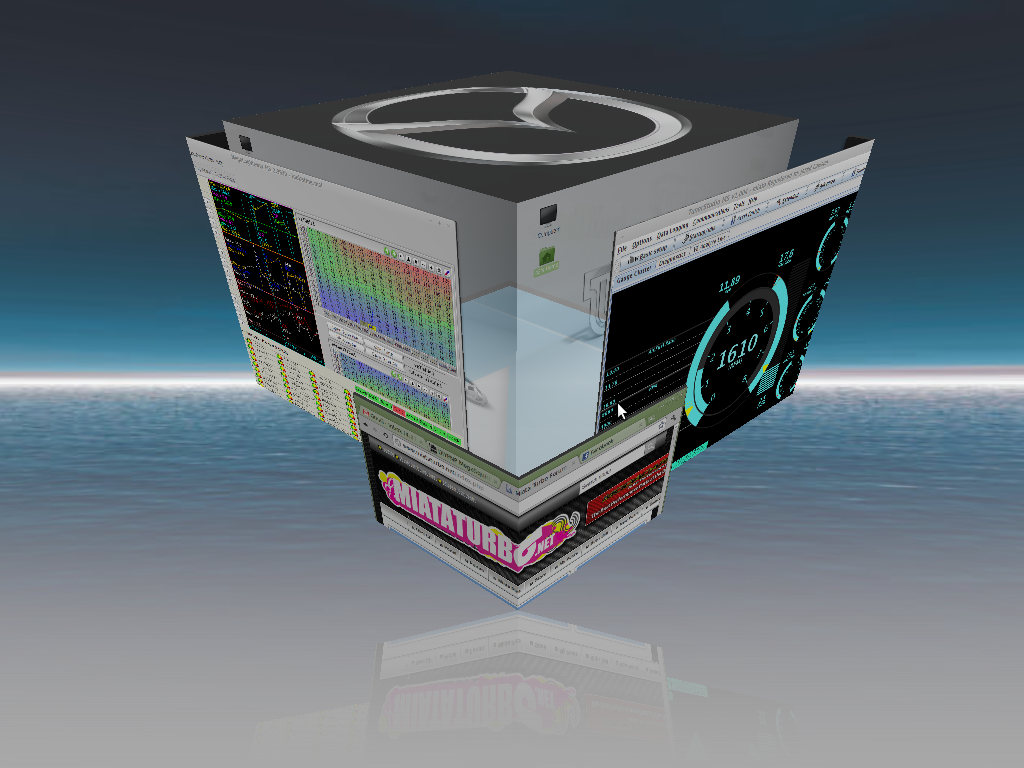
Well I just wanted to report that the programs work on Linux Mint as well.
Though I could not get the desktop links to work, and I haven't hardly tried to create menu entries for them yet.
Though I could not get the desktop links to work, and I haven't hardly tried to create menu entries for them yet.
Reply
0
0
Does ubuntu have support for MS3X (or vice versa)? If not I'll have to see if I can take my dads old XP, tear out the HD, use it as an external HD then boot from it to run whatever tuning program I end up using.
Reply
0
0


Yes the built in USB on the MS3x works fine in Ubuntu. I run Ubuntu on my work Dell laptop and it works perfectly.
Reply
0
0

Junior Member
Joined: Nov 2009
Posts: 459
Total Cats: 31
From: Jax Fl
Very cool to know I can use linux for tuning, I've tried tuning with some software (not for MS) throught an emulator and no bueno. Anyone wanting a fast lightweight ubuntu should try Lubuntu, I'm a big fan for my less powerful machines.
Reply
0
0
I'm running Ubunut 10.04 LTS and I followed your instructions, however when I attempt to "run" either program nothing happens. I can choose to "display", but if I try "run in terminal" a terminal flashes open and closes its self Any ideas?

TunerStudio:
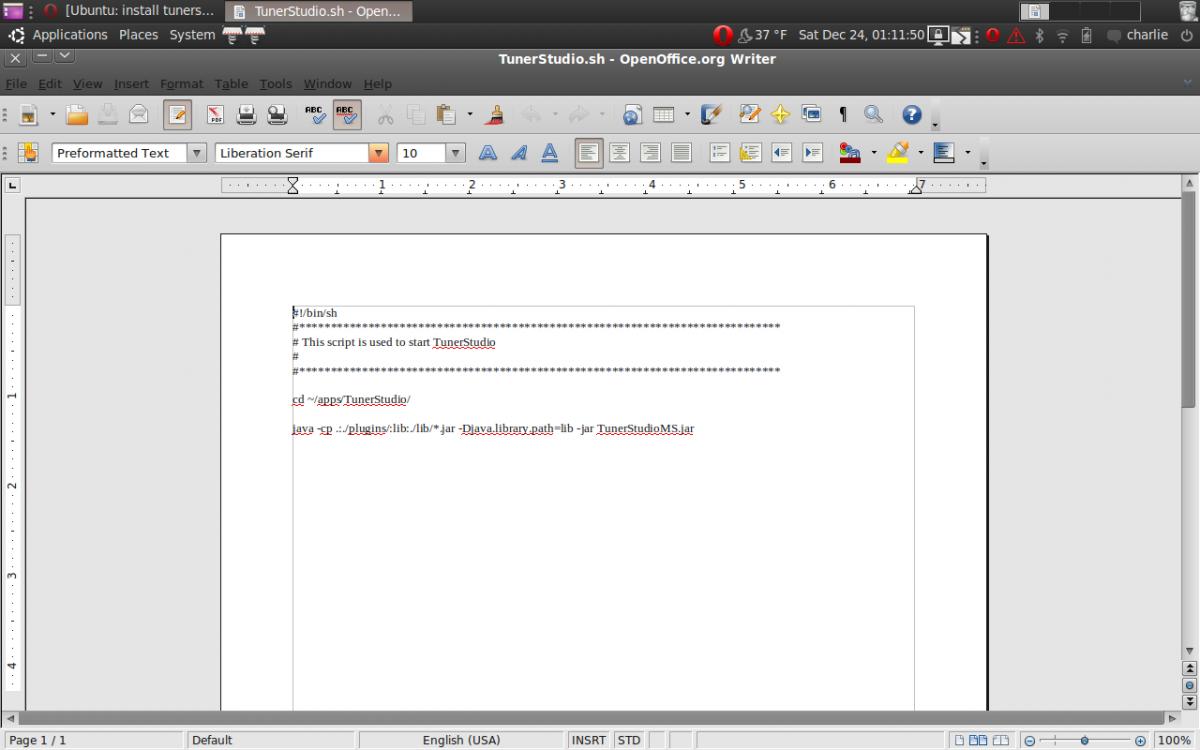
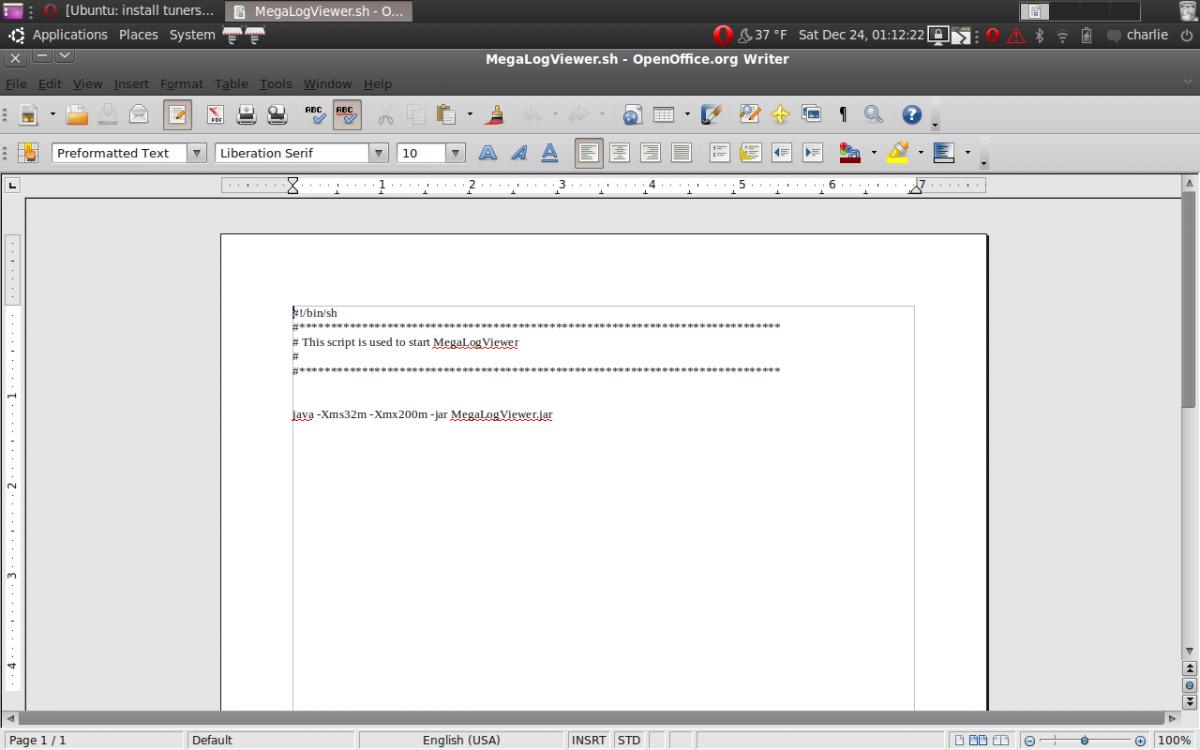
TunerStudio:
Reply
0
0
$cd Desktop
$./TunerStudio.ch
Reply
1
1
Reply
0
0
Reply
1
1
I did it with and w/ out the $.
Hope I'm doing this right.
charlie@charlies-laptop:~$ cd Desktop
charlie@charlies-laptop:~/Desktop$
charlie@charlies-laptop:~/Desktop$
charlie@charlies-laptop:~/Desktop$ ./TunerStudio.ch
bash: ./TunerStudio.ch: No such file or directory
charlie@charlies-laptop:~/Desktop$
bash: ./TunerStudio.ch: No such file or directory
charlie@charlies-laptop:~/Desktop$
Reply
0
0


