When you click on links to various merchants on this site and make a purchase, this can result in this site earning a commission. Affiliate programs and affiliations include, but are not limited to, the eBay Partner Network.
I have one at home that I use when I get voiceover work.
Wait, wait, wait... how did this go unnoticed? Where can I find the silky smooth tones of Joe Perez to enjoy while fapping and enjoying opiates with moderately priced whiskey?
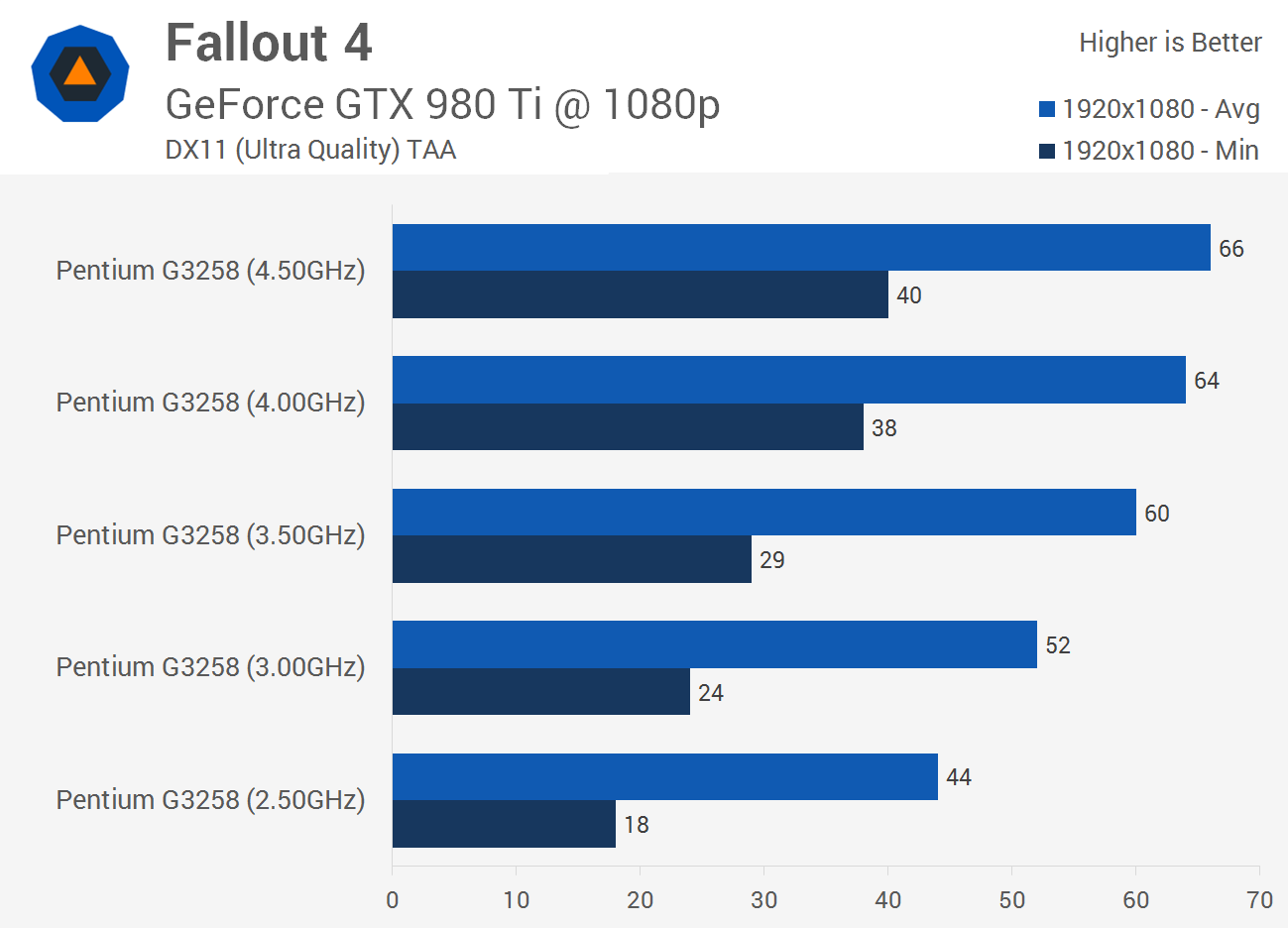
Currently running a G3258 overclocked and stable at 4.5Ghz, on a Z97 board.
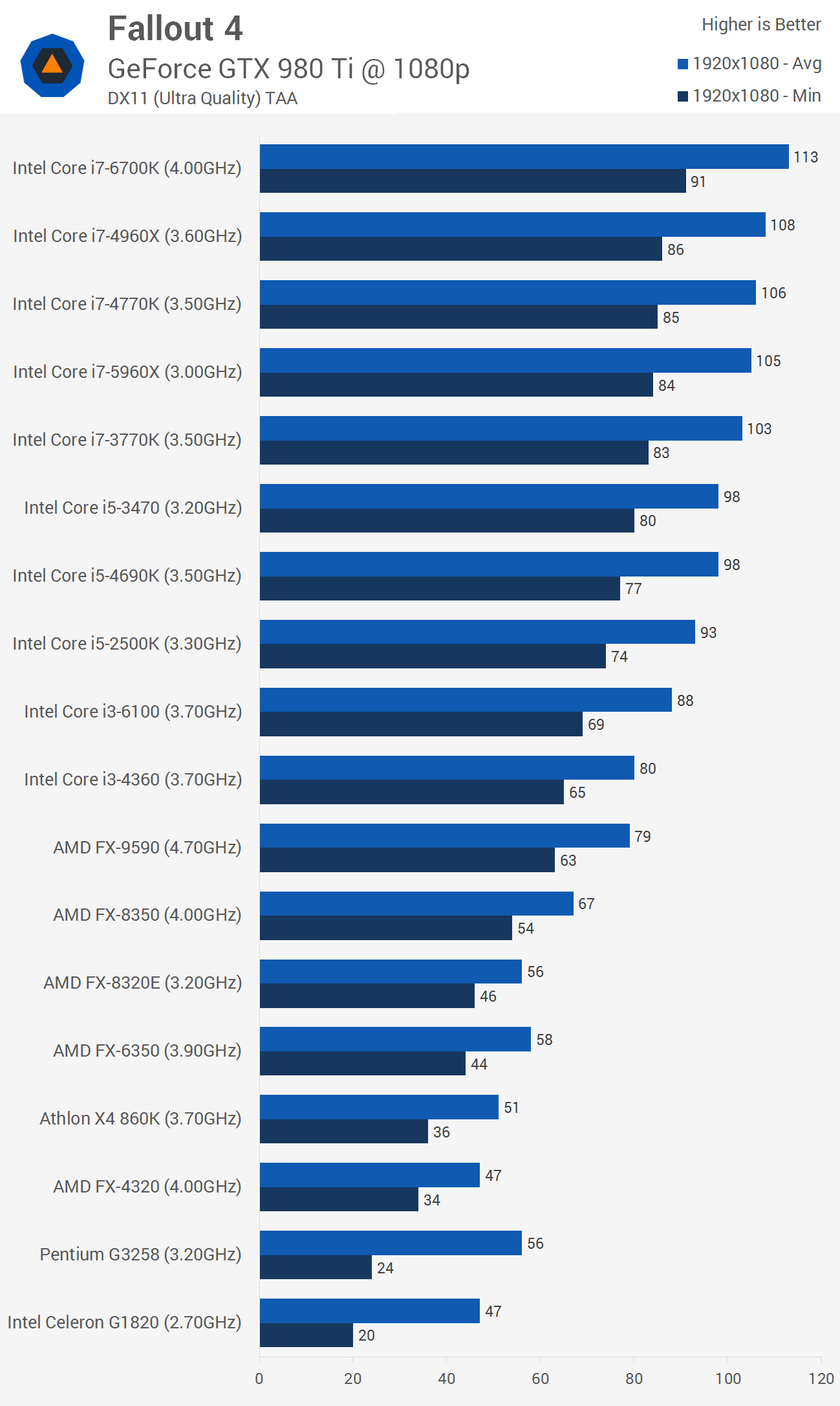
I have a cheap 4770k available, with the 2 additional cores and bigger cache offset the fact that it's not a great chip for overclocking? 4.5Ghz seems to be the limit without water cooling. I basically use the PC to play Fallout 4, will I notice a huge difference?
I can't speak to the overclocking because I've not tried to OC anything since the early 2000's, but +2 physical cores, +6 threads, a little bump in memory bandwidth that gives you support for DDR3-1600 XMP profiles out of the box, "Turbo" frequency pushes you up to 3.9GHz so that's 86% of your overclock out of the box, provided you have the cooling. If you are working with a properly multi-threaded application that will see benefits from more cores and more threads, then its a no-brainer.
I can't speak to the overclocking because I've not tried to OC anything since the early 2000's, but +2 physical cores, +6 threads, a little bump in memory bandwidth that gives you support for DDR3-1600 XMP profiles out of the box, "Turbo" frequency pushes you up to 3.9GHz so that's 86% of your overclock out of the box, provided you have the cooling. If you are working with a properly multi-threaded application that will see benefits from more cores and more threads, then its a no-brainer.
I sort of have the same thoughts as G. You get there with no big cons on the upgrade. Not sure how much the actual cpu speed would affect how the system runs. What amount of wattage are you using to get up to the 4.5Ghz?
IMO, a few pages back I upgraded my amd cpu to a 6-core with L3 cache. Felt very noticeable and 'snappy' all around.
CPU: Intel Core i7-4790K 4.0GHz Quad-Core Processor CPU Cooler: Noctua NH-U12S 55.0 CFM CPU Cooler Motherboard: Asus H97M-PLUS Micro ATX LGA1150 Motherboard Memory: Corsair Vengeance 16GB (4 x 4GB) DDR3-1600 Memory Storage: Kingston Predator 240GB M.2-2280 Solid State Drive Storage: Mushkin ECO2 240GB 2.5" Solid State Drive Video Card: MSI GeForce GTX 960 2GB Video Card Case: Fractal Design Define Mini MicroATX Mini Tower Case Power Supply: Corsair Professional Gold 850W 80+ Gold Certified Fully-Modular ATX Power Supply Case Fan: Noctua NF-F12 PWM 55.0 CFM 120mm Fan ( x2, front intake) Case Fan: Noctua NF-S12A PWM 120mm Fan (x2, top and rear exhaust)
Its quiet and fast for what I use it for, and that's mostly dicking around on the interwebs and Steam games. OS lives on the M.2 while my hoard of Steam games lives on the SSD. I don't play anything new, Fallout 3/NV and Company Of Heroes 2 are probably the newest titles I play with any frequency. I will say Fallout 4 and Civ 6 are both calling my name, but I kinda want to invest in a GTX 1060 first. We'll see.
I can't speak to the overclocking because I've not tried to OC anything since the early 2000's, but +2 physical cores, +6 threads, a little bump in memory bandwidth that gives you support for DDR3-1600 XMP profiles out of the box, "Turbo" frequency pushes you up to 3.9GHz so that's 86% of your overclock out of the box, provided you have the cooling. If you are working with a properly multi-threaded application that will see benefits from more cores and more threads, then its a no-brainer.
Check that out! It even covers your overclocked G3258, how badass is that? The numbers look good, how cheap is cheap?
Well, ****, can't hate on that response at all. Ended up getting the i7. Most people seem to report getting it into the 4.4-4.5Ghz range, but with a cooler master on it, it hits triple digit temps while running prime95 at 4Ghz. Not sure I want to push it much farther than that. Fallout definitely seems faster though.
So, new architecture / completely new build problems.
This garbage gskill RAM i bought doesn't seem to work. I believe i had one stick come DOA. So i'm only running one 8gb stick currently. BF1 has crashed on me a couple times, i am relating this issue to the RAM. (or a ryzen / RAM i bought compatibility problem)
My "silent" fans i bought are not silent.
The LED light bar has some burnt out LEDs.
I'm having some weird BIOS issues. Some of which have been fixed after a BIOS flash. I'm also having some weird Q-codes that aren't in the book, which is super annoying.
I'm actually boosting to 4.1ghz and hottest i've recorded(i'm guessing for a short amount of time) has been 66C. It idles at 39C.
I also wish i would have bought a new SSD, this M.2 drive is going to be full very soon.
CPU: AMD Ryzen 7 1800x CPU Cooler: Corsair H60 Motherboard: Asus ROG Crosshair VI Hero Memory: G.SKILL Aegis 16GB (2 x 8GB) (JUNK only one working currently) Storage: SAMSUNG 960 EVO M.2 250GB Video Card: EVGA GTX980sc Case: Cooler Master MasterCase 5t Power Supply: CORSAIR RMx Series RM850X Case Fan: DEEPCOOL Gamer Storm GS 120mm Case Fan: Cooler Master 140mm
Don't worry... I'll be adding a bit more to this thing. Plus a full on custom water loop. Just waiting on money, parts, and time.
I have an old lenovo laptop that I've now had for 5-6 years. I basically use it like a desktop because I have a surface pro for school etc. I bought it at the time because it came with a GTX660M, which was pretty solid for a laptop at the time. Processor is an i7-3610QM, again pretty decent for the time. I put in a second stick of ram so it now has 16 gigs of ram in it. Again, not insane, but I think that's the max for this motherboard (though it could maybe be 32?)
I know the GPU is a mobile card, but is there any way to upgrade this on a laptop without having to swap the motherboard etc or is it one unit in these? I don't play games all that much, but I wouldn't mind spending a bit of money now or in the near future to get this thing updated a bit. I'm likely going to be using it for the next few years if it keeps behaving.
Figured this was a reasonable place to ask...
...
I know the GPU is a mobile card, but is there any way to upgrade this on a laptop without having to swap the motherboard etc or is it one unit in these? I don't play games all that much, but I wouldn't mind spending a bit of money now or in the near future to get this thing updated a bit. I'm likely going to be using it for the next few years if it keeps behaving.
Not really an option, and swapping mobo on a laptop is rare. Don't expect to get much more unless there is a similar model/year with different specs same case. You'd just be swapping the guts over aka just buying a similar laptop anyways.
With laptops, you're kinda stuck with what you have unless you buy a newer one.
Yeah, it does what I need it to so I won't be messing with it. I'm sure it'd be more cost effective to get another computer down the line. I'll likely end up getting a desktop next since I rarely unplug this computer due to owning a surface.





 0
0