


HighRes on MSPNP - anyone?


Supporting Vendor

Joined: Sep 2006
Posts: 2,332
Total Cats: 67

We'd only void the warranty if you actually made changes to the board - unscrewing the lid and putting a boot jumper in place doesn't count unless you use a soldering iron.
And yes, if it goes wrong you can just reload the standard code.
And yes, if it goes wrong you can just reload the standard code.
Reply
 0
0

0

Thread Starter
Senior Member
Joined: Dec 2004
Posts: 1,278
Total Cats: 37
From: Brisbane, Australia
So, my MegaSquirt PNP is now running HighRes 10d2! Overall, I'm impressed with the change, it seems to idle more like it did with the stock computer. I had to fine tune my idle a bit but that didn't take long.
I have noticed a couple of times that I get a slight miss and the tach drops a bit for no apparent reason, I will try and pin point why or when it is happening.
The steps I took to install HighRes:
1. Downloaded the HighRes 10d2 firmware image from the MS1 development section of msextra.com.
2. Grabbed msns-extra.s19 and msns-extra.ini from the zip file, discarded the rest.
3. Modded msns-extra.s19 with EasyTherm so it used the same values as the standard MSPNP firmware.
You can start at step 4 if you use my modified (MSPNP prepped) HighRes 10d2 firmware.
4. Made a copy of my current MegaSquirt project folder. My old project folder was called "MSPNP MM9093 with AFM", so I made a copy called "MSPNP MM9093 with AFM HR10d2".
5. Copied msns-extra.s19 and msns-extra.ini into the new project folder created in step 4. Also dropped another copy of msns-extra.s19 into the "src" subfolder.
6. Unplugged my ignitor.
7. Ran download-firmware.bat from the new project folder.
8. Fire up MegaTune, choose your new project then load your old MSQ. You will get a few warnings, check the audit.log to ensure nothing is too serious. Once the MSQ is loaded, switch the car off again.
9. Plug the ignitor back in.
10. Start the car on HighRes!
I have noticed a couple of times that I get a slight miss and the tach drops a bit for no apparent reason, I will try and pin point why or when it is happening.
The steps I took to install HighRes:
1. Downloaded the HighRes 10d2 firmware image from the MS1 development section of msextra.com.
2. Grabbed msns-extra.s19 and msns-extra.ini from the zip file, discarded the rest.
3. Modded msns-extra.s19 with EasyTherm so it used the same values as the standard MSPNP firmware.
You can start at step 4 if you use my modified (MSPNP prepped) HighRes 10d2 firmware.
4. Made a copy of my current MegaSquirt project folder. My old project folder was called "MSPNP MM9093 with AFM", so I made a copy called "MSPNP MM9093 with AFM HR10d2".
5. Copied msns-extra.s19 and msns-extra.ini into the new project folder created in step 4. Also dropped another copy of msns-extra.s19 into the "src" subfolder.
6. Unplugged my ignitor.
7. Ran download-firmware.bat from the new project folder.
8. Fire up MegaTune, choose your new project then load your old MSQ. You will get a few warnings, check the audit.log to ensure nothing is too serious. Once the MSQ is loaded, switch the car off again.
9. Plug the ignitor back in.
10. Start the car on HighRes!
Last edited by timk; Jan 12, 2008 at 06:06 PM.
Reply
0
0

Shouldn't it be:
6. Unplug ignitor
7. Run download-firmware.bat
7b. Reload MSQ
8. Plug in ignitor
I *think* I remember the docs saying that you can fry your ignitor if you don't reload your .msq before plugging it back in.
Nice work and thanks for posting the step by step - I'll have to try it at some point.
Cheers!
Jeff
6. Unplug ignitor
7. Run download-firmware.bat
7b. Reload MSQ
8. Plug in ignitor
I *think* I remember the docs saying that you can fry your ignitor if you don't reload your .msq before plugging it back in.
Nice work and thanks for posting the step by step - I'll have to try it at some point.
Cheers!
Jeff
Reply
0
0
Thread Starter
Senior Member
Joined: Dec 2004
Posts: 1,278
Total Cats: 37
From: Brisbane, Australia
Yes you are correct! The first time you re-load the MSQ after the flash you need to have the ignitor unplugged, but after that it doesn't matter. I will amend the steps now, thanks! 
Reply
0
0
Thread Starter
Senior Member
Joined: Dec 2004
Posts: 1,278
Total Cats: 37
From: Brisbane, Australia
Just FYI I have posted about the miss on msextra.com:
http://www.msextra.com/viewtopic.php?p=177785#177785
http://www.msextra.com/viewtopic.php?p=177785#177785
Reply
0
0

Just FYI I have posted about the miss on msextra.com:
http://www.msextra.com/viewtopic.php?p=177785#177785
http://www.msextra.com/viewtopic.php?p=177785#177785
I don't get the tach dropout tho...
Reply
0
0



Reply
0
0

Could someone snap a couple of pics and post them while they are doing the "cap" mod. I will be getting my MS from braineak shortly and am considering doing this once i make sure that the ms is working correctly. I have soldiered a modchip into just about everyone of my gaming consoles including one in a brand new wii so i think i should be up for the task of soldering in one little .1uf capacitor. So the hires code really makes that much of a diff. huh? Does it add alot more time into fine tuning the fuel and timing maps?
Reply
0
0
worked a treat, top job Jerry 
I very occasionally had the same miss when running the stock code, and it's completely killed the lot.
I love it when such a cheap component makes such a big difference
Pin 11 and ground, it's pretty obvious when you look at the board. Pin11 will already have a lead jumpered off it, there's a ground parked near to the proto area. don't forget to insulate the bare ends of the leads, I used the insulation for telephone wire, perfect thickness.
no, doesn't work like that, it adds more resolution into the timing of the injectors, so instead of it being for example 2.1ms it'll be 2.134ms.
yes that small difference is huge if you have big high impedance injectors
I very occasionally had the same miss when running the stock code, and it's completely killed the lot.
I love it when such a cheap component makes such a big difference
Could someone snap a couple of pics and post them while they are doing the "cap" mod. I will be getting my MS from braineak shortly and am considering doing this once i make sure that the ms is working correctly.
So the hires code really makes that much of a diff. huh? Does it add alot more time into fine tuning the fuel and timing maps?
yes that small difference is huge if you have big high impedance injectors
Last edited by richyvrlimited; Jan 15, 2008 at 05:36 PM.
Reply
0
0



Reply
0
0
Oh ok. When i heard hires i figured it changed the size and number of cell in the fuel and timing tables.
Reply
0
0
Reply
0
0

Joined: Sep 2005
Posts: 34,433
Total Cats: 7,549
From: Chicago. (The less-murder part.)

Reply
0
0

did not know that, I guess you can use JS8 then.
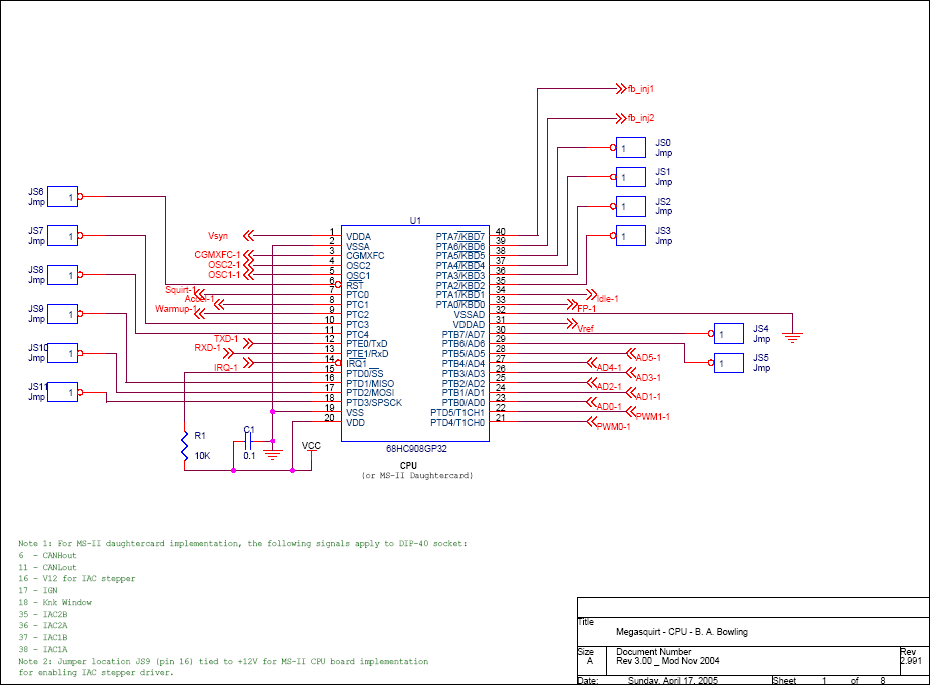
This is where my flakey electronics knowledge comes to the fore, how can an output for CAN (on the MS2, which uses the same socket as the MS1) also be the input for a cam trigger?
fecking confuses me!
This is where my flakey electronics knowledge comes to the fore, how can an output for CAN (on the MS2, which uses the same socket as the MS1) also be the input for a cam trigger?
fecking confuses me!
Reply
0
0


