


Tunerstudio is now 40$ or am I missing something?


On a nearly related dissaster - My lap top died and ate the email with my registration number for a paid version of Tuner Studio.
I replaced the hard drive but how do I get my registration number for another install ?
Looked in the EFI Analytical/ Tuner Studio site but did not find an email adress
Thanks
I replaced the hard drive but how do I get my registration number for another install ?
Looked in the EFI Analytical/ Tuner Studio site but did not find an email adress
Thanks
Reply
 0
0

0



IIRC, it's only a couple things like VE Analyzer Live (and possibly other features that don't yet exist like a base map generator) that are pay features in the final release. The plan is to have a free version (TunerStudio Lite) that's able to work as good basic tuning software, while with the paid version you get extra awesomeness.
Im playing in tunerstudio lite right now.... Im wondering what the extra awesomeness is.
I know there is VEAnalize live, 3d tables but what is useful beyond that goes unmentioned?
I don't see mention of it, but does either the lite or full version have a cell trace option for if I do a pull to see where it was through the sweep?
Reply
0
0


VE analyze live is worth the $40 by itself without a doubt. I have never seen a memory trace through the cells but that sounds like it nice feature, possibly. Why don't you contact Phil Tobin and see if he would be willing to add that. It might already do it and I just don't know about it.
Reply
0
0

Senior Member
Joined: Mar 2011
Posts: 697
Total Cats: 27
From: South Chicago
I paid $60 for TS and have installed it numerous times on the few laptops I have cause I'm constantly going back and forth and reinstalling OS's. I've never once bee prompted to repurchase.
So I dunno lol.
So I dunno lol.
Reply
0
0
Your gauges are also live when looking and changing features in menus. Very helpful when you want to see the exact effect of a change without closing and reopening the menu.
It now also includes WUE autotune.
Don't quote me on this, but I don't think you can use table smoothing on the lite version either.
Read this:
TunerStudio Change Log | tunerstudio.com
Mainly the 11/15/2013 - Summary of Changes for TunerStudio 2.5 part.
It now also includes WUE autotune.
Don't quote me on this, but I don't think you can use table smoothing on the lite version either.
Read this:
TunerStudio Change Log | tunerstudio.com
Mainly the 11/15/2013 - Summary of Changes for TunerStudio 2.5 part.
Reply
0
0


Reply
0
0
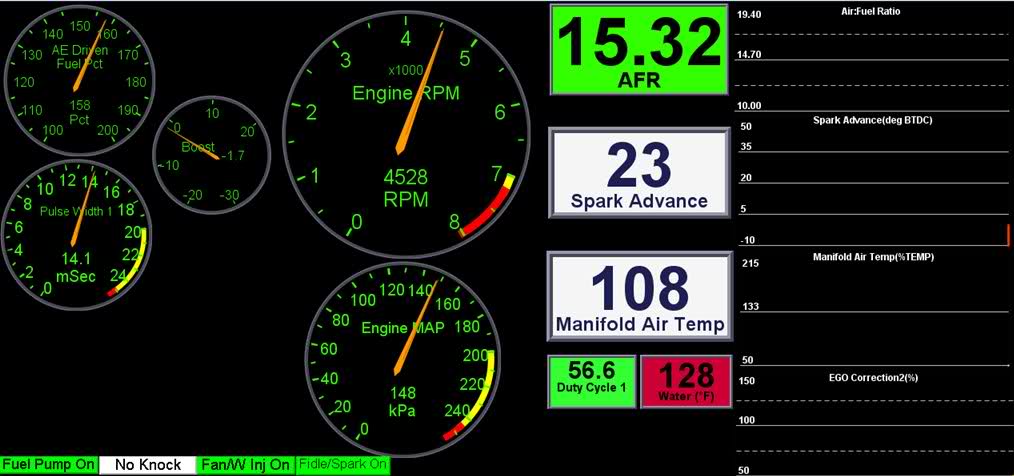
I used to have my boost and AFR plots show up as a continuous line so I could look back during a pull if I had the laptop attached and see any spikes that shouldn't be there.
I'd suggest doing to same, otherwise use MLV to look in the past. watching a gauge playback is silly when you can capture the data to a spreadsheet and pick it apart.
something like seen here:
I'd suggest doing to same, otherwise use MLV to look in the past. watching a gauge playback is silly when you can capture the data to a spreadsheet and pick it apart.
something like seen here:
Reply
0
0
For example, boost target and boost, AFR target and actual AFR, stuff like that. I will post a screenshot of it when I get home if it would help.
Reply
0
0


I went a step further. I created an identical historgram guage with transparency on top of the histogram that gives target in a different color. Seeing a peak it useful but it's nice to see how far off you were from target as well.
For example, boost target and boost, AFR target and actual AFR, stuff like that. I will post a screenshot of it when I get home if it would help.
For example, boost target and boost, AFR target and actual AFR, stuff like that. I will post a screenshot of it when I get home if it would help.
Reply
0
0
I'll post up when I get home tonight. Forgot to follow thread and didn't see till I got to work today. It's not super pretty but it tells me almost everything I need to know while driving.
No, TunerStudio dashboard.
No, TunerStudio dashboard.
Reply
0
0
Ok, here they are.
Brain's are better but this will give you an idea of how did my layering. I bet if you took Brains' dash and added a few of my ideas you would end up with something really nice.
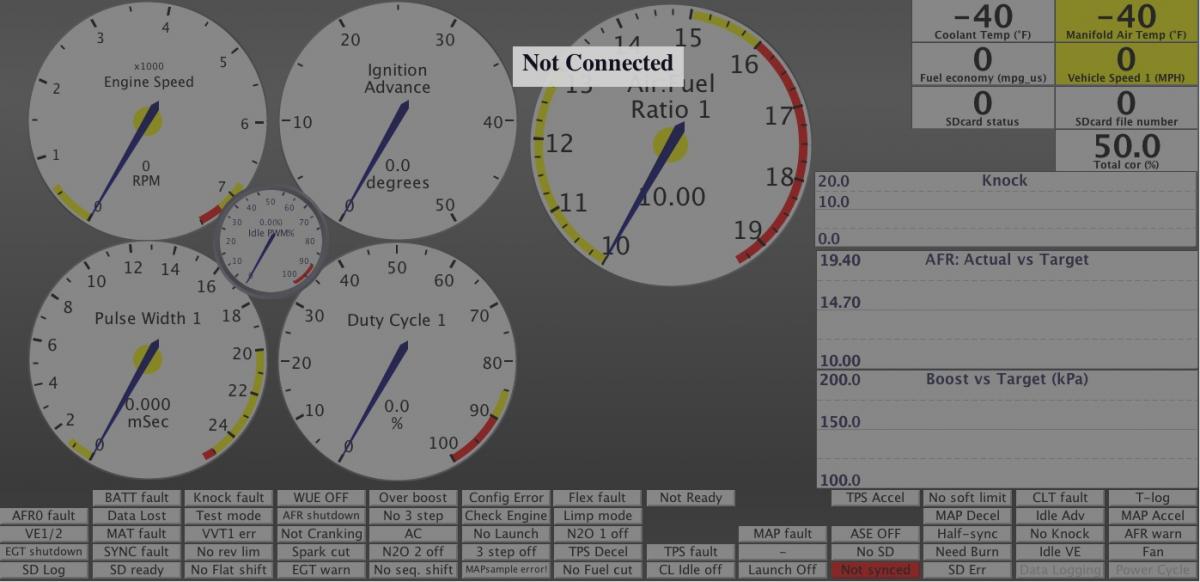
Brain's are better but this will give you an idea of how did my layering. I bet if you took Brains' dash and added a few of my ideas you would end up with something really nice.
Reply
0
0

Thread
Thread Starter
Forum
Replies
Last Post
Zaphod
MEGAsquirt
47
Oct 26, 2018 11:00 PM
Mikel
MEGAsquirt
4
Sep 28, 2015 04:46 PM


