


MSPNP1 - Pin confirmation


Thread Starter
Junior Member
Joined: May 2011
Posts: 257
Total Cats: 13
From: Signal Hill, CA
 MSPNP1 - Pin confirmation
Trying to power the mspnp1 unit outside the car, to test out some serial connection issues that I am having.
Just wanted to confirm that these are the pins.
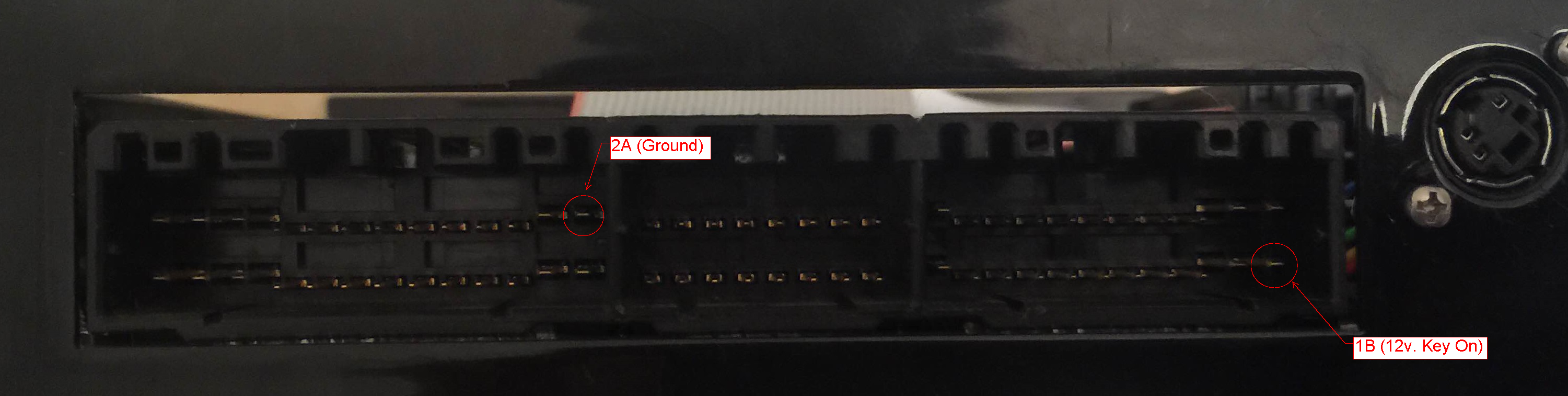
Just wanted to confirm that these are the pins.
Reply
 0
0

0


Thread Starter
Junior Member
Joined: May 2011
Posts: 257
Total Cats: 13
From: Signal Hill, CA
Been having issues with connection, tried to flash a new firmware and I kept getting an error. This wasn't an issue before, but my car was put in storage for awhile and now nothing works lol
Info:
Windows 7 64bit
FTDI chipset USB to serial cable
Did the boot jumper thingy
MSPNP is out of the car
Port check:
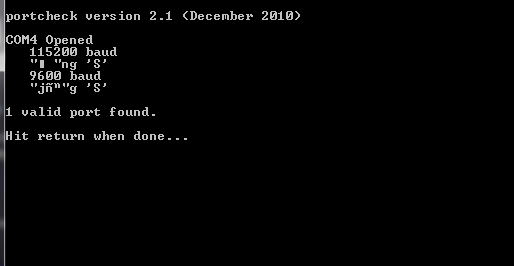
Flash
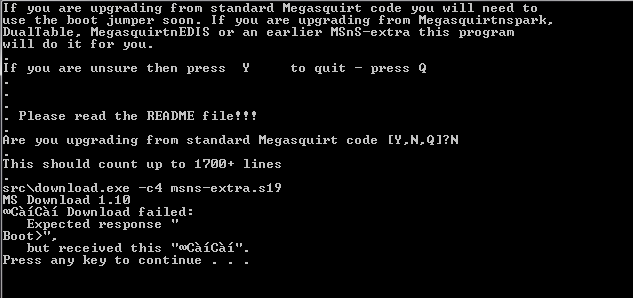
Info:
Windows 7 64bit
FTDI chipset USB to serial cable
Did the boot jumper thingy
MSPNP is out of the car
Port check:
Flash
Reply
0
0
Reply
0
0


<p>Was the boot jumper installed? What brand USB adapter?</p><p>Your serial comms appear to be garbage. If the boot jumper was installed, you need to replace your tuning cable and/or USB adapter.</p>

Reply
0
0
Thread Starter
Junior Member
Joined: May 2011
Posts: 257
Total Cats: 13
From: Signal Hill, CA
I used a piece of wire to short the boot, as for USB adapter, I originally was using this with no issues: TRENDnet | Products | TU-S9 | USB to Serial Converter which is a prolific chipset. After getting tired of trying to make it work, I browsed the msextra forums, and many recommended a ftdi base chipset for the USB adapter.
So I went out and bought this thing: SABRENT Model SBT-FTDI - Newegg.com
and still no luck. I considered the tuning cable to be bad, so I opened up the serial connector but I didn't see anything out of the ordinary.
So I went out and bought this thing: SABRENT Model SBT-FTDI - Newegg.com
and still no luck. I considered the tuning cable to be bad, so I opened up the serial connector but I didn't see anything out of the ordinary.
Reply
0
0
<p>It looks like symptoms of a bad cable. The other option is that the bad cable screwed comms up so bad, the monitor on the MS1 chip is toast. If that's the case, the easiest solution is to purchase a new MS1 chip. They're cheap.</p>
Reply
0
0
Thread Starter
Junior Member
Joined: May 2011
Posts: 257
Total Cats: 13
From: Signal Hill, CA
Guessing there's no way to test if it's a bad cable or the monitor on the ms1 is toast?
I just want to make absolutely sure that my mspnp took a dump on me before purchasing another one.
I just want to make absolutely sure that my mspnp took a dump on me before purchasing another one.
Reply
0
0

Junior Member

Joined: Sep 2007
Posts: 114
Total Cats: 3
From: Memphis
Sorry to hijack, but this doesn't really seem worthy of a new thread. Is there any way to find out which pin is which? I bought a DIYPNP already built and I can't find a pinout anywhere. I mean I can probably figure it out if I look at a stock ECU harness pinout and then look at the board and all the documentation, but I figure someone HAS to have already done this. My car is a 96 manual with a blue board (3.0) DIYPNP.
Reply
0
0
Thread Starter
Junior Member
Joined: May 2011
Posts: 257
Total Cats: 13
From: Signal Hill, CA
Reply
0
0
Sorry to hijack, but this doesn't really seem worthy of a new thread. Is there any way to find out which pin is which? I bought a DIYPNP already built and I can't find a pinout anywhere. I mean I can probably figure it out if I look at a stock ECU harness pinout and then look at the board and all the documentation, but I figure someone HAS to have already done this. My car is a 96 manual with a blue board (3.0) DIYPNP.
How to jumper and configure your DIYPNP to get your car fired up on the first try
1996-1997 Mazda Miata USDM 1.8L BP MT
Reply
0
0
Junior Member
Joined: Sep 2007
Posts: 114
Total Cats: 3
From: Memphis
I was going to write some pissy-mean comment, but it was actually just easier to link what you needed:
How to jumper and configure your DIYPNP to get your car fired up on the first try
1996-1997 Mazda Miata USDM 1.8L BP MT
How to jumper and configure your DIYPNP to get your car fired up on the first try
1996-1997 Mazda Miata USDM 1.8L BP MT
Reply
0
0
Thread Starter
Junior Member
Joined: May 2011
Posts: 257
Total Cats: 13
From: Signal Hill, CA
Update: Issue resolved
For whatever reason the mspnp's cpu was toast. Replaced it, and now the unit works flawlessly.
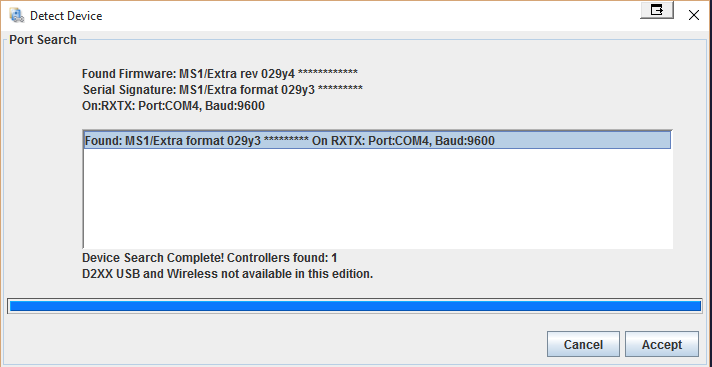
For whatever reason the mspnp's cpu was toast. Replaced it, and now the unit works flawlessly.
Last edited by .one lane; Sep 12, 2015 at 08:22 PM.
Reply
0
0

Thread
Thread Starter
Forum
Replies
Last Post
stoves
Suspension, Brakes, Drivetrain
5
Apr 21, 2016 03:00 PM


