


Win8 is a cruel sick joke.


Oh another fun one I forgot about.
So I wanted to add RealTemp to the 'startup' folder so the app will start when I boot the computer.
Well? I just click the super key->all programs->startup, right?
To that MS says "**** YOU STEVE, YOU AIN'T STARTING UP ****!" There is no "all programs" button. Or an entry for the startup folder. Or an ability to search for the startup folder using the search bar.
To make it even better when I did navigate to C:\users\<username>\whatever\path\to\startup\folde r\ I couldn't actually open it up or view the contents, as I was getting some error message.
So I wanted to add RealTemp to the 'startup' folder so the app will start when I boot the computer.
Well? I just click the super key->all programs->startup, right?
To that MS says "**** YOU STEVE, YOU AIN'T STARTING UP ****!" There is no "all programs" button. Or an entry for the startup folder. Or an ability to search for the startup folder using the search bar.
To make it even better when I did navigate to C:\users\<username>\whatever\path\to\startup\folde r\ I couldn't actually open it up or view the contents, as I was getting some error message.
Reply
 0
0

0



Oh another fun one I forgot about.
So I wanted to add RealTemp to the 'startup' folder so the app will start when I boot the computer.
Well? I just click the super key->all programs->startup, right?
To that MS says "**** YOU STEVE, YOU AIN'T STARTING UP ****!" There is no "all programs" button. Or an entry for the startup folder. Or an ability to search for the startup folder using the search bar.
To make it even better when I did navigate to C:\users\<username>\whatever\path\to\startup\folde r\ I couldn't actually open it up or view the contents, as I was getting some error message.
So I wanted to add RealTemp to the 'startup' folder so the app will start when I boot the computer.
Well? I just click the super key->all programs->startup, right?
To that MS says "**** YOU STEVE, YOU AIN'T STARTING UP ****!" There is no "all programs" button. Or an entry for the startup folder. Or an ability to search for the startup folder using the search bar.
To make it even better when I did navigate to C:\users\<username>\whatever\path\to\startup\folde r\ I couldn't actually open it up or view the contents, as I was getting some error message.
Win8 + Start Menu 8
Reply
0
0

Newb
Joined: Mar 2008
Posts: 12
Total Cats: 0
From: Brooklyn, NY
8.1 RTM is available on MSDN now, w00t.
Not happy that the start button's return is forced on everyone (really only needed in a Remote Desktop / VM window), but the other changes are long overdue.
Not happy that the start button's return is forced on everyone (really only needed in a Remote Desktop / VM window), but the other changes are long overdue.
Reply
0
0

....it still shouldn't have windows 8 on it...because obviously your "surface" tablets and "windows phones" haven't yet transcended "paperweight" status. I feel sorry for the fools who have bought windows phones on 2-year agreements and must now wait 2 years to get out of their digital hell.
but WP8 is not Windows8. and I agree completely that enforcing the touch interface onto a desktop is beyond retarded.
Reply
0
0

Thread Starter

Joined: May 2005
Posts: 80,581
Total Cats: 4,371
From: Chantilly, VA
I was able to disable the gestures and hot-spots and boot to the desktop mode. Seems okay (I think Classic Start is better than Menu 8).
But I did have one other issue come up: My internet was going slow as **** and you had to wait for a page to fully load before you could do anything, like scroll down or click a button or anything. Turns out it had something to do with the machine being on Power Save mode or something. Once I changed it back to normal pages loaded fine.
I'll probably keep the laptop now.
But I did have one other issue come up: My internet was going slow as **** and you had to wait for a page to fully load before you could do anything, like scroll down or click a button or anything. Turns out it had something to do with the machine being on Power Save mode or something. Once I changed it back to normal pages loaded fine.
I'll probably keep the laptop now.
Reply
0
0

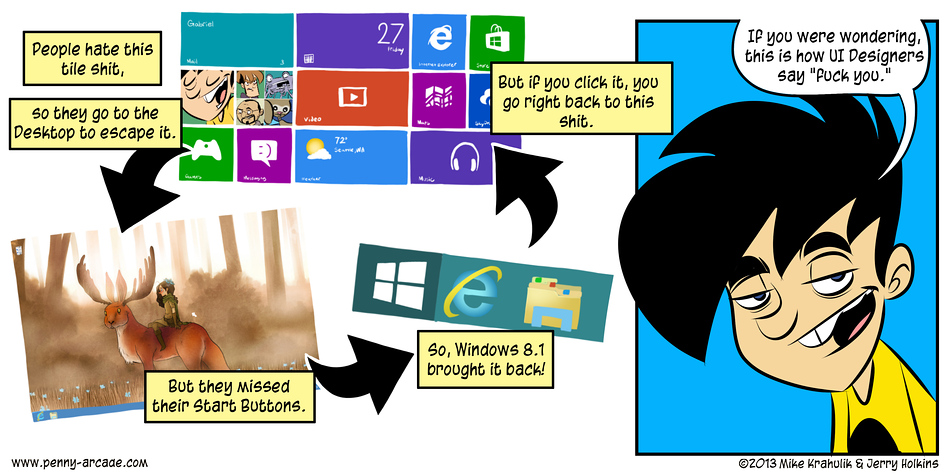
So apparently Windows 8.1 is coming later this year, and will be a free upgrade.
Why should we care? Well in addition to more "apps" and other such douchebaggery-
Why should we care? Well in addition to more "apps" and other such douchebaggery-
Originally Posted by microcunt
Boot to Desktop
We have made configuration options available which will allow you to boot directly to the desktop in Windows 8.1.
Desktop and Start Screen
Improvements have been made to better support users who prefer a mouse and keyboard experience to access applications.
We have made configuration options available which will allow you to boot directly to the desktop in Windows 8.1.
Desktop and Start Screen
Improvements have been made to better support users who prefer a mouse and keyboard experience to access applications.
Last edited by Full_Tilt_Boogie; Sep 12, 2013 at 07:11 PM.
Reply
0
0




I hate this user friendly trend OS's have been taking on. Every new release of Windows has gotten worse and worse for me. XP was my ideal balance of functionality and design. Vista was worse, 7 was even worse, and I'm scared to even see 8. I have yet to even see that OS, let alone use it.
By spending a lot of time disabling features, I've gotten 7 to work decently, close to XP, but not quite. It still from time to time does some **** that it thinks I want it to do for me, that I don't. I'll handle everything myself thank you.
By spending a lot of time disabling features, I've gotten 7 to work decently, close to XP, but not quite. It still from time to time does some **** that it thinks I want it to do for me, that I don't. I'll handle everything myself thank you.
Reply
0
0


Thread
Thread Starter
Forum
Replies
Last Post


