


My MS is almost in



Well, I had some COM port issues and fixed them. I installed the files from the mspnp9093 and now the computer won't talk to the MS at all again.
Right now I'm stuck after the copyini part of the FAQ.
This part-
Create a File called "EFI" on your C: drive and copy the zip file of your MSnSE 029v.zip into that file. Then un-zip the file into the C:\EFI\ folder.
My file wasn't zipped. I ran the copyini app, but I don't have the "edit-settings" app.
I don't know why I always have so much trouble with the software.
Right now I'm stuck after the copyini part of the FAQ.
This part-
Create a File called "EFI" on your C: drive and copy the zip file of your MSnSE 029v.zip into that file. Then un-zip the file into the C:\EFI\ folder.
My file wasn't zipped. I ran the copyini app, but I don't have the "edit-settings" app.
I don't know why I always have so much trouble with the software.
Reply
 0
0

0

Delete all your MS software garbage. Then download the .exe for your car from mspnp.com.
Make the appropriate adjustments and use their folders. That software install FAQ you're following is bogus and difficult to follow. You don't need to do all that crap. You only need one folder. The one that says Megasquirt, inside that you will have your project folder and megatune and a bunch of crap like that.
Make sure you use the correctly easythermed file and .inc files though as well. Stay away from that FAQ, its bogus.
Make the appropriate adjustments and use their folders. That software install FAQ you're following is bogus and difficult to follow. You don't need to do all that crap. You only need one folder. The one that says Megasquirt, inside that you will have your project folder and megatune and a bunch of crap like that.
Make sure you use the correctly easythermed file and .inc files though as well. Stay away from that FAQ, its bogus.
Reply
0
0
Yeah it is. Thanks for helping.
I deleted all my old stuff, and got the new pnp stuff. Now when I open megatune it asks for afm or not, I chose no. I changed the COM to 1 and 9600, still "no response!" from the test.
Do I need to modify the pnp files? I don't get it, my computer talked to the MS just a while ago.
I deleted all my old stuff, and got the new pnp stuff. Now when I open megatune it asks for afm or not, I chose no. I changed the COM to 1 and 9600, still "no response!" from the test.
Do I need to modify the pnp files? I don't get it, my computer talked to the MS just a while ago.
Reply
0
0
I have a feeling you corrupted the firmware and need to try to reflash it with the .bat included in the MSPNP folder just to get it to communicate again.
When firmware corruption takes place you can still connect to it but not with megatune. Try that.
When firmware corruption takes place you can still connect to it but not with megatune. Try that.
Reply
0
0

I suppose that is possible. When I connected the first time it said that if I didn't close megatune it would corrupt it. I closed it, but maybe it corrupted it anyway?
Sorry to be such a pain, but is there a writeup I should follow now? I'm really confused by the programs.
Sorry to be such a pain, but is there a writeup I should follow now? I'm really confused by the programs.
Reply
0
0
I doubt it. I always have a hard time with the software side of tuning. It took me a million tries before my Emanage blue would work. I bet I'm just doing something stupid wrong.
Reply
0
0
For anyone following this, it works! Hasn't started yet, but their talking. The problem was the com port buffer. I had to lower them. It worked before on the high ones, but on medium it works just fine. Turn the key and the gauges move and the com test is a "success!".
With brains help I'm going to figure out if my timing or injector size is wrong, then hopefully start it. Then I get to redo all my joints and run the wires where I want them and get set for tuning.
With brains help I'm going to figure out if my timing or injector size is wrong, then hopefully start it. Then I get to redo all my joints and run the wires where I want them and get set for tuning.
Reply
0
0



I burned it and it cranks alot easier and faster. It still wouldn't start though. Would a vacuum leak or anything be causing it?
It said my timing advance is 17.something. Isn't that high?
It said my timing advance is 17.something. Isn't that high?
Reply
0
0
Turns out I forgot to set the LC-1 in the configurator. I also forgot to scale the LC-1 output. I'll search for the voltage settings later, I have seen them here before. Mine should be the same right?
I have class now, so I have to wait until tommorow. Damn.
I have class now, so I have to wait until tommorow. Damn.
Reply
0
0
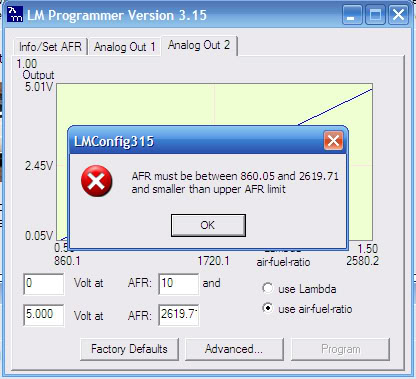
My LC-1 won't let me input those voltages. It says that 0 volts at 10 afr won't work the afr needs to be between 860.5 and something else. I have my autometer NB gauge on output 1, I think it reset itself. Anyone have those settings as well?
Reply
0
0

Junior Member
Joined: Dec 2007
Posts: 297
Total Cats: 0
From: San Diego to LA, CA
It doesnt work when you are trying to set them using the Innovative Software?
Reply
0
0
Something has to be off somewhere. The first time I tried cranking I got a backfire that could wake up the neighbors. I heard some weird noise up front so I took off the intercooler pipes and cranked. It turns over fast then just stops and I hear a big "psh" from the intake. I get maybe 3 cranks then the psh.
When I crank the dash tach isn't moving but the MS tach is. I unplugged my ignitor everytime I modified a setting in the MS so I doubt it's the ignitor. I noticed the left LED is on when the ignitor is plugged in.
I did do the " set" for the LC-1 0-5v o2 in the configurator. Under spark settings my "cranking advance angle" is 12, in the FAQ it says it should be 18. My trigger angle addition is +22.5.
I'm so frustrated. I want to fix something, but nothing is working with me. I need to fix one thing at a time, but nothing is fixing. Its the emanage all over again.
When I crank the dash tach isn't moving but the MS tach is. I unplugged my ignitor everytime I modified a setting in the MS so I doubt it's the ignitor. I noticed the left LED is on when the ignitor is plugged in.
I did do the " set" for the LC-1 0-5v o2 in the configurator. Under spark settings my "cranking advance angle" is 12, in the FAQ it says it should be 18. My trigger angle addition is +22.5.
I'm so frustrated. I want to fix something, but nothing is working with me. I need to fix one thing at a time, but nothing is fixing. Its the emanage all over again.
Reply
0
0


