


Virtual Dyno


Tried this out. Need more miata options.... no 6 speed that I could find- or maybe if there was just a way to input manual gearing ratios, etc. weight would be nice too.
maybe im a noob and not using it right, but thats the issues i ran into with it.
maybe im a noob and not using it right, but thats the issues i ran into with it.
Reply
 0
0

0

Build your own. See post 15 and subsequent.
Reply
1
1
Made a few. I used .37 Cd and 22.3 Af for the drag values. 2350 pounds as a good median value and 225/45/15 tires and applicable rear end ratios, but of course it varied by year. thankfully those values are modifiable.
Internet seems to indicate base model 99-00 is 2300lbs and 01-05 with minimum options is around 2350lbs.
Miata_99-05_5-Speed.xml
<?xml version="1.0" standalone="yes"?>
<CarDataset xmlns="http://tempuri.org/CarDataset.xsd">
<CarParameters>
<CarMake>Mazda</CarMake>
<CarModel>Miata</CarModel>
<CarSubModel>1.8 (5-Speed)</CarSubModel>
<StartYear>1999</StartYear>
<EndYear>2005</EndYear>
<Weight>2350</Weight>
<TransTypeManual>true</TransTypeManual>
<TransGear2>1.888</TransGear2>
<TransGear3>1.333</TransGear3>
<TransGear4>1.000</TransGear4>
<FinalGearRatio>4.30</FinalGearRatio>
<DragCoefficient>0.37</DragCoefficient>
<FrontalArea>22.3</FrontalArea>
<TireDiameter>23.0</TireDiameter>
</CarParameters>
</CarDataset>
Miata_99-05_6-Speed.xml
<?xml version="1.0" standalone="yes"?>
<CarDataset xmlns="http://tempuri.org/CarDataset.xsd">
<CarParameters>
<CarMake>Mazda</CarMake>
<CarModel>Miata</CarModel>
<CarSubModel>1.8 (6-Speed)</CarSubModel>
<StartYear>1999</StartYear>
<EndYear>2005</EndYear>
<Weight>2350</Weight>
<TransTypeManual>true</TransTypeManual>
<TransGear3>1.645</TransGear3>
<TransGear4>1.257</TransGear4>
<TransGear5>1.000</TransGear5>
<FinalGearRatio>3.909</FinalGearRatio>
<DragCoefficient>0.37</DragCoefficient>
<FrontalArea>22.3</FrontalArea>
<TireDiameter>23.0</TireDiameter>
</CarParameters>
</CarDataset>
Internet seems to indicate base model 99-00 is 2300lbs and 01-05 with minimum options is around 2350lbs.
Miata_99-05_5-Speed.xml
<?xml version="1.0" standalone="yes"?>
<CarDataset xmlns="http://tempuri.org/CarDataset.xsd">
<CarParameters>
<CarMake>Mazda</CarMake>
<CarModel>Miata</CarModel>
<CarSubModel>1.8 (5-Speed)</CarSubModel>
<StartYear>1999</StartYear>
<EndYear>2005</EndYear>
<Weight>2350</Weight>
<TransTypeManual>true</TransTypeManual>
<TransGear2>1.888</TransGear2>
<TransGear3>1.333</TransGear3>
<TransGear4>1.000</TransGear4>
<FinalGearRatio>4.30</FinalGearRatio>
<DragCoefficient>0.37</DragCoefficient>
<FrontalArea>22.3</FrontalArea>
<TireDiameter>23.0</TireDiameter>
</CarParameters>
</CarDataset>
Miata_99-05_6-Speed.xml
<?xml version="1.0" standalone="yes"?>
<CarDataset xmlns="http://tempuri.org/CarDataset.xsd">
<CarParameters>
<CarMake>Mazda</CarMake>
<CarModel>Miata</CarModel>
<CarSubModel>1.8 (6-Speed)</CarSubModel>
<StartYear>1999</StartYear>
<EndYear>2005</EndYear>
<Weight>2350</Weight>
<TransTypeManual>true</TransTypeManual>
<TransGear3>1.645</TransGear3>
<TransGear4>1.257</TransGear4>
<TransGear5>1.000</TransGear5>
<FinalGearRatio>3.909</FinalGearRatio>
<DragCoefficient>0.37</DragCoefficient>
<FrontalArea>22.3</FrontalArea>
<TireDiameter>23.0</TireDiameter>
</CarParameters>
</CarDataset>
Reply
0
0

I added a 2nd gear to the 6th speed.
<?xml version="1.0" standalone="yes"?>
<CarDataset xmlns="http://tempuri.org/CarDataset.xsd">
<CarParameters>
<CarMake>Mazda</CarMake>
<CarModel>Miata</CarModel>
<CarSubModel>1.8 (5-Speed)</CarSubModel>
<StartYear>1999</StartYear>
<EndYear>2005</EndYear>
<Weight>2350</Weight>
<TransTypeManual>true</TransTypeManual>
<TransGear2>1.888</TransGear2>
<TransGear3>1.333</TransGear3>
<TransGear4>1.000</TransGear4>
<FinalGearRatio>4.30</FinalGearRatio>
<DragCoefficient>0.37</DragCoefficient>
<FrontalArea>22.3</FrontalArea>
<TireDiameter>23.0</TireDiameter>
</CarParameters>
<CarParameters>
<CarMake>Mazda</CarMake>
<CarModel>Miata</CarModel>
<CarSubModel>1.8 (6-Speed)</CarSubModel>
<StartYear>1999</StartYear>
<EndYear>2005</EndYear>
<Weight>2350</Weight>
<TransTypeManual>true</TransTypeManual>
<TransGear2>2.269</TransGear2>
<TransGear3>1.645</TransGear3>
<TransGear4>1.257</TransGear4>
<TransGear5>1.000</TransGear5>
<FinalGearRatio>3.909</FinalGearRatio>
<DragCoefficient>0.37</DragCoefficient>
<FrontalArea>22.3</FrontalArea>
<TireDiameter>23.0</TireDiameter>
</CarParameters>
</CarDataset>
What would be nice is having a timing graph along with the 2 bottom ones. Something else i've noticed is that the kpa does not scale from the bottom number, it always stays at 0 instead of cutting off what is not needed.
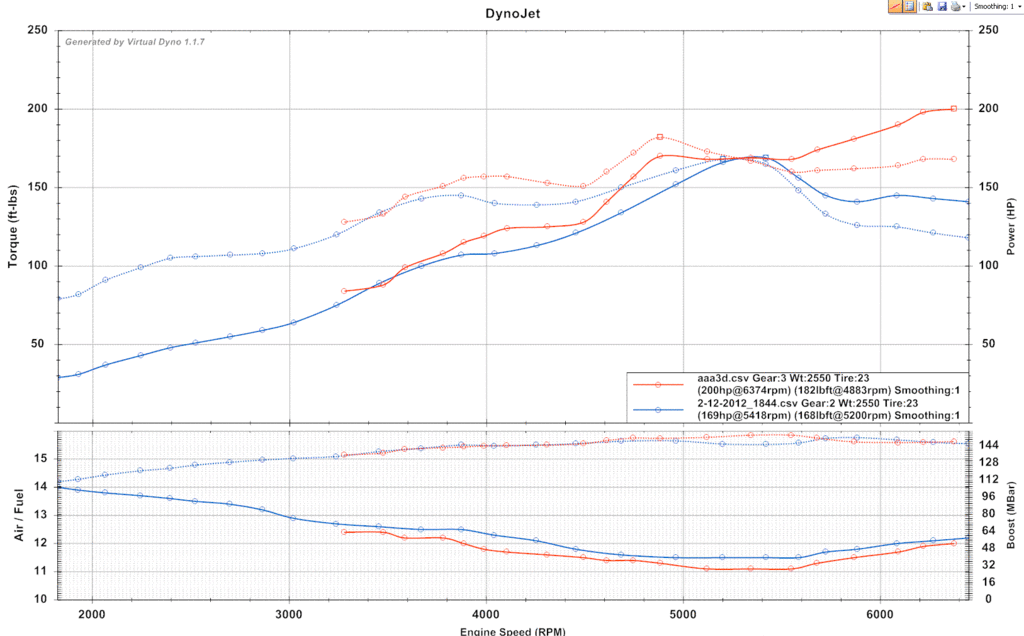
On a side note, i added few degrees. Heres the plots. blue is 2nd gear, red is 3rd gear... was wet out and couldnt hook on 2nd gear. big difference.
<?xml version="1.0" standalone="yes"?>
<CarDataset xmlns="http://tempuri.org/CarDataset.xsd">
<CarParameters>
<CarMake>Mazda</CarMake>
<CarModel>Miata</CarModel>
<CarSubModel>1.8 (5-Speed)</CarSubModel>
<StartYear>1999</StartYear>
<EndYear>2005</EndYear>
<Weight>2350</Weight>
<TransTypeManual>true</TransTypeManual>
<TransGear2>1.888</TransGear2>
<TransGear3>1.333</TransGear3>
<TransGear4>1.000</TransGear4>
<FinalGearRatio>4.30</FinalGearRatio>
<DragCoefficient>0.37</DragCoefficient>
<FrontalArea>22.3</FrontalArea>
<TireDiameter>23.0</TireDiameter>
</CarParameters>
<CarParameters>
<CarMake>Mazda</CarMake>
<CarModel>Miata</CarModel>
<CarSubModel>1.8 (6-Speed)</CarSubModel>
<StartYear>1999</StartYear>
<EndYear>2005</EndYear>
<Weight>2350</Weight>
<TransTypeManual>true</TransTypeManual>
<TransGear2>2.269</TransGear2>
<TransGear3>1.645</TransGear3>
<TransGear4>1.257</TransGear4>
<TransGear5>1.000</TransGear5>
<FinalGearRatio>3.909</FinalGearRatio>
<DragCoefficient>0.37</DragCoefficient>
<FrontalArea>22.3</FrontalArea>
<TireDiameter>23.0</TireDiameter>
</CarParameters>
</CarDataset>
What would be nice is having a timing graph along with the 2 bottom ones. Something else i've noticed is that the kpa does not scale from the bottom number, it always stays at 0 instead of cutting off what is not needed.
On a side note, i added few degrees. Heres the plots. blue is 2nd gear, red is 3rd gear... was wet out and couldnt hook on 2nd gear. big difference.
Reply
0
0

Junior Member
Joined: Jan 2012
Posts: 66
Total Cats: 3
From: Kansas City, KS
Ive found on real dynos and virtual dynos that the closer to 1.00 the gear ratio is the better the runs turn out. The reason is that 2nd gear is so short that you dont get enough data points to get a good graph. The loggers dont sample fast enough to get enough data points is what is the weakest link in the chain. Thats why I left 2nd gear out.
Reply
0
0
Actually, when you use a low gear, a larger percentage of your torque and HP is consumed by overcoming the moments of inertia of rotating components (like your flywheel, wheels and tires . . . and everything else that rotates). A higher gear always gives a number closer to the actual power.
The obvious problem with the highest gear is the speeds attained and the need for longer stretches of straight, flat, traffic/cop-free road. In most of my runs, I use 3rd as a compromise. The program is best used for comparative rather than absolute purposes anyway.
Brad, any progress on exporting a text file? I'm kind of stuck until I have that. Would be OK with me if that was in a registered version.
The obvious problem with the highest gear is the speeds attained and the need for longer stretches of straight, flat, traffic/cop-free road. In most of my runs, I use 3rd as a compromise. The program is best used for comparative rather than absolute purposes anyway.
Brad, any progress on exporting a text file? I'm kind of stuck until I have that. Would be OK with me if that was in a registered version.
Reply
0
0
Junior Member
Joined: Jan 2012
Posts: 66
Total Cats: 3
From: Kansas City, KS
Just got my internet turned on at the new place ... had to move 8.5 hours from home for my new job. Sorry I didnt reply till now but I think thats a valid excuse 
hornet ... please refresh my memory on export a text file ... of just HP and TQ values? I vaguely remember talking to you about this so remind me and Ill get on it.
hornet ... please refresh my memory on export a text file ... of just HP and TQ values? I vaguely remember talking to you about this so remind me and Ill get on it.
Reply
0
0
Just need an export of the HP and TQ parameters that Virtual Dyno derives. Something like "Timestamp, HP, TQ" so that it can be related easily to the input file.
Also, if you made any progress on run averaging using that interpolation function I posted for you, that would be awesome. But I know that's a much bigger project.
Also, if you made any progress on run averaging using that interpolation function I posted for you, that would be awesome. But I know that's a much bigger project.
Reply
0
0
So i've been using Virtual dyno quite a bit. One of the most annoying things is selecting my car over and over and over each run. Most of us will be just like me and will be using 1 car for 99% of our logs. I'm asking for a way to make 1 car default so it can automatically load it.
Reply
0
0
Profile, yes but doesn't appear to be doing anything, when i load a new log all the spaces are empty and i have to select them like i always do. When i go to profile and then the profile i created all i see is edit and remove.
Reply
0
0
Junior Member
Joined: Jan 2012
Posts: 66
Total Cats: 3
From: Kansas City, KS
Dont got to edit or remove ... click on the profile ... and it will populate all your profile info you selected into every run. Or you can right click anywhere in the run box on the left and a context menu will appear showing Smoothing and Profiles. These will only be applied to that particular run.
Reply
0
0
Junior Member
Joined: Jan 2012
Posts: 66
Total Cats: 3
From: Kansas City, KS
Ive got to start working on that text output feature. I fixed the 1.8 -> 1.6 definition and Ive got to push a car definition update out as soon as I add a few more cars so Ill wait and push that update out with the rest.
Reply
0
0
Hey Brad, look over here:
https://www.miataturbo.net/engine-performance-56/bmep-divided-map-why-its-important-60527/
https://www.miataturbo.net/engine-performance-56/bmep-divided-map-why-its-important-60527/
Reply
0
0
Not sure what Jason used for graphing (probably Excel), but once text data output is available, all kinds of post-processing can be done.
What I really meant was that you should take a look at the concepts that Jason was presenting. Those kinds of things could easily be added into Virtual Dyno (you've already done the hard part -- deriving Torque -- all the other equation inputs are already present). A Virtual Dyno with run averaging, BMEP calculation and BMEP/MAP calculation would be one powerful tuning tool.
But, at the least, text data output!!
What I really meant was that you should take a look at the concepts that Jason was presenting. Those kinds of things could easily be added into Virtual Dyno (you've already done the hard part -- deriving Torque -- all the other equation inputs are already present). A Virtual Dyno with run averaging, BMEP calculation and BMEP/MAP calculation would be one powerful tuning tool.
But, at the least, text data output!!
Reply
0
0


