Notices
ECUs and Tuning Discuss Engine Management, Tuning, & Programming

Virtual Dyno

Old Jul 4, 2012 | 09:08 AM
  #121  
hornetball's Avatar
Elite Member
iTrader: (4)
 
Joined: Mar 2008
Posts: 6,301
Total Cats: 697
From: Granbury, TX
Default

I'm a control freak. I do not fear hard.

Speaking of hard . . . text HP/TRQ output? It's been what, a year?
Old Jul 4, 2012 | 02:03 PM
  #122  
matthewdesigns's Avatar
Elite Member
iTrader: (8)
 
Joined: Jun 2008
Posts: 1,648
Total Cats: 55
From: WNC
Default

OK, as per hornetball's advice I changed the time to read in seconds, and then changed the header of that column to read "Time (s)" instead of "Timestamp (us)" (based on what I see in a csv that triple88a posted earlier in the thread). Still not right I'd guess, as it's showing me at >350hp when my airflow is only peaking at 23-24lb/min.

Any other suggestions to make this work? Getting closer...
Attached Files
File Type: csv
log.2012.07.03-21.csv (8.2 KB, 188 views)
Old Jul 4, 2012 | 03:51 PM
  #123  
triple88a's Avatar
Elite Member
iTrader: (2)
 
Joined: Apr 2006
Posts: 10,522
Total Cats: 1,830
From: Chicago, IL
Default

I'll do it, gotta install PWP. Is that a 2nd gear pull? Are you running a 1.6? Which transmission? Which Rear Diff?
Old Jul 4, 2012 | 04:13 PM
  #124  
hornetball's Avatar
Elite Member
iTrader: (4)
 
Joined: Mar 2008
Posts: 6,301
Total Cats: 697
From: Granbury, TX
Default

Hey Matt, plotted your data. Dynojet plot attached (used 3rd gear, stock wheel height and swagged weights at 2250# for car and 170# for driver). It looks pretty reasonable, but the curve gets wacky above 6500 or so. Makes me wonder if your clutch is slipping, although I'll occasionally get something similar at the end of a run -- probably some kind of VD trimming issue at the end of the data. Obviously, the stuff from 6500-on isn't real, but the rest of the curve is. Looks like ~220RWHP. Nice!
Attached Thumbnails Virtual Dyno-discard.jpg  
Old Jul 4, 2012 | 04:45 PM
  #125  
triple88a's Avatar
Elite Member
iTrader: (2)
 
Joined: Apr 2006
Posts: 10,522
Total Cats: 1,830
From: Chicago, IL
Default

^ The log is screwed up from the rev limiter since the rpm keeps going up and down and virtual dyno cant filter that info. Try this instead.
Attached Files
File Type: csv
log.2012.07.03-21.csv (7.7 KB, 175 views)
Old Jul 4, 2012 | 05:00 PM
  #126  
Leafy's Avatar
Elite Member
iTrader: (1)
 
Joined: Jun 2012
Posts: 9,491
Total Cats: 105
From: NH
Default

Originally Posted by matthewdesigns
OStill not right I'd guess, as it's showing me at >350hp when my airflow is only peaking at 23-24lb/min.

Any other suggestions to make this work? Getting closer...
Do you have the correct car weight and gear ratio? Are you sure there wasnt a slight downward grade to the road, strong tail wind (really really strong)? Have aero mods that reduce drag?
Old Jul 4, 2012 | 05:02 PM
  #127  
triple88a's Avatar
Elite Member
iTrader: (2)
 
Joined: Apr 2006
Posts: 10,522
Total Cats: 1,830
From: Chicago, IL
Default

Originally Posted by Leafy
Do you have the correct car weight and gear ratio? Are you sure there wasnt a slight downward grade to the road, strong tail wind (really really strong)? Have aero mods that reduce drag?
Again its because of the revlimiter screwing stuff up (RPM bouncing up and down really quick) See Ricks picture 3 posts up.

Once you cut the bad portion from the log you get a good graph up until the revlimiter starts affecting stuff.

On the file I attached i cut that portion out and adjusted the time so you get a correct dyno.
Old Jul 4, 2012 | 05:10 PM
  #128  
hornetball's Avatar
Elite Member
iTrader: (4)
 
Joined: Mar 2008
Posts: 6,301
Total Cats: 697
From: Granbury, TX
Default

Originally Posted by triple88a
^ The log is screwed up from the rev limiter since the rpm keeps going up and down and virtual dyno cant filter that info. Try this instead.
Ahhhhh . . . better.
Attached Thumbnails Virtual Dyno-discard.jpg  
Old Jul 4, 2012 | 05:14 PM
  #129  
hornetball's Avatar
Elite Member
iTrader: (4)
 
Joined: Mar 2008
Posts: 6,301
Total Cats: 697
From: Granbury, TX
Default

BTW, looking at this graph, I think you could safely add some timing up top.
Old Jul 4, 2012 | 05:28 PM
  #130  
matthewdesigns's Avatar
Elite Member
iTrader: (8)
 
Joined: Jun 2008
Posts: 1,648
Total Cats: 55
From: WNC
Default

Damn you guys are faster than me haha...just did the same thing, trimmed the logfile and got the same results on the graph. And yeah hornetball, after getting my AFRs in line I started adding timing...will revisit that in the near future and keep bumping it up.

Originally Posted by triple88a
I'll do it, gotta install PWP. Is that a 2nd gear pull? Are you running a 1.6? Which transmission? Which Rear Diff?
1.6, stock 5 speed and rear end; 3rd gear run in that file.

Originally Posted by hornetball
Hey Matt, plotted your data. Dynojet plot attached (used 3rd gear, stock wheel height and swagged weights at 2250# for car and 170# for driver). It looks pretty reasonable, but the curve gets wacky above 6500 or so. Makes me wonder if your clutch is slipping, although I'll occasionally get something similar at the end of a run -- probably some kind of VD trimming issue at the end of the data. Obviously, the stuff from 6500-on isn't real, but the rest of the curve is. Looks like ~220RWHP. Nice!
Thanks for plugging all that in…pretty much nailed the weights, too. How did you get the boost to show up in the lower graph?

Here’s a shot of the pull in ECMLink:
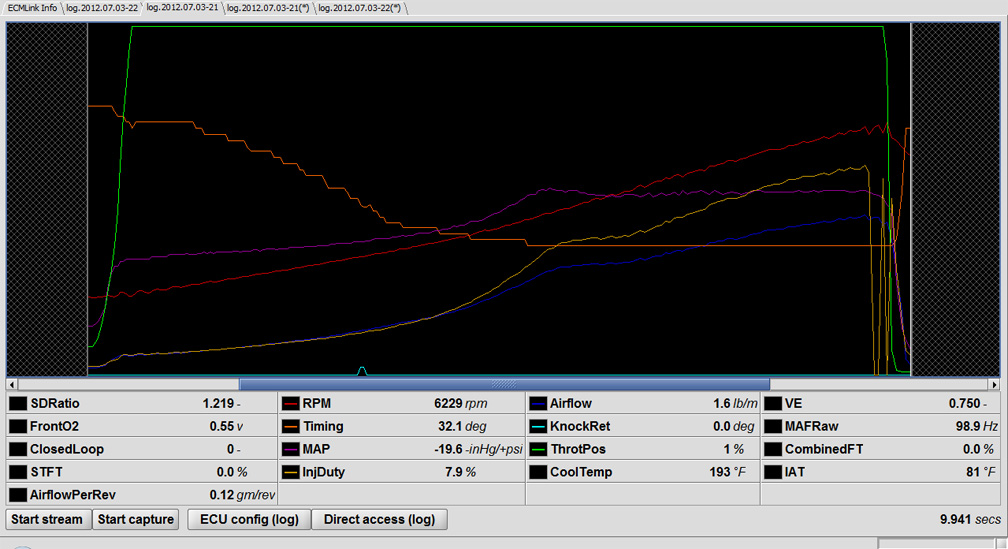
Attached Thumbnails Virtual Dyno-logs-2012-07-21.jpg  

Last edited by matthewdesigns; Jul 4, 2012 at 08:46 PM.
Old Jul 5, 2012 | 12:34 AM
  #131  
hornetball's Avatar
Elite Member
iTrader: (4)
 
Joined: Mar 2008
Posts: 6,301
Total Cats: 697
From: Granbury, TX
Default

Originally Posted by matthewdesigns
How did you get the boost to show up in the lower graph?
File==>Options==>Columns and Profiles

Make sure "Boost" is checked. Copy and paste the column name from your *.csv file (in your case, it was "MAP (-in Hg/+psi)").

BTW, AFR is also a good thing to plot.
Old Jul 5, 2012 | 01:07 AM
  #132  
matthewdesigns's Avatar
Elite Member
iTrader: (8)
 
Joined: Jun 2008
Posts: 1,648
Total Cats: 55
From: WNC
Default

Thanks Rick. And I can't yet log AFRs...need an input buffer for my ecu. But that's coming up sooner than later, and I'll be able to further refine them at that point as well. At the moment they are safe but not quite as smooth as I'd like. And after I found that my wastegate was loose last month I shimmed the ---- out of it, probably accounting for some of that boost spike. I may back it down a little and see if that helps smooth out the curve.
Old Jul 6, 2012 | 12:23 AM
  #133  
bbarnhill's Avatar
Junior Member
 
Joined: Jan 2012
Posts: 66
Total Cats: 3
From: Kansas City, KS
Default

You know you can plot any column in the other columns window? Just sayin.
Old Jul 21, 2012 | 01:44 AM
  #134  
Fireindc's Avatar
Elite Member
iTrader: (13)
 
Joined: Dec 2006
Posts: 7,705
Total Cats: 904
From: Taos, New mexico
Default

Hey guys, I've been trying to get this to work and for the life of me can't figure out what I'm missing. MS1 mspnp log, 3rd gear pull, once i can get it to work i'm going to work on getting some better pulls. As you can see my boost control sucks.

It gives the following error when I try to plot it:

"E101: Not all columns needed for calculations found.
REQUIRED COLUMNS: Time, RPM, Throttle Position
If your log does not contain these, the developer does not need your log."

Its a regular ms1 log which contains all of the above.

Please help me plot this and let me know what I need to do for future plots.
Attached Files
File Type: msl
3rd pull.msl (161.7 KB, 229 views)
Old Jul 21, 2012 | 02:10 AM
  #135  
matthewdesigns's Avatar
Elite Member
iTrader: (8)
 
Joined: Jun 2008
Posts: 1,648
Total Cats: 55
From: WNC
Default

Originally Posted by Fireindc
Please help me plot this and let me know what I need to do for future plots.
Originally Posted by ianferrell
Quick update, if you delete the first line from an msl file it seems to be able to parse the files (I've been renaming them .txt so it finds the files)
Did you do that? There's some good info on the first few pages of the thread. I had to export my logs as a .csv then do some trickery to get it to work. I don't know what to use to open .msl files or I'd try it myself.
Old Jul 21, 2012 | 02:50 AM
  #136  
matthewdesigns's Avatar
Elite Member
iTrader: (8)
 
Joined: Jun 2008
Posts: 1,648
Total Cats: 55
From: WNC
Default

I just dl'd Megalogviewer so I could see your file. Am I seeing your TP signal correctly? The steady, but low, value does not correspond to the jagged looking graph. That could be part of the problem with viewing the log in VD if so.
Old Jul 21, 2012 | 01:43 PM
  #137  
Fireindc's Avatar
Elite Member
iTrader: (13)
 
Joined: Dec 2006
Posts: 7,705
Total Cats: 904
From: Taos, New mexico
Default

You may be right. I've noticed that before, what the hell does that mean? Literally the TPS is a jagged line across the log when viewed in MLV. Screenshot for easier reference.
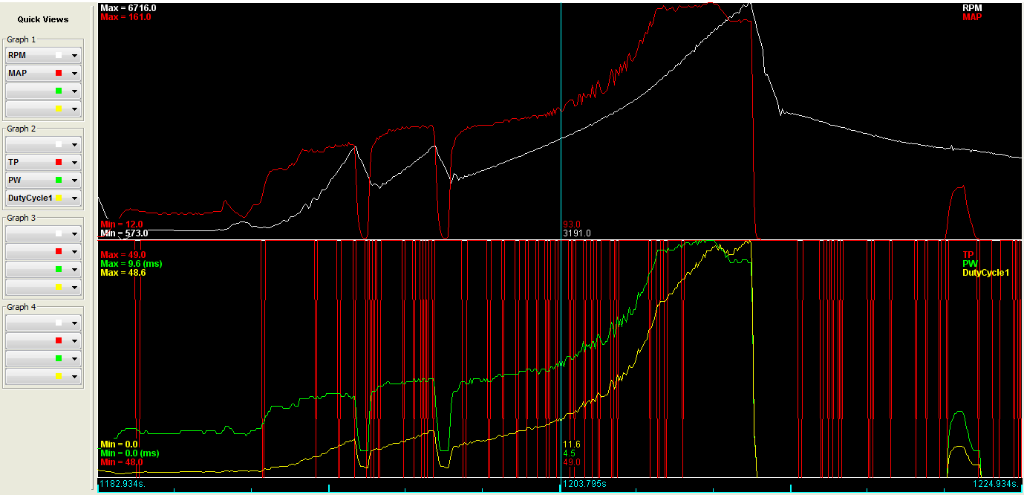


I know I need to upgrade from my crappy 1990 TPS (on/off switch) to a variable TPS sensor, but is this part of my trouble when i go to graph out my log?
Attached Thumbnails Virtual Dyno-datalogtpsscreenshot.png  
Old Jul 21, 2012 | 02:24 PM
  #138  
triple88a's Avatar
Elite Member
iTrader: (2)
 
Joined: Apr 2006
Posts: 10,522
Total Cats: 1,830
From: Chicago, IL
Default

Change it to 100 where the pull is, change everywhere else to a random low number like 3.
Old Jul 21, 2012 | 02:54 PM
  #139  
Fireindc's Avatar
Elite Member
iTrader: (13)
 
Joined: Dec 2006
Posts: 7,705
Total Cats: 904
From: Taos, New mexico
Default

Do i need ms excel to do this? I tried opening it in a notepad and the info looks jumbled to me.

Working on getting a excel torrent now.
Old Jul 21, 2012 | 04:55 PM
  #140  
matthewdesigns's Avatar
Elite Member
iTrader: (8)
 
Joined: Jun 2008
Posts: 1,648
Total Cats: 55
From: WNC
Default

I just opened it up in Excel, I'll dick around with it later when I have some time. From the log viewer, it looks like your pull starts at timestamp ~1200 and ends at ~1212...that correct?

Thread Tools
Search this Thread

All times are GMT -4. The time now is 08:46 AM.