


Another Computer Build Thread


I have that monitor. Double plus good. I think I have 1 dead pixel, but it's over 2 years old now, so that's not bad.
How are you getting $125? I see $159 and a $20 off coupon code.
How are you getting $125? I see $159 and a $20 off coupon code.
Reply
 0
0

0


I got a good deal on that monitor 2 years ago for $159.
Not sure if that says a lot about its reliablity, or the ridiculousness that is computer monitors (all being 1080p).
Not sure if that says a lot about its reliablity, or the ridiculousness that is computer monitors (all being 1080p).
Reply
0
0

Thread Starter
Junior Member
Joined: Jul 2010
Posts: 52
Total Cats: 0
From: Home: Hatfield PA, School: Rochester NY
Picked up an i5-3570k from microcenter today. Got a gigabyte Z77X-D3H too. Wanted to get a UD3H, but they were out. The D3H should be fine for a mild air cooled overclock. Picked up a cheap keyboard and mouse too. Only thing left is a case. I'd like to get the Fractal Arc Midi, but I'm gonna see what deals pop up in the next week and a half. Getting pretty excited to build this sucker
Reply
0
0
Nice. I'm lazy so I still have the OEM fan and heatsink installed. I have a nice one, and at some point I'll put it in, but right now I am doing fine at 4GHz with no voltage bump, so I am not in a big hurry.
Reply
0
0
Thread Starter
Junior Member
Joined: Jul 2010
Posts: 52
Total Cats: 0
From: Home: Hatfield PA, School: Rochester NY
The arc midi went on sale for $60 this morning, so I have all my parts ordered. Now I just have to wait to go back to school (where I shipped all my parts) to build it. Final bill was $684.23 for everything. Pretty darn good price if you ask me
Reply
0
0


Joined: Sep 2005
Posts: 34,381
Total Cats: 7,504
From: Chicago. (The less-murder part.)
Some time back, I'd mentioned how in the late 90s, there was a trend in overclocking which involved submerging the entire PC into a fish tank filled with mineral oil. (This was before "water blocks" existed as we know them today.)
Turns out that at least one manufacturer has actually created a PC case which is, in effect, a giant plastic fish tank intended to be filled with mineral oil!
This isn't a joke, it's actually a real product. DIY Computers: Mineral Oil Aquarium PC - Kits Available
Turns out that at least one manufacturer has actually created a PC case which is, in effect, a giant plastic fish tank intended to be filled with mineral oil!
Looking for an unconventional case to show off and a matching cooling solution to go with it? Boutique PC maker Puget Systems has announced a new revision of their unique aquarium PC, which submerges your machine's components in mineral oil to keep them cool -- needless to say it's not for the faint of heart. The Aquarium PC V4 is available as a do-it-yourself kit for adventurous users who would like to experiment with alternative cooling solutions.
The company first started offering a DIY kit for mineral oil submerged computers in 2008. Since then, they've apparently seen enough demand for the aquarium PC that they decided to purchase a laser cutting machine to start manufacturing the kits entirely in-house. This allowed them to bring down costs and create a much more finely tuned product.
Puget explains the difference with their previous V3 kit: "Instead of large bulky bracing, we cut it down to only what is necessary. Instead of dual pumps with complicated interconnects, we run a single more powerful pump. This leads to a dramatic decrease in complication, assembly, number of parts needed, […] and less points of possible failure"
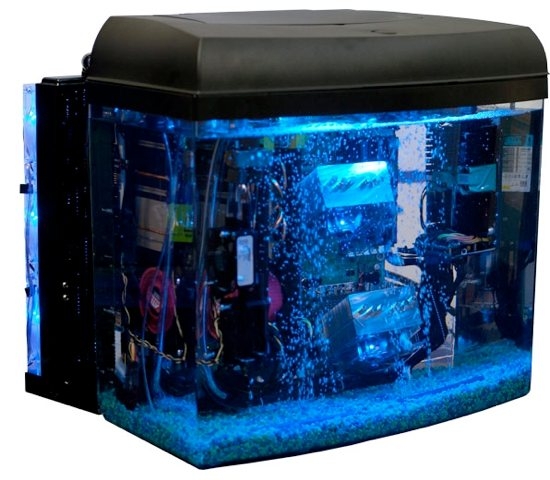
The V4 kit will run you $596 plus shipping and includes a 12-gallon tank and cover, acrylic motherboard tray, 7 slot I/O shield, power cord, power/HDD LEDs, power switch, PCI SATA and power bracket, 3-inch brushed nickel wire handles, hard drive mounts that go above the surface, Watercool MO_RA3 Pro radiator and a radiator stand, submersible Swiftech MCP35X pump, 5 feet of half-inch tubing, and all necessary screws, barbs, and fittings.
The company first started offering a DIY kit for mineral oil submerged computers in 2008. Since then, they've apparently seen enough demand for the aquarium PC that they decided to purchase a laser cutting machine to start manufacturing the kits entirely in-house. This allowed them to bring down costs and create a much more finely tuned product.
Puget explains the difference with their previous V3 kit: "Instead of large bulky bracing, we cut it down to only what is necessary. Instead of dual pumps with complicated interconnects, we run a single more powerful pump. This leads to a dramatic decrease in complication, assembly, number of parts needed, […] and less points of possible failure"
The V4 kit will run you $596 plus shipping and includes a 12-gallon tank and cover, acrylic motherboard tray, 7 slot I/O shield, power cord, power/HDD LEDs, power switch, PCI SATA and power bracket, 3-inch brushed nickel wire handles, hard drive mounts that go above the surface, Watercool MO_RA3 Pro radiator and a radiator stand, submersible Swiftech MCP35X pump, 5 feet of half-inch tubing, and all necessary screws, barbs, and fittings.
This isn't a joke, it's actually a real product. DIY Computers: Mineral Oil Aquarium PC - Kits Available
Reply
0
0
Yep, that's the one I was too lazy to go find when we first started talking about it. It's pretty cool.
Also when I win the lottery and/or Obama gives me a bunch of moneys I would totally get one of those just to have it and brag about it.
Oh cool computer. Too bad it's not in a tank of mineral oil.
Also when I win the lottery and/or Obama gives me a bunch of moneys I would totally get one of those just to have it and brag about it.
Oh cool computer. Too bad it's not in a tank of mineral oil.
Reply
0
0


Dear Joe,
I added a 2nd hard drive to my computer over the weekend. During that time, I added a spare 2nd case fan in the front to draw air in. My GPU reports much cooler temps and I was able to overclock it a bit further from 575MHz to 700Mhz.
Love, Brain
P.S. I didn't hack away the metal "mesh" because I was way too lazy and I half-assed the install anyways.
I added a 2nd hard drive to my computer over the weekend. During that time, I added a spare 2nd case fan in the front to draw air in. My GPU reports much cooler temps and I was able to overclock it a bit further from 575MHz to 700Mhz.
Love, Brain
P.S. I didn't hack away the metal "mesh" because I was way too lazy and I half-assed the install anyways.
Reply
0
0
Joined: Sep 2005
Posts: 34,381
Total Cats: 7,504
From: Chicago. (The less-murder part.)
I wonder how much cooler than 39° my new card would run while operating at 1 Ghz if I added a second case fan?
I guess we'll never know.

Reply
0
0
Joined: Sep 2005
Posts: 34,381
Total Cats: 7,504
From: Chicago. (The less-murder part.)
THIS is why the regulations state that we're supposed to keep our helmets on and securely latched, even when all indications are that the atmosphere is breathable.
Reply
1
1

Alright guys, I have a few more questions.
Would you buy this? Newegg.com - Acer G246HLAbd Black 24" 5ms Widescreen LED Monitor 250 cd/m2 ACM 100,000,000:1 (1000:1)
Also, I need some opinions on wireless mouse and keyboard combos. I know they are generally frowned upon, but I need them for when I use my 32" tv as a monitor and lay on my couch.
Serious business guys.
Would you buy this? Newegg.com - Acer G246HLAbd Black 24" 5ms Widescreen LED Monitor 250 cd/m2 ACM 100,000,000:1 (1000:1)
Also, I need some opinions on wireless mouse and keyboard combos. I know they are generally frowned upon, but I need them for when I use my 32" tv as a monitor and lay on my couch.
Serious business guys.
Reply
0
0

wireless keyboard/mouse for use on the couch? Get one of the keyboards with a track pad on it. Basically a laptop keyboard without the rest of the laptop. Dont know any brands for those though.
I just got 16gb of ram delivered for my work laptop. Waiting for the tech to install it since there is a high chance of breaking the keyboard/its a complete pain in the *** on my work station. I'm very tempted to do the 2 easy sticks, but I dont want to get my pee pee slapped
I just got 16gb of ram delivered for my work laptop. Waiting for the tech to install it since there is a high chance of breaking the keyboard/its a complete pain in the *** on my work station. I'm very tempted to do the 2 easy sticks, but I dont want to get my pee pee slapped
Reply
0
0
I got this one for my mediacenter.
It's not as good as having a real mouse, but it works MUCH better than a real mouse when lying on the couch. Which I do a lot of, so I should know.
It's not as good as having a real mouse, but it works MUCH better than a real mouse when lying on the couch. Which I do a lot of, so I should know.
Reply
0
0


