


Enhanced Megasquirt Group Buy for all Miatas (90-05)



Junior Member
Joined: Jun 2010
Posts: 291
Total Cats: 43
From: Minneapolis, MN
 OEM mounting location details
I reused the lower bracket. It attaches to the MS case using small bolts/nuts/washers. A zip tie between the front of the case and the upper bracket stabilizes it.
****IF you do this, you need to buy a 90 degree, serial adapter for your communication cable. There isn't enough room to attach a serial cable using the OEM lower bracket because the MS sits too close to the firewall. Another option may be to cut out part of the firewall insulation but that didn't occur to me until just now.
I can't remember where I ordered the adapter but it required slight modification (dremel tool) to screw it to the MS because the mounting screws weren't long enough. I could have bought longer screws but it was easier to cut the plastic than drive to find longer, tiny bolts with proper thread pitch! I didn't take any pictures of the modified adapter. My serial cable screws into the adapter and exits towards the driver's front tire. I ran the cable under the dash, down the console, and up into the storage compartment through the hole for the truck/gas release levers.
I considered posting a "How To Mount" post but figured if you can't figure out how to mount it sercurely, maybe you shouldn't be installing it.


Reply
 0
0

0


Reply
0
0


Below are pictures and a brief write up that Jesse99James did.
I bought a DB9, 90 degree adapter. I used MS Paint to show how I modified it. The screws/bolts weren’t long enough to attach to the serial port on my MSII. Cutting the DB9 adapter was easier than locating longer screws. Beware, there are multiple (4?), 90 degree adapters. You do NOT want the two that have screws on the Female side. The two you want will have screws on the Male side. The only difference is the direction it points.
I chose to buy the one that points towards the driver’s side. Either may work BUT I can’t remember if there was a reason I chose this adapter. ...there may be an obstruction towards the passenger side.
I also used a zip tie to secure the front of the MS case to the upper bracket.
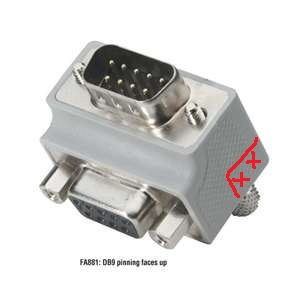
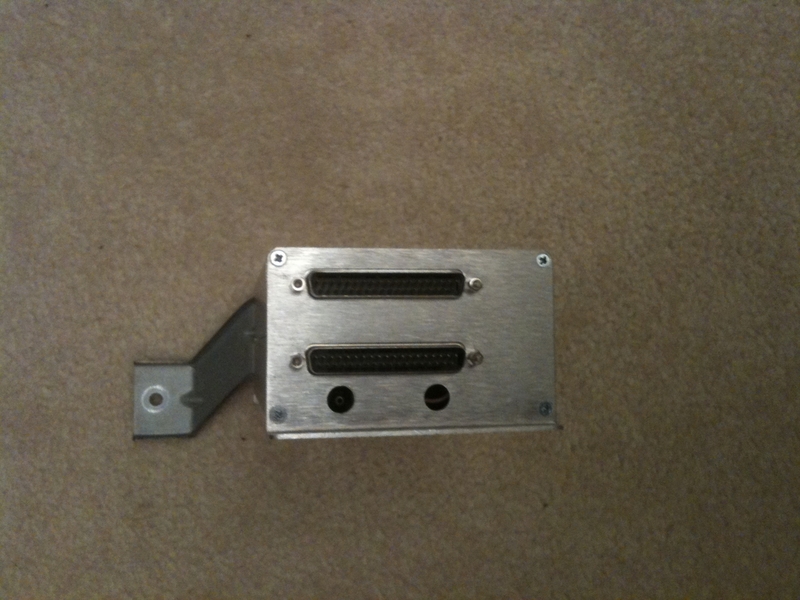
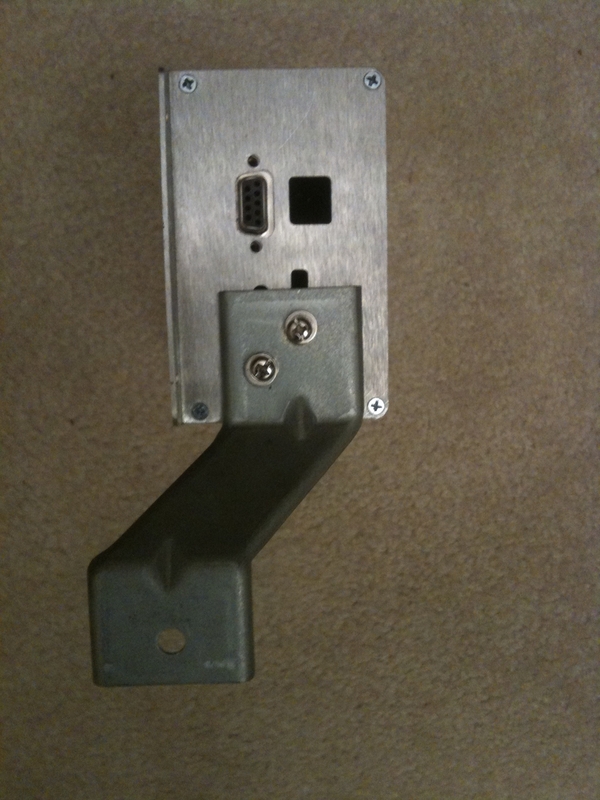
I bought a DB9, 90 degree adapter. I used MS Paint to show how I modified it. The screws/bolts weren’t long enough to attach to the serial port on my MSII. Cutting the DB9 adapter was easier than locating longer screws. Beware, there are multiple (4?), 90 degree adapters. You do NOT want the two that have screws on the Female side. The two you want will have screws on the Male side. The only difference is the direction it points.
I chose to buy the one that points towards the driver’s side. Either may work BUT I can’t remember if there was a reason I chose this adapter. ...there may be an obstruction towards the passenger side.
I also used a zip tie to secure the front of the MS case to the upper bracket.
Reply
0
0

Joined: Jun 2006
Posts: 29,085
Total Cats: 375
From: Republic of Dallas
Oh ----, I was thinking this was just like my MSpnp, what kind of cable do I need to plug into the MS2+++ computer?
My package arrived yesterday, there is a two-day window for me to pick it up, and I was told yesterday they will not give it to me because my delivery address differs from my license. This is ------- retarded. I'm going back to argue more today.
My package arrived yesterday, there is a two-day window for me to pick it up, and I was told yesterday they will not give it to me because my delivery address differs from my license. This is ------- retarded. I'm going back to argue more today.
Reply
0
0

Thread Starter
Joined: Jun 2006
Posts: 6,020
Total Cats: 369
From: Athens, Greece
Either a serial port or a USB to serial port. If you have the gear to connect with the MSPNP, then you don't need anything else to connect to the Enhanced MS2.
Reply
0
0
Joined: Jun 2006
Posts: 29,085
Total Cats: 375
From: Republic of Dallas
Reply
0
0
Junior Member
Joined: Jun 2010
Posts: 291
Total Cats: 43
From: Minneapolis, MN
No pictures of it mounted. There is clearance all around. It doesn't touch anywhere other than the single, 10mm bolt to the firewall through the OEM bracket as shown mounted in the above pictures PLUS one plastic wire tie to the OEM, upper bracket. This just shows my solution after reading somebody say mounting the MSII in the OEM spot was tight. It really isn't that bad! It doesn't require making new brackets or modifying anything other than the 90* serial adaptor which was <$15 shipped IIRC. All the holes used are already in the MSII case. I simply cut down two bolts and dug out a few washers and nuts from my spare parts bins. 
I don't have cruise control so I ran my wideband O2's signal wire and the vacuum hose through the hole in the firewall that was intended for the cruise control cable. YMMV for vacuum hose and other wiring.
I don't have cruise control so I ran my wideband O2's signal wire and the vacuum hose through the hole in the firewall that was intended for the cruise control cable. YMMV for vacuum hose and other wiring.
Reply
0
0
Joined: Jun 2006
Posts: 29,085
Total Cats: 375
From: Republic of Dallas
What wire are you guys using for the WB input?
I typically drill a big hole in the passenger side footwell for all the accessory wires, then foam it shut so it's somewhat water tight. If I ever get the dash out of the green car I'm doing a bulkhead there in its place.
I typically drill a big hole in the passenger side footwell for all the accessory wires, then foam it shut so it's somewhat water tight. If I ever get the dash out of the green car I'm doing a bulkhead there in its place.
Reply
0
0
Joined: Jun 2006
Posts: 29,085
Total Cats: 375
From: Republic of Dallas
I ahve a few dumb questions that I'll open to the peanut gallery rather than email Dimitris over and over.
I'd like to use the factory o2 sensor harness if possible to run the WB signal, Gauge signal, and the other two wires for calibration. Can I use those wires for this? If so, is it a bitch to add a pin to the connector for the factory o2 signal wire?
I'd like to use the factory o2 sensor harness if possible to run the WB signal, Gauge signal, and the other two wires for calibration. Can I use those wires for this? If so, is it a bitch to add a pin to the connector for the factory o2 signal wire?
Reply
0
0


