


New Tuner Studio version with VEanalyze live


Newb
Joined: Aug 2007
Posts: 22
Total Cats: 0
From: Italy, €urope.

The standard MegaLogViewer & TunerStudio License agreement covers one (1) user installing the application on up to 3 computers for their own use.
Reply
 0
0

0


Newb
Joined: May 2008
Posts: 33
Total Cats: 0
Hi,
just a couple of questions.
where can i read the MegaLogViewer & TunerStudio License agreement?
i will buy the TS soon but i need to know if i can reinstall the program whenever i want... etc... and if can use the registration key in the future versions?
just a couple of questions.
where can i read the MegaLogViewer & TunerStudio License agreement?
i will buy the TS soon but i need to know if i can reinstall the program whenever i want... etc... and if can use the registration key in the future versions?
Reply
0
0
Newb
Joined: Aug 2007
Posts: 22
Total Cats: 0
From: Italy, €urope.
register in this forum and ask there, I'm sure they'll answer all your questions:
http://www.msextra.com/forums/viewforum.php?f=122
http://www.msextra.com/forums/viewforum.php?f=122
Reply
0
0

Gawd, I just configured this last night and tuned idle like a dork in my garage. So awesome. I just wish I hadn't spent last dyno day ******* with mt/mlv to try to dial in my afr. This would have been way easier to make changes on the fly and see what the result was.
Tomorrow I'll road tune my goofy CSP car. Almost definitely get pulled over.
Tomorrow I'll road tune my goofy CSP car. Almost definitely get pulled over.
Reply
0
0

Junior Member
Joined: Oct 2008
Posts: 272
Total Cats: 0
From: Manchester, UK
The "old-style-tuning" via log/MLV is nowhere near as good as the VEanalyze live.
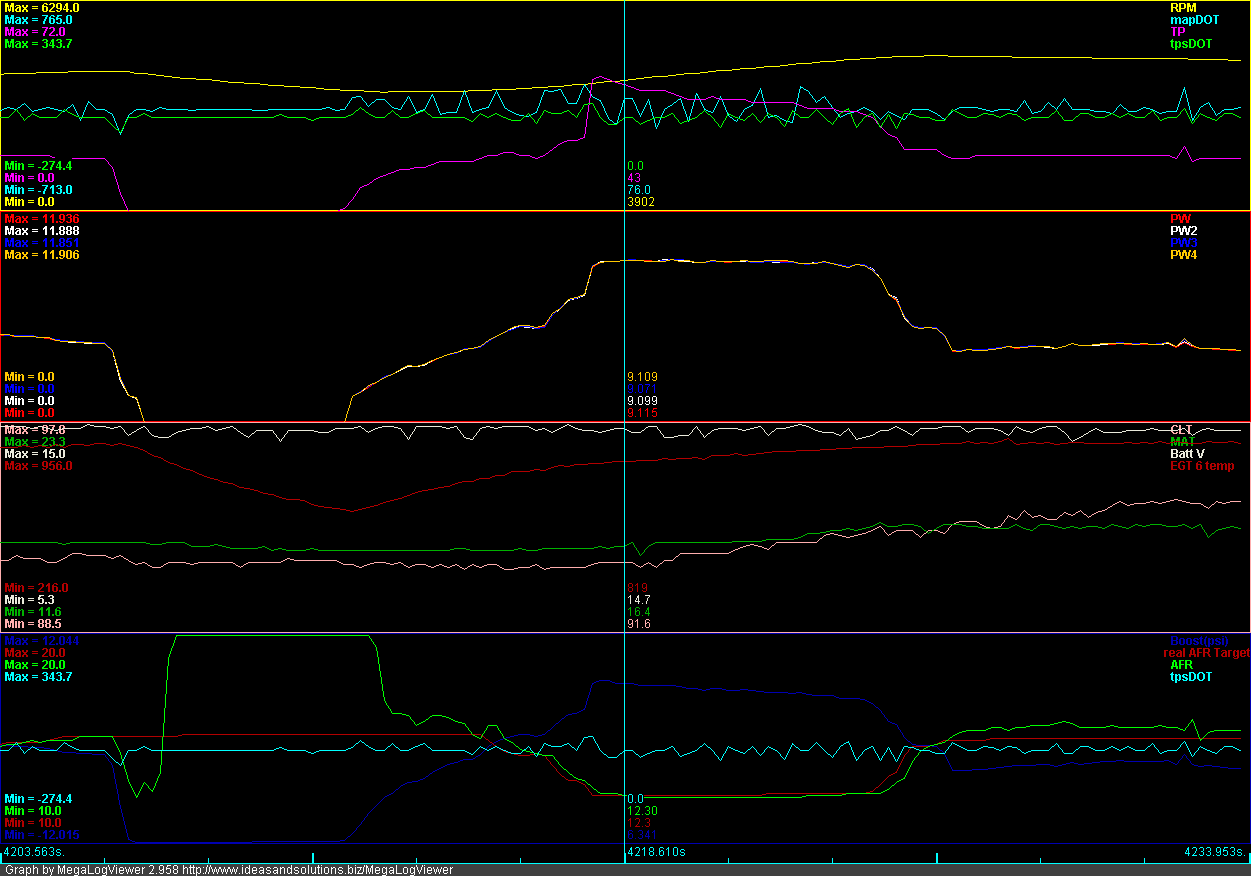
This is a screen shot of a run I did yesterday. - It's about 1 hour of driving done with veanalyze
Have a look at how the AFR follows the line called "real AFR target" - I could never get this so close with MLV.
As stated many times before - this piece of software is worth every cent I paid.
Greets
This is a screen shot of a run I did yesterday. - It's about 1 hour of driving done with veanalyze
Have a look at how the AFR follows the line called "real AFR target" - I could never get this so close with MLV.
As stated many times before - this piece of software is worth every cent I paid.
Greets
Reply
0
0




Thread Starter
Elite Member
Joined: Mar 2006
Posts: 1,574
Total Cats: 106
From: Schwarzenberg, Germany
At the time I did this - the AFR target was of with a factor of 100 - 14.7 was 1470. I had to create an separate value using a formula:
I have no idea how the formula was - something like
realAFRtarget=[afrtgt1]/100
or such.
You asked me about the number of traces:
That is something you can change in the MSgraph.properties file.(iirc)
That file is located in you MLV directory. Open it with the windows-editor.
You will find the following somewhere inside the file:
(in your case set to 3 - just change to 4, save and you are good to go.)
#Number of selectors and max number of graphs
numberOfGraphs=4
numberOfOverlayGraphs=4
numberOfOverlays=4
Please make an copy of the original file first!
I have no idea how the formula was - something like
realAFRtarget=[afrtgt1]/100
or such.
You asked me about the number of traces:
That is something you can change in the MSgraph.properties file.(iirc)
That file is located in you MLV directory. Open it with the windows-editor.
You will find the following somewhere inside the file:
(in your case set to 3 - just change to 4, save and you are good to go.)
#Number of selectors and max number of graphs
numberOfGraphs=4
numberOfOverlayGraphs=4
numberOfOverlays=4
Please make an copy of the original file first!
Reply
0
0
 BARO correction
I decided to start a new tune today just to see where I end up. I set my default baro to 98 since this is my local correction for altitude.
Does VE analyze take this into account? It doesn't appear that it does because my logs are showing a 2% correction for pressure.
If I set the default to 98, I would expect that it tunes the fuel cells referenced to 98kpa. However, it appears to tune to a default 100kpa.
This makes it seem like it would be better to set the default baro to 100.
Any thoughts?
Does VE analyze take this into account? It doesn't appear that it does because my logs are showing a 2% correction for pressure.
If I set the default to 98, I would expect that it tunes the fuel cells referenced to 98kpa. However, it appears to tune to a default 100kpa.
This makes it seem like it would be better to set the default baro to 100.
Any thoughts?
Reply
0
0

Reply
0
0

Newb
Joined: Feb 2011
Posts: 20
Total Cats: 0
I just started running it this morning on the way to work.. Too soon to be sure, but my car seemed to run pretty well. Hopefully this will work out.. I have had limited success tuning manually. I have not found clear enough guidelines to make good tuning decisions.. There are just too many variables.. I may figure it out someday, but if this can make the car run mostly ok for now.. it is well worth the money..
Reply
0
0

I just started running it this morning on the way to work.. Too soon to be sure, but my car seemed to run pretty well. Hopefully this will work out.. I have had limited success tuning manually. I have not found clear enough guidelines to make good tuning decisions.. There are just too many variables.. I may figure it out someday, but if this can make the car run mostly ok for now.. it is well worth the money..
It will only tune as good as the AFR table so make sure you got that going on.
Far as I know the AFR table is what tells it what you want to have lean rich etc...
Reply
0
0

Senior Member
Joined: Jun 2006
Posts: 684
Total Cats: 1
From: Orlando FL - UCF
To anyone wondering if the $50 is worth it, YES.
Bought it last night after not getting to try the beta, slightly wondering why I'd pay $50 for essentially one extra feature. I've since put about 75 miles on the car with VE Analyzer running and it has been working flawlessly. The car was already fairly smooth, although rich and with slightly unsteady readings. Now, the AFRs are much more predictable, and all my transient points in the table are much better tuned.
+1 in my book.
Bought it last night after not getting to try the beta, slightly wondering why I'd pay $50 for essentially one extra feature. I've since put about 75 miles on the car with VE Analyzer running and it has been working flawlessly. The car was already fairly smooth, although rich and with slightly unsteady readings. Now, the AFRs are much more predictable, and all my transient points in the table are much better tuned.
+1 in my book.
Reply
0
0


Fuel and spark changes occur in real time but will not be permanently saved unless you burn.

Reply
0
0

Joined: Jun 2006
Posts: 29,085
Total Cats: 375
From: Republic of Dallas
Reply
0
0

Well, I purchased this software last night. Still have to install the MSPNP/LC1/AFR Gauge in my 96, but can't wait to get going. Have a feeling it's gonna be a long learning process to get up and running, as I am a total NOOB with stand-alone tuning.
Jason
Jason
Reply
0
0

If you have any issues / tips / tricks i need to know about them. Im in a similar situation with my ms3X and am planning on running VE when i finish my wiring. (No tuning expierence)
Reply
0
0


