


New Tuner Studio version with VEanalyze live


Reply
 0
0

0


Junior Member
Joined: Oct 2008
Posts: 272
Total Cats: 0
From: Manchester, UK

Oh my gawd! 
I was prompted by TS and installed the update today at work on my laptop, I didn't even see the new feature "VE Analyser live"
Another nice addition that I noticed was that any cell changes you make to your VE table holds the "red" and "blue" colours and notes previous values even after closing the table and re-opening it/switching 3D view etc. The old version used to lock the live trail after importing a modified VE table from MLV which meant you were forced to close the table and re-open it if you wanted to watch the live trail as you drive.
I did spot another issue too, I made changes by interpreting MLV data while offline and modifying my MSQ by hand in TS while offline and saving it to my usual folder. When connecting the laptop to my MS and connecting successfully, there was no 'settings change report' prompt? It confused me for second, so I had to manually load my MSQ in while my MS was online.
I'll try this new feature tomorrow for sure! I'm very excited about it if it does what it says on the tin!
I was prompted by TS and installed the update today at work on my laptop, I didn't even see the new feature "VE Analyser live"
Another nice addition that I noticed was that any cell changes you make to your VE table holds the "red" and "blue" colours and notes previous values even after closing the table and re-opening it/switching 3D view etc. The old version used to lock the live trail after importing a modified VE table from MLV which meant you were forced to close the table and re-open it if you wanted to watch the live trail as you drive.
I did spot another issue too, I made changes by interpreting MLV data while offline and modifying my MSQ by hand in TS while offline and saving it to my usual folder. When connecting the laptop to my MS and connecting successfully, there was no 'settings change report' prompt? It confused me for second, so I had to manually load my MSQ in while my MS was online.
I'll try this new feature tomorrow for sure! I'm very excited about it if it does what it says on the tin!
Last edited by CRAIGO; Jan 14, 2010 at 06:41 PM.
Reply
0
0


Nope, just follow that guide that someone posted a while ago, and you are all set. All of your settings are stored on the ECU, so when you install TS, you set up your car's "profile" and are good to go!
Reply
0
0
 awesome now searching to find link lol Thanks



My setup (.ini) files were different. So I had to change the afr gauge settings to read AFR instead of volts again. Other than that the menus are nearly identical. I think the nicest part was the gauges working behind the menus, and the little icons in the drop down menus. I always had to read every entry to find the AFR target table, now I know exactly where it is, it's the only table under "more settings"
My batteries dead, so I can only rev away at a stop with the laptop plugged in, but I'm going to go try this now, I'll report back in a few minutes.
My batteries dead, so I can only rev away at a stop with the laptop plugged in, but I'm going to go try this now, I'll report back in a few minutes.
Reply
0
0
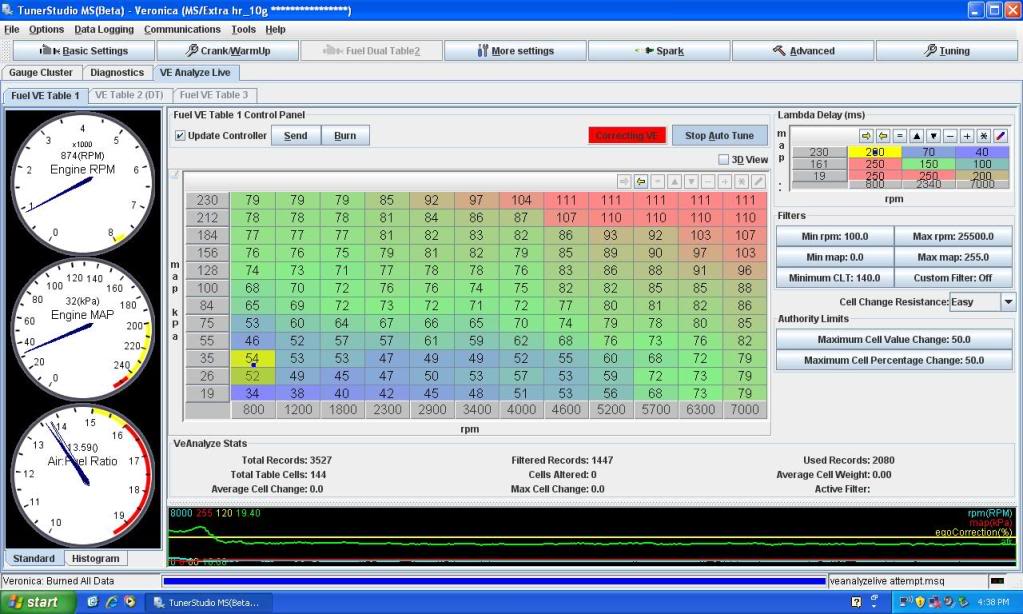
Well there it is. I can't get it to change anything, even with the resistance set to easy. As I said I can only rev it since my laptop battery is dead, and I'm unboosted since my 440's are out for cleaning, but at least this shows you what it looks like. The only time it wants to change something is when I floor the throttle, at which point it filters the log due to a "accel flag", whatever that means. Pretty simple though, me likely.
Reply
0
0

Thanks for the screenshot, I'm anxious to try this out.
Probably that it's ignoring the info since it's been "tainted" by the AE.
Probably that it's ignoring the info since it's been "tainted" by the AE.
Reply
0
0

I can verify that it works pretty well. Took it for a few runs and gave it a 10% authority, it didn't blow my **** up and it started dialing down my wot afrs. Seems like a super win...as soon as the "small" problem with the changes not visually taking effect.
Reply
0
0

Well there it is. I can't get it to change anything, even with the resistance set to easy. As I said I can only rev it since my laptop battery is dead, and I'm unboosted since my 440's are out for cleaning, but at least this shows you what it looks like. The only time it wants to change something is when I floor the throttle, at which point it filters the log due to a "accel flag", whatever that means. Pretty simple though, me likely.
Reply
0
0

Down below where it says "active filter:", it's blank. I had it up at 160 but I didn't want to wait that long, it says "active filter: min clt". No warnings like MLV saying that 100% of the log was ignored because of settings.
Reply
0
0


see mine dont take...
Reply
0
0
Reply
0
0
Oooooooh. I see. I'm positive that those changes take. There is a bug that doesn't update the button text. If you click the button again, the value that you set is still in there, meaning that the variable in memory which controls the authority is taking.
Reply
0
0


