


New Tuner Studio version with VEanalyze live


Reply
 0
0

0


Having used the autotune for a day i can say i like it... I initially forgot to edit a formula in the ini file so it was seeing AFRs incorrectly in the target table, but after that was resolved it appears that the live tuning works quite well.
i'm goign to let it do its thing for around an hour's worth of driving and save the map it ends up with. I will then re-set to the previous MSQ and do it over again. Then I can see if the results are the same (they should be.. right??)
-Tomaj
i'm goign to let it do its thing for around an hour's worth of driving and save the map it ends up with. I will then re-set to the previous MSQ and do it over again. Then I can see if the results are the same (they should be.. right??)
-Tomaj
Reply
0
0

Junior Member
Joined: Mar 2007
Posts: 95
Total Cats: 0
From: Chile
I'm about to modify the board to change to MS2
Reply
0
0



Anyone know what happens if you change settings while it's auto-tuning? Like today I changed from "easy" to "normal". Do I need to start and stop the auto-tuning for the change to take effect?
Reply
0
0
I've been playing some more with this feature. Over the past couple of days I've run the autotune feature about 5 times. It seems to tune within two fuel points around a certain value. I presume this has to to with the difference in temp. My 3D view isn't really very smooth, but my car runs very smoothly. This is probably due to the MS2's ability to interpolate between cells very quickly and efficiently.
My accel enrich is turned off, and so is my EGO correction.
Do you guys have accel enrich set to MAP or TPS based?
I have some nice long steep hills in the area so I am going to try to autotuning on these this weekend.
Is everyone else manually smoothing their ve table, or are you all letting it be, and then letting the EGO correction do its thing?
How many of you are tuning with EGO and accel enrich on, and how many with them off? How many have autotuned in both scenarios? Which did you think worked best?
My accel enrich is turned off, and so is my EGO correction.
Do you guys have accel enrich set to MAP or TPS based?
I have some nice long steep hills in the area so I am going to try to autotuning on these this weekend.
Is everyone else manually smoothing their ve table, or are you all letting it be, and then letting the EGO correction do its thing?
How many of you are tuning with EGO and accel enrich on, and how many with them off? How many have autotuned in both scenarios? Which did you think worked best?
Reply
0
0


I always tune with EGO and accel enrichments on. It's pretty apparent where you'll nee dot tweak things, **** should be close after a week of driving around, eventually it'll just wanna move the numbers up or down a point or two depending on the current conditions and it's nothing EGO wont take care of anyways.
I went to buy a power inverter at lunch today, not only did they not have the one the website said was in stock, but i broke my damn usb port on my laptop!
I went to buy a power inverter at lunch today, not only did they not have the one the website said was in stock, but i broke my damn usb port on my laptop!
Reply
0
0

I autotune with everything left on. What I've noticed is that autotune produces a VE table that doesn't look anything like what I would produce by hand. It is a little choppy which makes me want to hand smooth, but I have to say, the car runs great and my logged afr's are dead on, so I'm not sure if its worth my time.
Reply
0
0
I always tune with EGO and accel enrichments on. It's pretty apparent where you'll nee dot tweak things, **** should be close after a week of driving around, eventually it'll just wanna move the numbers up or down a point or two depending on the current conditions and it's nothing EGO wont take care of anyways.
I went to buy a power inverter at lunch today, not only did they not have the one the website said was in stock, but i broke my damn usb port on my laptop!
I went to buy a power inverter at lunch today, not only did they not have the one the website said was in stock, but i broke my damn usb port on my laptop!
What is everyone using for EGO settings. I must not have it sampling for long enough or something.
Can you post screencaps of your accel enrich and ego settings. I am planning on running diyautotune defaults. I'll give autotuning a try with these turned on.
Last edited by miatauser884; Jan 19, 2010 at 07:52 PM.
Reply
0
0
So here is what my settings currently are for the ego and what I'm changing them to after reading the documentation on msextra.com:
Ignition events per step 16 -----> 29
Controller authority 10 ----> 5
above coolant 160 -----> 177.1
above rpm 1300 ----> 1200
Below tps % 70 ----> 70
Active below map 90 ---- 100
Active above map 20 ----> 20
WB controller settings PID
What are these settings?
Also, can someone who has very stable afr's post a screen cap of their ve live session. I want to see how my oscillations compare with someone that has a nice stable signal.
Ignition events per step 16 -----> 29
Controller authority 10 ----> 5
above coolant 160 -----> 177.1
above rpm 1300 ----> 1200
Below tps % 70 ----> 70
Active below map 90 ---- 100
Active above map 20 ----> 20
WB controller settings PID
What are these settings?
Also, can someone who has very stable afr's post a screen cap of their ve live session. I want to see how my oscillations compare with someone that has a nice stable signal.
Last edited by miatauser884; Jan 19, 2010 at 08:39 PM.
Reply
0
0

So here is what my settings currently are for the ego and what I'm changing them to after reading the documentation on msextra.com:
Ignition events per step 16 -----> 29
Controller authority 10 ----> 5
above coolant 160 -----> 177.1
above rpm 1300 ----> 1200
Below tps % 70 ----> 70
Active below map 90 ---- 100
Active above map 20 ----> 20
WB controller settings PID
What are these settings?
Ignition events per step 16 -----> 29
Controller authority 10 ----> 5
above coolant 160 -----> 177.1
above rpm 1300 ----> 1200
Below tps % 70 ----> 70
Active below map 90 ---- 100
Active above map 20 ----> 20
WB controller settings PID
What are these settings?
Reply
0
0
I don't like it touching idle personally.
I just need to rescale my idle columns right now, I'm at 500, 800, 1000, 1500, I hardly touch the 500 rpm row obviously, but I need an extra column between 1000 and 1500 so I need to fool with them to help out my idle.
(I'm working with a brand new 16x16 ve fuel table )
)
I just need to rescale my idle columns right now, I'm at 500, 800, 1000, 1500, I hardly touch the 500 rpm row obviously, but I need an extra column between 1000 and 1500 so I need to fool with them to help out my idle.
(I'm working with a brand new 16x16 ve fuel table
)
Reply
0
0

Junior Member
Joined: Oct 2008
Posts: 272
Total Cats: 0
From: Manchester, UK
I can't see any reason not too apart from having solid afrs 
I've heard lots of people saying they don't like EGO corrections at idle, but I've never heard a reason why.
Here's why I choose to have EGO correct from 700rpm up and shut off at 85kpa.
Oh and I need more injector...
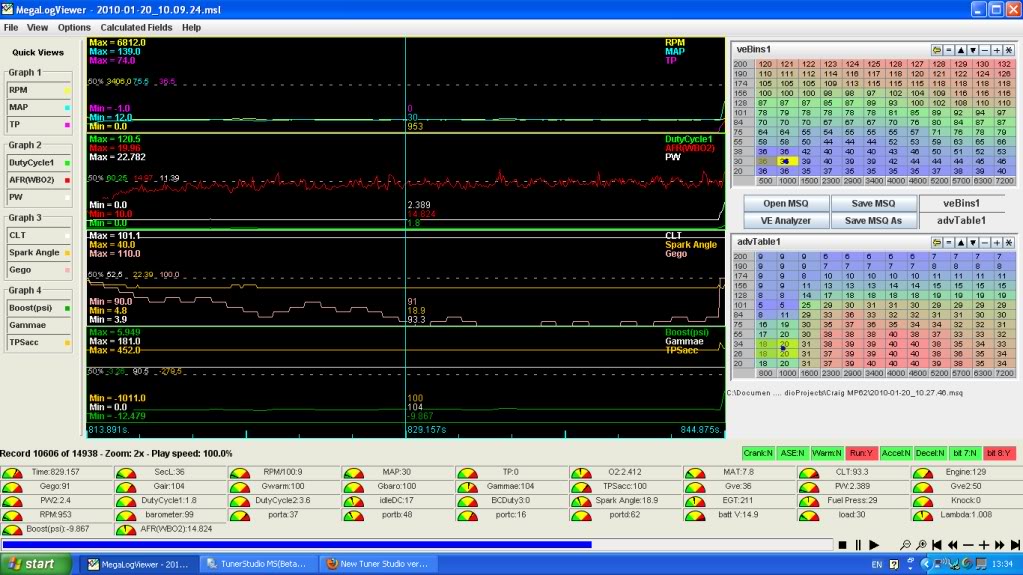
I've heard lots of people saying they don't like EGO corrections at idle, but I've never heard a reason why.
Here's why I choose to have EGO correct from 700rpm up and shut off at 85kpa.
Oh and I need more injector...
Reply
0
0
Here is my afr at idle. Center graph i red. 2x zoom

Where do you have your wideband grounded? I have mine grounded to the cars chassis ground and the ecu ground on the head. Does anyone use the MS ground? I was thinking about using one of my diypnp grounds and the chassis ground.
Where do you have your wideband grounded? I have mine grounded to the cars chassis ground and the ecu ground on the head. Does anyone use the MS ground? I was thinking about using one of my diypnp grounds and the chassis ground.
Reply
0
0
Junior Member
Joined: Oct 2008
Posts: 272
Total Cats: 0
From: Manchester, UK
My LC-1 grounds (3 of them!) are wired as per the instructions.
Signal and analog grounds (GREEN and WHITE) are together and soldered at the stock ECU (Im running parallel)
The noisey heater ground (BLUE) is running to the engine earth strap at the back of the head.
Signal and analog grounds (GREEN and WHITE) are together and soldered at the stock ECU (Im running parallel)
The noisey heater ground (BLUE) is running to the engine earth strap at the back of the head.
Reply
0
0
are you sure?
5. The BLUE and WHITE wires should all be grounded to the same ground source.
Optimally, these (and any other MTS device ground) will be soldered to the same lug, and
connected to a single point.
Optimally, these (and any other MTS device ground) will be soldered to the same lug, and
connected to a single point.
When this isn’t possible, connect each one to a separate lug,
and attach in close proximity.
and attach in close proximity.
Note: The LC-1’s heater ground and system ground wires should share the same
grounding location of the analog input’s ground.
grounding location of the analog input’s ground.
Reply
0
0


